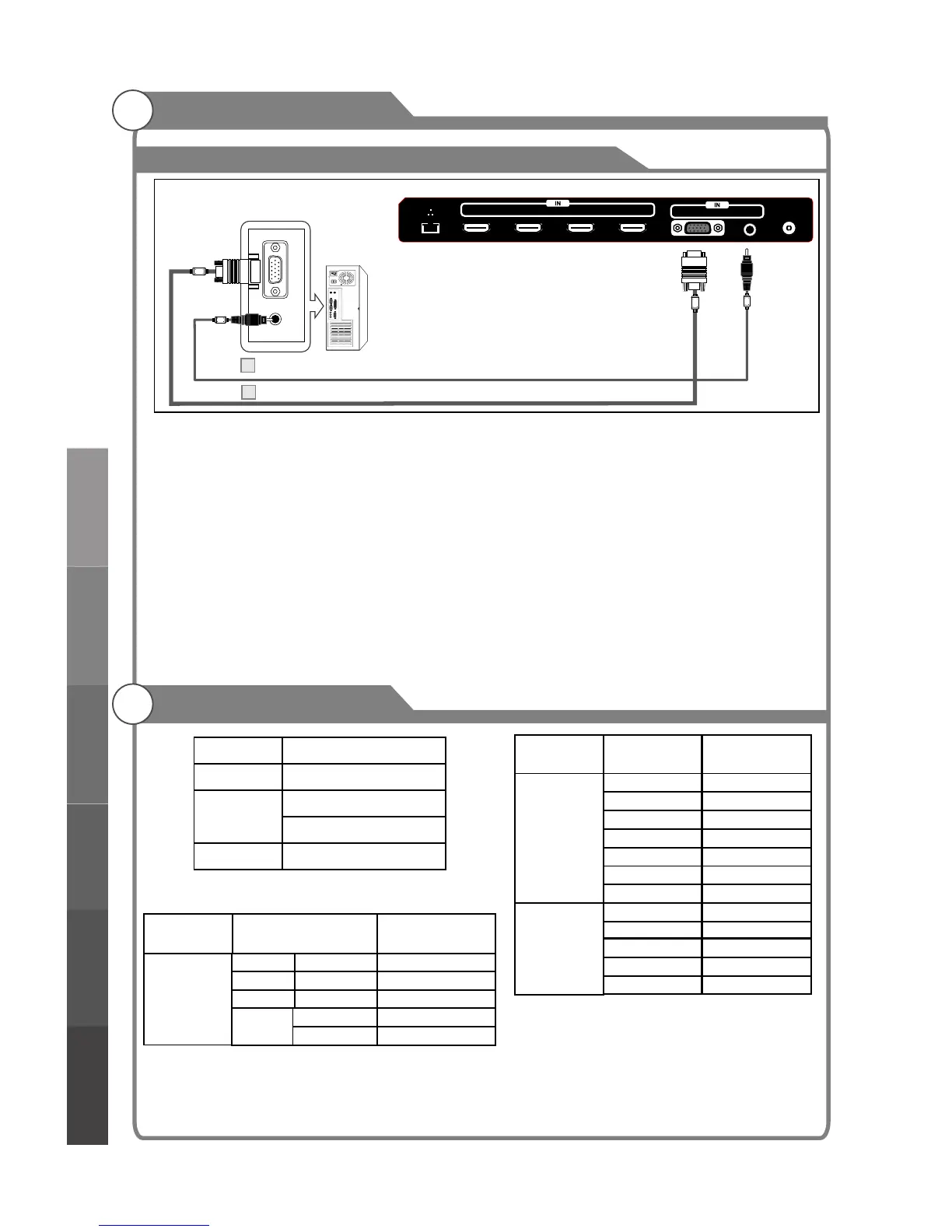
Connecting PC
External Connection
Resolution
Input
VGA
60Hz
640x480
PC/VGA
SVGA
XGA
60Hz
60Hz
800X600
1024X768
Vertical
Frequency
Supported signals
Input
Mode
DTV
ATV
DVB-T
CVBS PAL/NTSC/SECAM
PAL BG I DK
SECAM BG DK
Resolution
Input
Component
60Hz
60Hz
50Hz/60Hz
480i
480p
720p
50Hz/60Hz
1080i
HDMI
50Hz/60Hz
50Hz/60Hz
480p
720p
60Hz
1080i
Vertical
Frequency
50Hz/60Hz
1080p
50Hz/60Hz
1080p
50Hz
50Hz
576i
576p
20
576p
50Hz
Each PC has a different back panel configuration.
The HDMI jacks do not support PC connection.
1. Connect a D-Sub Cable between VGA/PC IN connector on the TV and the PC output
connector on your computer.
2. Connect a PC Audio Cable between PC AUDIO IN jack on the TV and the Audio Out jack
of the soundcard on your computer.
You should set PC software before you connect a PC to your TV (please refer to "PC
Note:
1. Whenever you connect an external device to your TV, make sure that power on the unit is
turned off.
2. When connecting an external device, match the color of the connection terminal to the
cable.
Display'' settings)
D-Sub Cable (Not supplied)
PC Audio Cable (Not supplied)
PC
2
1
SXGA
60Hz
1280X1024
60Hz
1360X768
VGA AUDIO
ANT
HDMI4 HDMI3 HDMI2 HDMI1(MHL)
External Connection
Basic operationMenu system
instruction
Digital Media Player
Troubleshooting
Picture defects and
the reason



 To Next Page