EasyManua.ls Logo

Teac MT-20D-IO - Page 112

Teac MT-20D-IO
253 pages
Print Icon
To Next Page IconTo Next Page
To Previous Page IconTo Previous Page
Loading...
4-2-5
Initialization
of
SOA
The
SOA
(Simulator
OA)
is
a
simulator
to
adjust
and
test
only
the
drive
portions
except
for
PCBA
Interface
Control
in
MTU.
Prior
to
the
use
of
SOA,
perform
the
following
initialization.
(1)
Detach
the
PCBA
Interface
Control
from
MTU
in
accordance
with
Item
4-4-10.
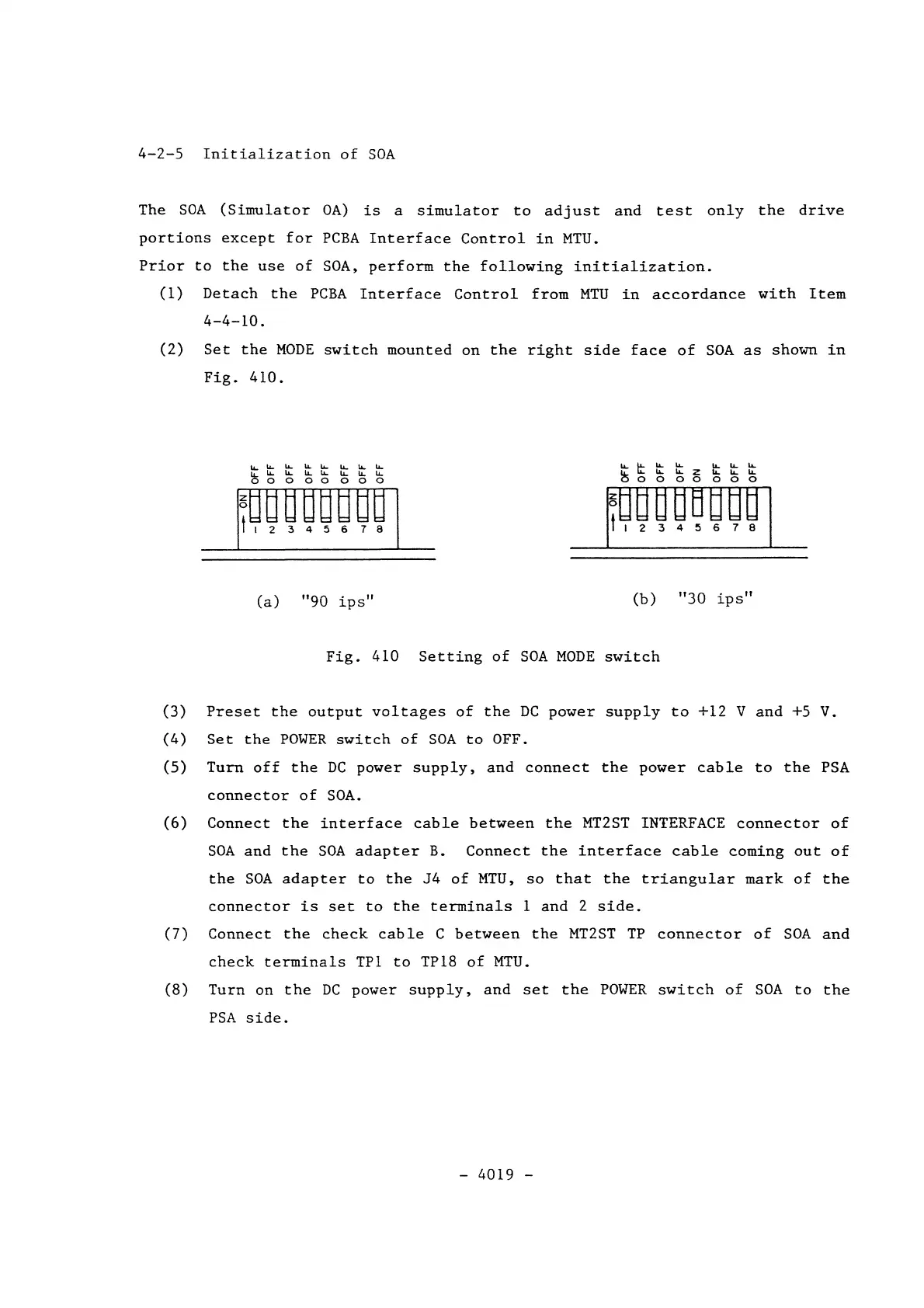
(2)
Set
the
MODE
switch
mounted
on
the
right
side
face
of
SOA
as
shown
in
Fig.
410.
~
LL..
u...
IJ..
Li-
lL...
1L
lL.
4-
4-
4-
4-
4- 4-
4-
4-
00000000
(a)
"90
ips"
...
4-
......
......
...
lL.
lL.
u..
LL
Z
1L.
I.L..
I.L..
00000000
(b)
"30
ips"
Fig.
410
Setting
of
SOA
MODE
switch
(3)
Preset
the
output
voltages
of
the
DC
power
supply
to
+12
V
and
+5 V.
(4)
Set
the
POWER
switch
of
SOA
to
OFF.
(5)
Turn
off
the
DC
power
supply,
and
connect
the
power
cable
to
the
PSA
connector
of
SOA.
(6)
Connect
the
interface
cable
between
the
MT2ST INTERFACE
connector
of
SOA
and
the
SOA
adapter
B.
Connect
the
interface
cable
coming
out
of
the
SOA
adapter
to
the
J4
of
MTU,
so
that
the
triangular
mark
of
the
connector
is
set
to
the
terminals
1
and
2
side.
(7)
Connect
the
check
cable
C
between
the
MT2ST
TP
connector
of
SOA
and
check
terminals
TP1
to
TP18
of
MTU.
(8)
Turn
on
the
DC
power
supply,
and
set
the
POWER
switch
of
SOA
to
the
PSA
side.
-
4019
-