EasyManua.ls Logo

Teac MT-20D-IO - Page 113

Teac MT-20D-IO
253 pages
Print Icon
To Next Page IconTo Next Page
To Previous Page IconTo Previous Page
Loading...
(9)
Key
in
"E3"
to
SOA.
(Hereinafter,
the
key-in
operation
performed
withthe
keyboard
of
the
simulator
is
represented
by
such
that
Key
in
"E3"
.
(0)
Key
in
"D5".
(11)
The
+5
V
power
voltage
is
indicated
to
the
display
DATA
1
of
SOA,
and
the
+12
V
power
voltage
to
the
display
DATA
2.
Readjust
the
DC
power
voltages
until
the
+5
V
power
voltage
is
within
the
range
of
4.95
V
to
5.05V,
and
the
+12
V
power
voltage
is
within
the
range
of
11.88
V
to
12.12V.
[
(2)
Key
in
"F".
(3)
Key
in
"E3
t1
MTU
a:
w
~
Il.
DC
POWER
SUPPLY
t-12V.
t-~V
1
..
~~
I-
a
~tn
..
0 INTERFACE CABLE
IJ)
POw
ER
LE
N
CAB
t
..
~
0
II
:;:
IJ)
TPI8
I
CHECK
~
'r
Ml'S'
fP
MT~~~
CABLE C
MT2ST
INTERFACE
I I
PSA
I
TPI
It
I
POWER
CABLE
PCBA
DRlvi
CONTROL
TEAC
SIMULATOR
OA
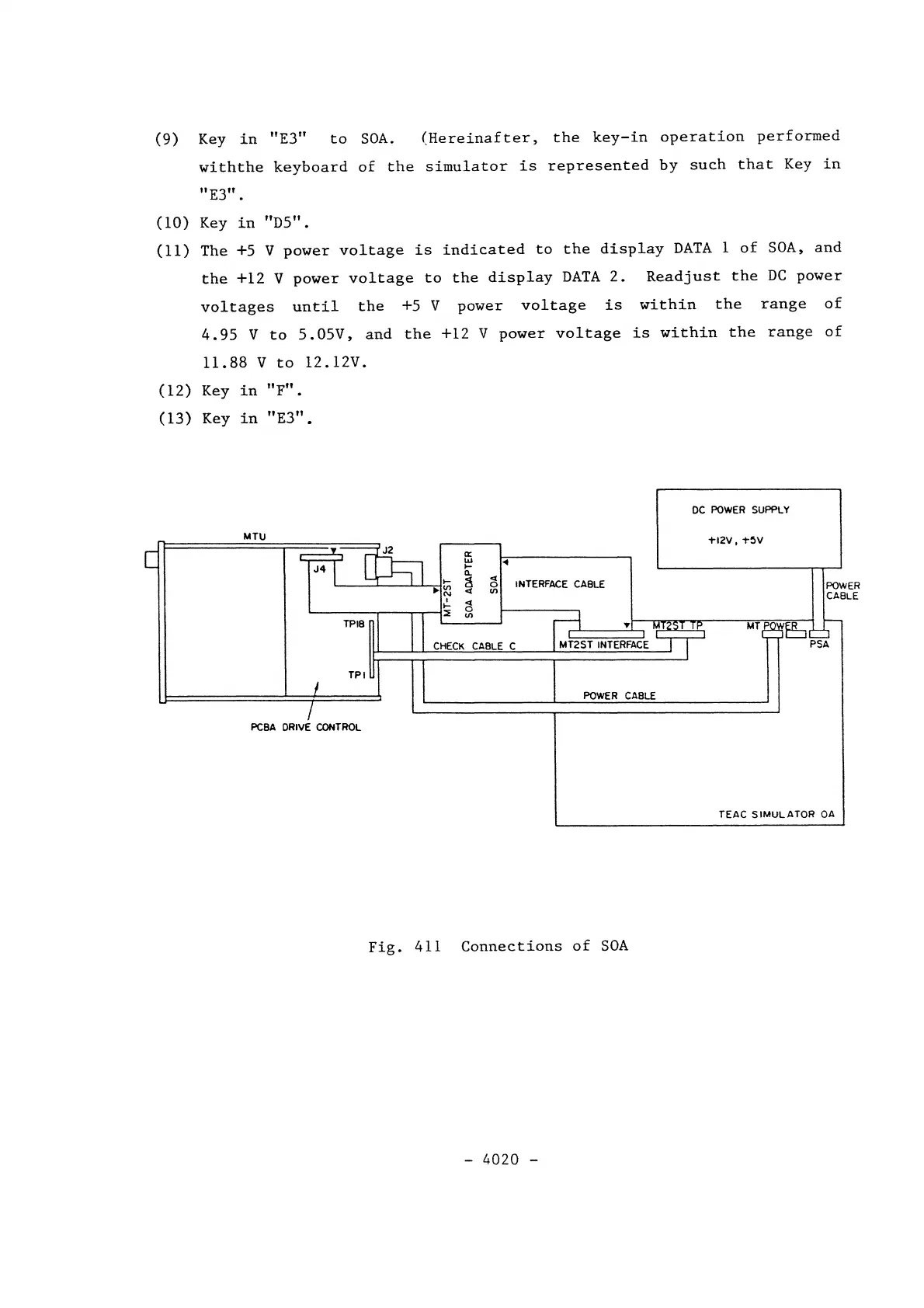
Fig.
411
Connections
of
SOA
-
4020
-