VOLUME
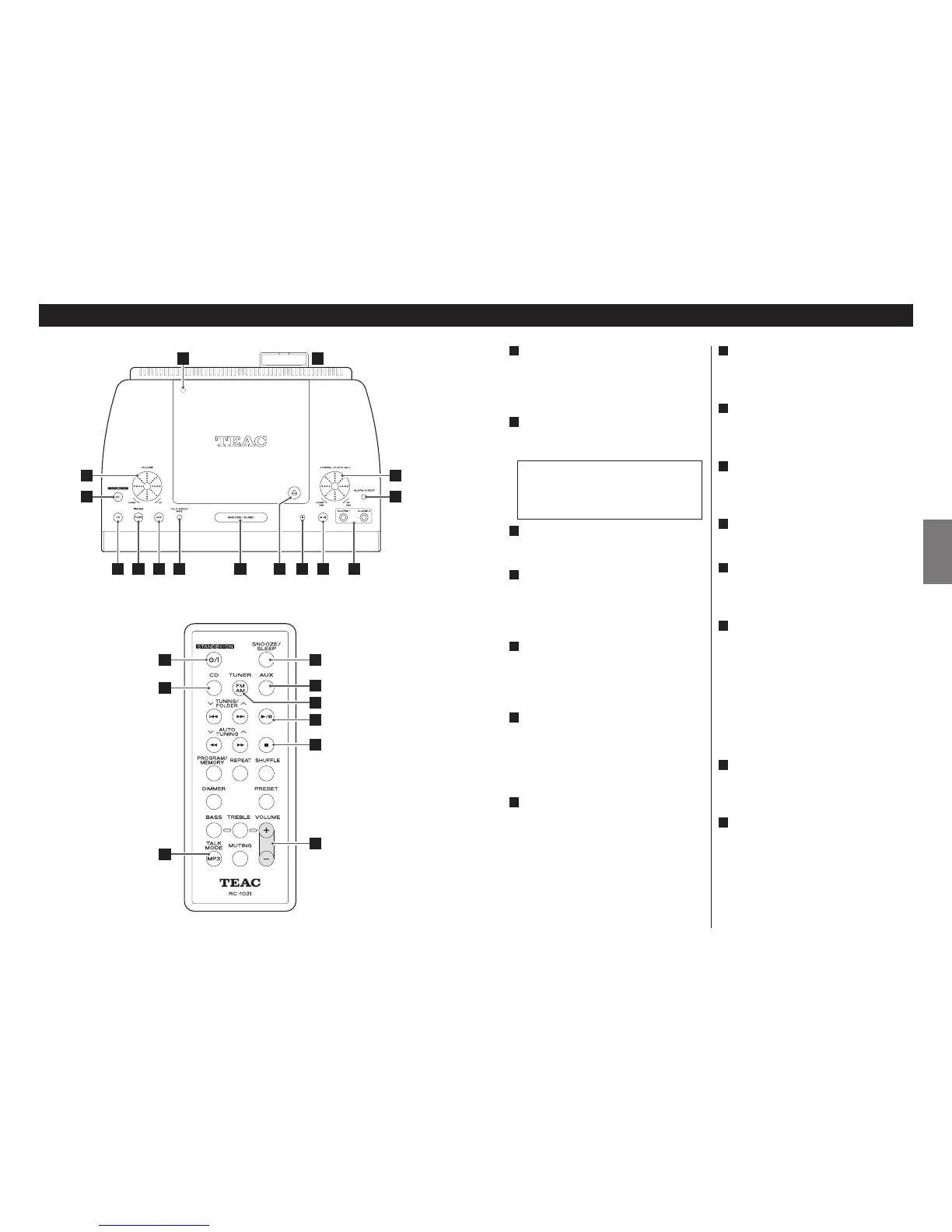
Turn the rotary knob (or press the
VOLUME buttons of the remote control
unit) to adjust the volume level.
STANDBY/ON
Use this button to turn the unit on or
standby.
CD
Use this button to select CD mode.
TUNER (FM/AM)
Use this button to select TUNER mode.
In TUNER mode, press this button to
select FM or AM.
AUX
When a component is connected to the
AUX IN jack, use this button to listen to
the external source.
TALK MODE/MP3
In TUNER mode, use this button to turn
on or off the Talk mode.
During playback of an MP3 disc, use this
button to display MP3 information.
SNOOZE/SLEEP
Use this button to set sleep timer.
When the unit is turned on by the timer,
press this button to turn the unit standby
for 10 minutes.
G
F
E
D
C
The equipment draws a nominal
amount of power from the AC outlet
even with its STANDBY/ON switch in the
STANDBY position.
B
A
Open/Close
Press this mark to open and close the
disc cover.
Stop (H)
In CD mode, use this button to stop
playback.
Play/Pause (y/J)
In CD mode, use this button to start or
pause playback.
ALARM 1/2
Use these buttons to set timers.
ALARM CHECK
Use this button to check the timer
setting.
Skip (.//)/TUNING/
CLOCK ADJUST
In CD mode, turn this rotary knob to skip
tracks.
In TUNER mode, turn this rotary knob to
tune in a station.
This rotary knob is also used to adjust
time, change timer settings, etc.
Slot for the remote control unit
Keep the remote control unit in this slot
when not in use.
TIME ADJUST
Open the disc cover and hold down the
TIME ADJUST button for more than 3
seconds to enter the clock setting mode.
Then adjust the clock using the Skip
rotary knob.
O
N
M
L
K
J
I
H



 To Next Page