ENGLISH
17
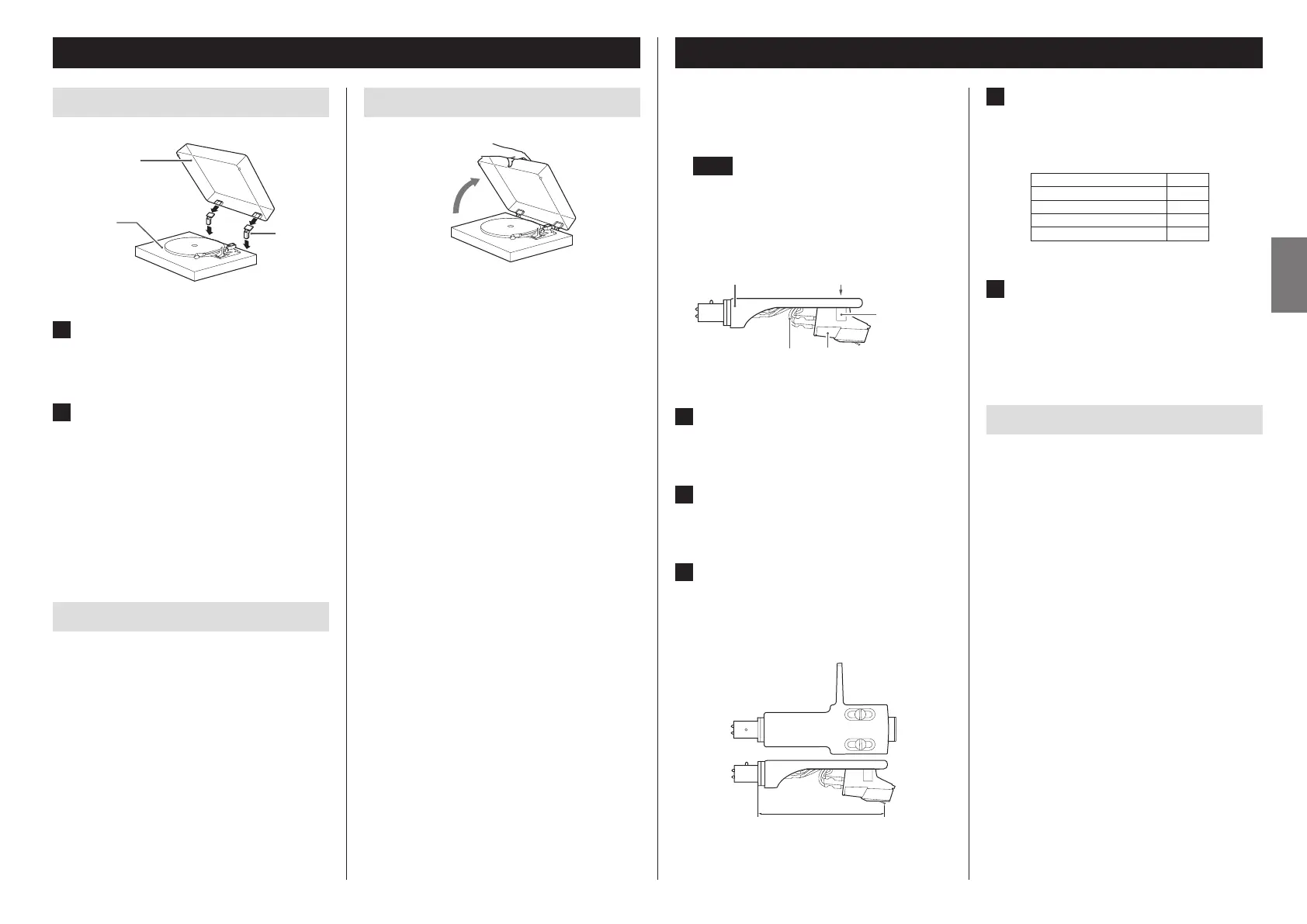
Attaching the dust cover
Hinge
Main unit
Dust cover
1 Insert the hinges completely into the
hinge holders at the left and right ends
of the back of the main unit.
2 Align the tops of the hinges with the
dust cover hinge holders and insert
them.
o Close the dust cover during playback. Since doing this pre-
vents skipping caused by unintended contact and blocks
external sound pressure, it makes noise less likely to occur.
o Do not open or close it when a record is playing. Doing so
could, for example, cause the stylus to skip.
o Keep it closed whenever possible to keep dust out.
Removing the dust cover
Hold both edges of the dust cover and lift it slowly to remove it
along with the hinges from the unit. Then, remove the hinges
from the dust cover.
Dust cover
Opening and closing the dust cover
Open
Opening
Hold the front edge of the dust cover and gently lift it open
completely until it stops.
The dust cover will stay open in this position.
Closing
Gently lower the dust cover until it is closed.
V
Be careful not to pinch your fingers, for
example, when opening and closing the
dust cover.
Changing the cartridge
To change the cartridge, first remove the headshell from the
tone arm.
o An Audio-Technica AT-VM95E VM Type cartridge is installed
in this unit.
NOTE
VM type cartridges have the same characteristics as MM
type cartridges.
o We recommend that you attach the protective cap to the
cartridge stylus before doing this task.
Headshell
CartridgeShell leads
Screws
Nuts
(embedded)
1 Disconnect the shell lead terminals from
the cartridge.
2 Loosen the screws and remove the
cartridge.
3 Attach the new cartridge and tighten
the screws.
See the illustration below for the position of the screws
when attached.
52.8 ±0.5 mm
4 Connect the shell lead terminals to the
cartridge.
o The signals and colors of the shell leads are shown
below.
Signal Color
Left channel + White
Left channel − Blue
Right channel + Red
Right channel − Green
5 Balance the tone arm and adjust the
tracking force.
Follow the procedures in “Balancing the tone arm and
adjusting the tracking force” on page15.
Precautions when changing the cartridge
The weight of cartridges that can be used with this unit is lim-
ited. See “Tone arm” on page20. Also check the acceptable
cartridge weight (with the included head shell) shown on the
same page when changing the head shell.
Using MC cartridges
The equalizer amplifier built into this unit is for MM cartridges.
It does not support MC cartridges.
To use an MC cartridge, connect this unit to a phono equalizer
amplifier that supports MC cartridges or an amplifier with an
MC phono input connector, for example. Then, set this unit’s
PHONO EQ (audio output) setting switch to THRU.


 To Next Page
 Loading...