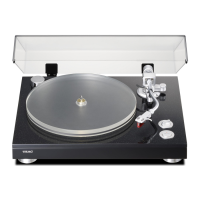
This document is a user manual for the TEAC Stereo Turntable with Bluetooth Input, model TTDEDS2018D.
Function Description
The TEAC TTDEDS2018D is a belt-drive stereo turntable designed for playing vinyl records and streaming audio via Bluetooth. It features built-in stereo speakers, allowing for standalone playback, but also includes an RCA output for connecting to an external amplifier or Hi-Fi system. The turntable supports three playback speeds: 33.3, 45, and 78 RPM, accommodating various record types (7", 10", and 12").
A key feature is its Bluetooth input capability. When the tonearm is placed in its rest position, the turntable automatically switches to Bluetooth mode, allowing users to pair and stream music from Bluetooth-enabled devices such as mobile phones or tablets.
Important Technical Specifications
- Drive Type: Belt Drive with DC Motor
- Speeds: 33.3, 45, 78 RPM
- Record Compatibility: 7", 10", and 12" records
- Audio Output: RCA out jack for connecting to an amplifier
- Input: Bluetooth Input
- Speakers: Built-in stereo speakers (4Ω, 3W x 2)
- Cartridge: Ceramic cartridge with diamond needle
- Power: DC in power jack (220V-240V/50Hz mains connection)
- Output Power: 7W
- Unit Dimensions: 379 x 163 x 330mm
- Unit Weight: 2.25 kg
Usage Features
Playing a Record:
- Place the record on the turntable, using the 45rpm adaptor if needed for records with a cut-out center.
- Select the desired playing speed (33.3, 45, or 78 RPM) using the speed selection switch.
- Turn on the Rotary Power Switch, which also controls the volume.
- Release the tonearm lock.
- Raise the tonearm using the lift lever.
- Position the stylus vertically over the first track of the record; the turntable will begin to turn automatically.
- Gently lower the stylus onto the record to begin playback.
- The auto-stop function, if enabled, will stop the turntable automatically when the record ends. If disabled, it will continue revolving until the tonearm is returned to its rest.
- After playback, lift the tonearm, return it to the rest, replace the protective cap on the stylus, and close the tonearm lock.
- Turn off the power.
Connecting to Bluetooth Devices:
- Ensure the AUTO STOP ON/OFF switch is set to "ON."
- Place the tonearm in the rest position; a beep sound will indicate Bluetooth mode activation.
- Activate Bluetooth on your mobile phone or tablet.
- Search for available devices; the turntable will appear as "TTDEDS2018D."
- Select it for pairing. Once connected, you can play music from your Bluetooth device through the turntable.
Bluetooth Connectivity Notes:
- Bluetooth connection may be interrupted by signal interference, distance, or physical obstructions. The device usually reconnects automatically, but manual reconnection may be necessary.
- If connection issues persist, updating the Bluetooth driver on your device might be required.
- To disconnect, either turn off the turntable directly or disable Bluetooth on the paired device.
- To connect a new Bluetooth device, turn off Bluetooth on the previously paired device. The turntable will emit a beep sound as a prompt to pair a new device.
Maintenance Features
Replacing the Stylus:
The manual provides an eight-step visual guide for replacing the stylus:
- Push the arm lock to release the tonearm.
- Take off the cap of the cartridge to expose the needle.
- Separate the cartridge from the socket gently.
- Completely remove the audio-line from the cartridge.
- To fit a new one, reverse the process.
- Insert the audio-line accordingly.
- Install the cartridge to the socket gently.
- Reassemble the components.
- Caution: Exercise extreme care during this operation to avoid damaging the tonearm and audio line wires.
Product Care:
- Record Cleaning: Regularly clean records with an anti-static cloth for optimal sound quality and longevity.
- Stylus Replacement: Replace the stylus periodically (approximately every 250 hours) for best playback results.
- Stylus Cleaning: Clean the stylus occasionally with a very soft brush dipped in alcohol, brushing from back to front of the cartridge.
- Transportation: When moving the record player, always replace the protective cap on the stylus and secure the pick-up arm with the rest clip.
- Storage and Operation: Store and operate the turntable in a dry, well-ventilated environment.
- Safety: Do not place naked flame sources (e.g., lit candles) on or near the device. Avoid exposing the turntable to dripping or splashing water.

 Need help?

 To Next Page
 General