EasyManua.ls Logo

Teac TN-400 - Operation; Electro-Touch Control Center; Adjusting the Speed

Teac TN-400
8 pages
Print Icon
To Next Page IconTo Next Page
To Previous Page IconTo Previous Page
Loading...
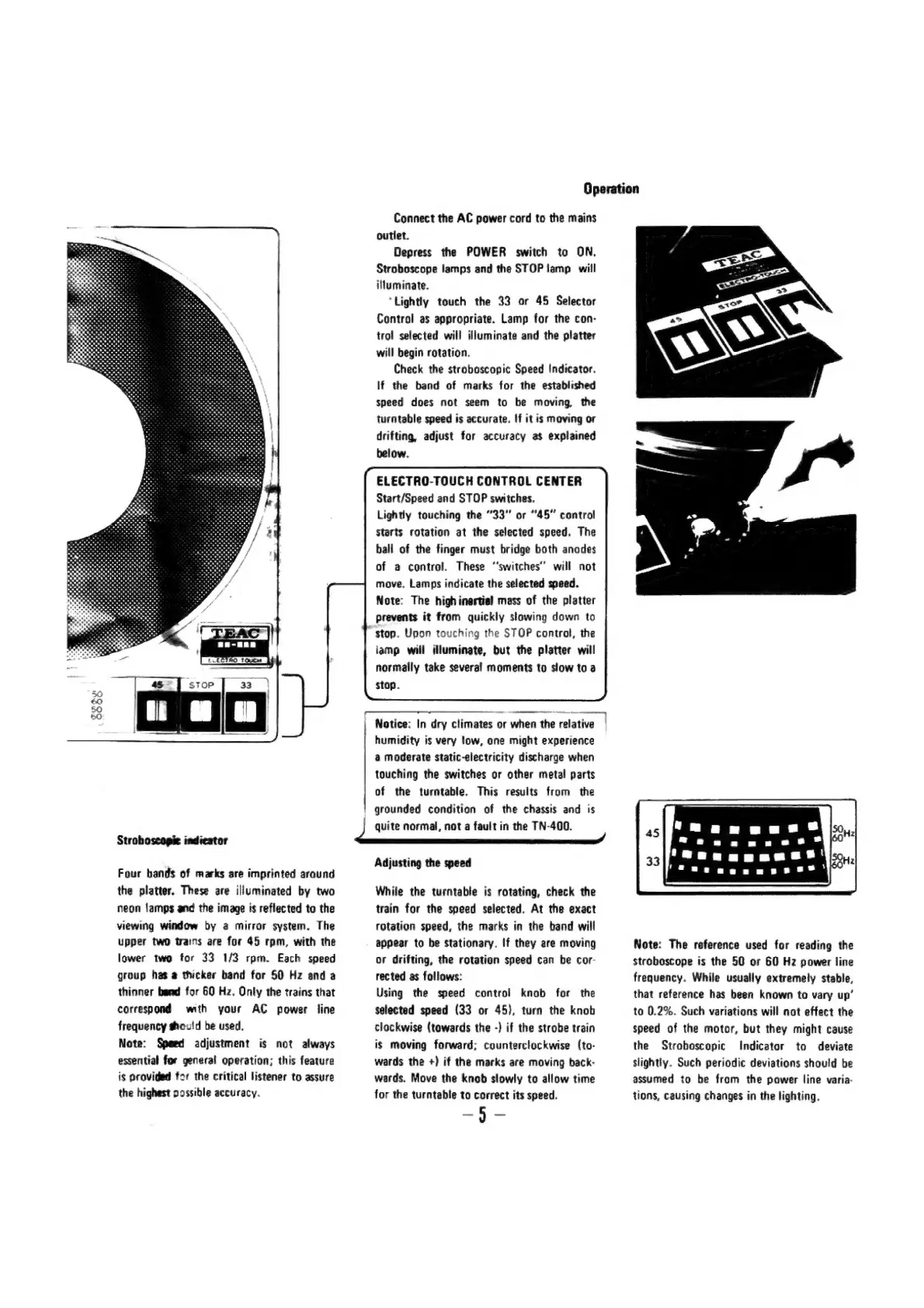
Stroboscopie
indicator
Four
bands
of
marks
are
imprinted
around
the
platter.
These
are
illuminated
by
two
neon
lamps
and
the
image
is
reflected
to
the
viewing
window
by
a
mirror
system.
The
upper
two
trains
are
for
45
rpm,
with
the
lower
two
for
33
1/3
rpm.
Each
speed
group
has
a
thicker
band
for
50
Hz
and
a
thinner
band
for
60
Hz.
Only
the
trains
that
correspond
with
your
AC
power
line
frequency
should
be
used,
Note:
Speed
adjustment
is
not
always
essential
for
general
operation;
this
feature
is
provided
for
the
critical
listener
to
assure
the
highest
cossible
accuracy.
ree
eee
ame
|
Notice:
In
dry
climates
or
when
the
relative
Operation
Connect
the
AC
power
cord
to
the
mains
outlet.
Depress
the
POWER
switch
to
ON,
Stroboscope
lamps
and
the
STOP
lamp
will
illuminate.
‘Lightly
touch
the
33
or
45
Selector
Control
as
appropriate.
Lamp
for
the
con-
trol
selected
will
illuminate
and
the
platter
will
begin
rotation.
Check
the
stroboscopic
Speed
Indicator.
If
the
band
of
marks
for
the
established
speed
does
not
seem
to
be
moving
the
turntable
speed
is
accurate.
If
it is
moving
or
drifting,
adjust
for
accuracy
as
explained
below.
ELECTRO-TOUCH
CONTROL
CENTER
Start/Speed
and
STOP
switches.
Lightly
touching
the
“33”
or
“45”
control
Starts
rotation
at
the
selected
speed.
The
ball
of
the
finger
must
bridge
both
anodes
of
a
control.
These
“‘switches’’
will
not
move.
Lamps
indicate
the
selected
speed.
Note:
The
high
inertial
mass
of
the
platter
prevents
it
from
quickly
slowing
down
to
stop.
Upon
touching
the
STOP
control,
the
lamp
will
illuminate,
but
the
platter
will
normally
take
several
moments
to
slow
to
a
stop.
humidity
is
very
low,
one
might
experience
a
moderate
static-electricity
discharge
when
touching
the
switches
or
other
metal
parts
of
the
turntable.
This
results
from
the
grounded
condition
of
the
chassis
and
is
quite
normal,
not
a
fault
in
the
TN-400.
Adjusting
the
speed
While
the
turntable
is
rotating,
check
the
train
for
the
speed
selected.
At
the
exact
rotation
speed,
the
marks
in
the
band
will
appear
to
be
stationary.
If
they
are
moving
or
drifting,
the
rotation
speed
can
be
cor-
rected
as
follows:
Using
the
speed
control
knob
for
the
selected
speed
(33
or
45),
turn
the
knob
clockwise
(towards
the
-)
if
the
strobe
train
is
moving
forward;
counterclockwise
(to-
wards
the
+)
if
the
marks
are
moving
back-
wards.
Move
the
knob
slowly
to
allow
time
for
the
turntable
to
correct
its
speed.
—-5-
Note:
The
reference
used
for
reading
the
Stroboscope
is
the
50
or
60
Hz
power
line
frequency.
While
usually
extremely
stable,
that
reference
has
been
known
to
vary
up’
to
0.2%.
Such
variations
will
not
effect
the
speed
of
the
motor,
but
they
might
cause
the
Stroboscopic
Indicator
to
deviate
slightly.
Such
periodic
deviations
should
be
assumed
to
be
from
the
power
line
varia-
tions,
causing
changes
in
the
lighting.

Related product manuals