EasyManua.ls Logo

Teac W-550R - Page 6

Teac W-550R
10 pages
Print Icon
To Next Page IconTo Next Page
To Previous Page IconTo Previous Page
Loading...
SSS
SS
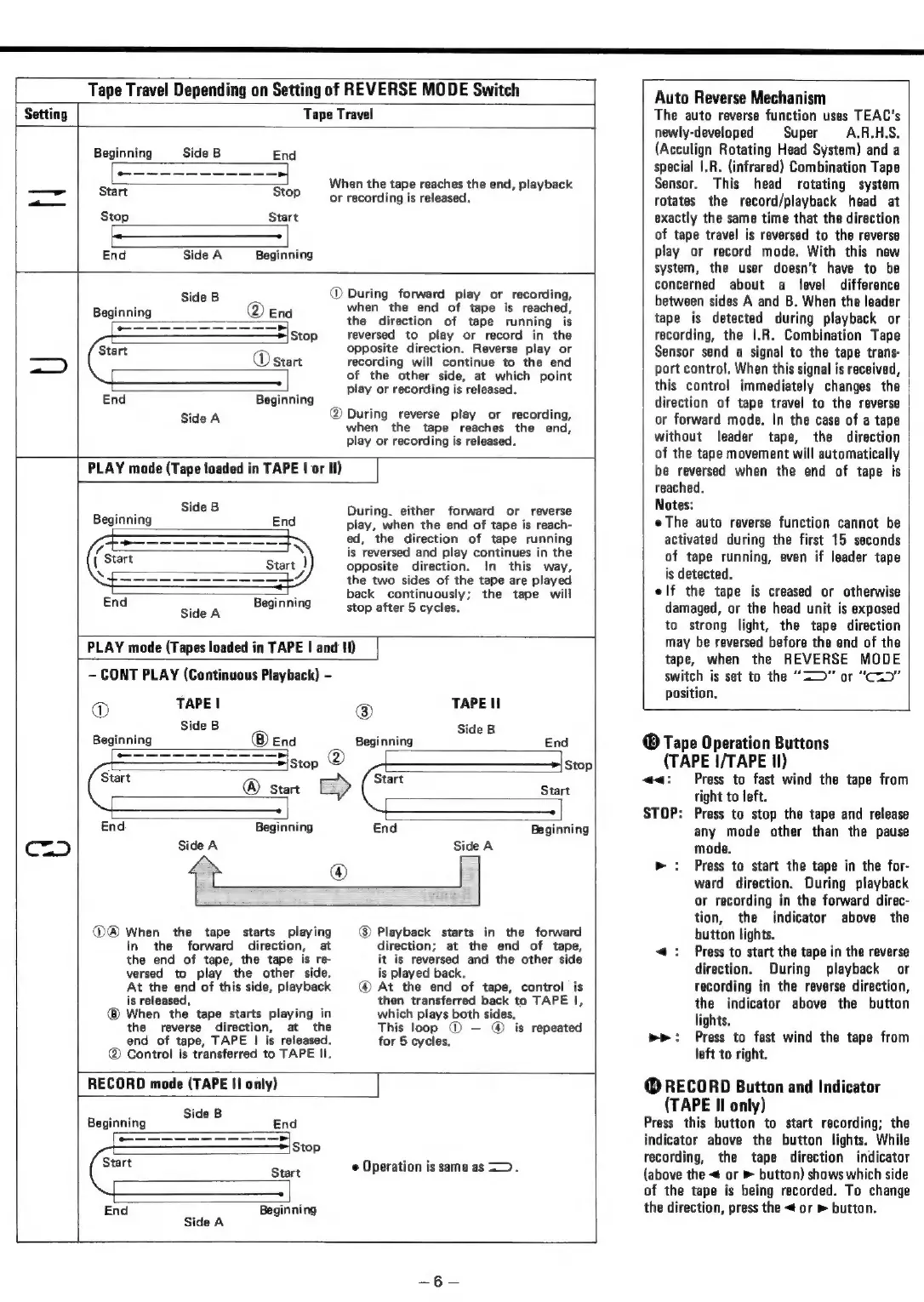
Tape
Travel
Depending
on
Setting
of
REVERSE
MODE
Switch
Setting
Tape
Travel
Beginning
Side
B
End
aaa
as
ia
When
th
hes
the
end,
playback
en
the
tape
reaches
the
end,
playbac!
z.
2
Start
Stop
or
recording
is
released.
Stop
Start
{$$
$$$____________+
End
Side
A
Beginning
Side
B
During
forward
play
or
recording,
Beginning
End
when
the
end
of
tape
is
reached,
aS
>]
the
direction
of
tape
running
is
Stop
reversed
to
play
or
record
in
the
Start
opposite
direction.
Reverse
play
or
ED
|
®
start
recording
will
continue
to
the
end
of
the
other
side,
at
which
point
alt
play
or
recording
is
released.
End
Beginning
Side
A
@
During
reverse
play
or
recording,
when
the
tape
reaches
the
end,
play
or
recording
is
released.
PLAY
mode
(Tape
loaded
in
TAPE
|
or
Il)
eta
Side
B
During.
either
forward
or
reverse
Beginning
End
play,
when
the
end
of
tape
is
reach-
ed,
the
direction
of
tape
running
is
reversed
and
play
continues
in
the
opposite
direction.
In
this
way,
the
two
sides
of
the
tape
are
played
aan
back
continuously;
the
tape
will
End
Side
A
Beginning
stop
after
5
cycles.
PLAY
mode
(Tapes
loaded
in
TAPE
|
and
II)
-
CONT
PLAY
(Continuous
Playback)
-
APE!
TAPE
II
ome
8
ide
Side
B
Beginning
End
Beginning
End
ee
S|
@
Stop
Stop
Start
Start
®
Start Start
End
Beginning
End
Beginning
C=
)
Side
A
Side
A
@@®
When
the
tape
starts
playing
Playback
starts
in
the
forward
in
the
forward
direction,
at
direction;
at
the
end
of
tape,
the
end
of
tape,
the
tape
is
re-
it
is
reversed
and
the
other
side
versed
to
play
the
other
side.
is
played
back.
At
the
end
of
this
side,
playback
At
the
end
of
tape,
control
is
is
released,
then
transferred
back
to
TAPE
|,
When
the
tape
starts
playing
in
which
plays
both
sides.
the
reverse
direction,
at
the
This
loop
©
@
is
repeated
end
of
tape,
TAPE
|
is
released.
for
5
cycles.
®
Control
is
transferred
to
TAPE
Il.
RECORD
mode
(TAPE
II
only)
oie
Side
B
Beginning
End
——_—-------—
>
Stop
Start
Sint
Operation
is
same
as
<>.
End
Beginning
Side
A
L
Auto
Reverse
Mechanism
The
auto
reverse
function
uses
TEAC’s
newly-developed
Super
A.R.H.S.
(Acculign
Rotating
Head
System)
and
a
special
|.R.
(infrared)
Combination
Tape
Sensor.
This
head
rotating
system
Totates
the
record/playback
head
at
exactly
the
same
time
that
the
direction
of
tape
travel
is
reversed
to
the
reverse
play
or
record
mode.
With
this
new
system,
the
user
doesn't
have
to
be
concerned
about
a
level
difference
between
sides
A
and
B.
When
the
leader
tape
is
detected
during
playback
or
recording,
the
I.R.
Combination
Tape
Sensor
send
a
signal
to
the
tape
trans-
port
control.
When
this
signal
is
received,
this
control
immediately
changes
the
direction
of
tape
travel
to
the
reverse
or
forward
mode.
In
the
case
of
a
tape
without
leader
tape,
the
direction
of
the
tape
movement
will
automatically
be
reversed
when
the
end
of
tape
is
reached.
Notes:
eThe
auto
reverse
function
cannot
be
activated
during
the
first
15
seconds
of
tape
running,
even
if
leader
tape
is
detected.
elf
the
tape
is
creased
or
otherwise
damaged,
or
the
head
unit
is
exposed
to
strong
light,
the
tape
direction
may
be
reversed
before
the
end
of
the
tape,
when
the
REVERSE
MODE
switch
is
set
to
the
“2”
or
“C=”
position.
®
Tape
Operation
Buttons
(TAPE
I/TAPE
Il)
:
Press
to
fast
wind
the
tape
from
right
to
left.
STOP:
Press
to
stop
the
tape
and
release
any
mode
other
than
the
pause
mode.
>
:
Press
to
start
the
tape
in
the
for-
ward
direction.
During
playback
or
recording
in
the
forward
direc-
tion,
the
indicator
above
the
button
lights.
<<:
Press
to
start
the
tape
in
the
reverse
direction.
During
playback
or
recording
in
the
reverse
direction,
the
indicator
above
the
button
lights.
pe:
Press
to
fast
wind
the
tape
from
left
to
right.
@
RECORD
Button
and
Indicator
(TAPE
II
only)
Press
this
button
to
start
recording;
the
indicator
above
the
button
lights.
While
recording,
the
tape
direction
indicator
(above
the
<
or
>
button)
shows
which
side
of
the
tape
is
being
recorded.
To
change
the
direction,
press
the
<
or
»
button.
a

Related product manuals