EasyManua.ls Logo

Teac W-550R - Page 8

Teac W-550R
10 pages
Print Icon
To Next Page IconTo Next Page
To Previous Page IconTo Previous Page
Loading...
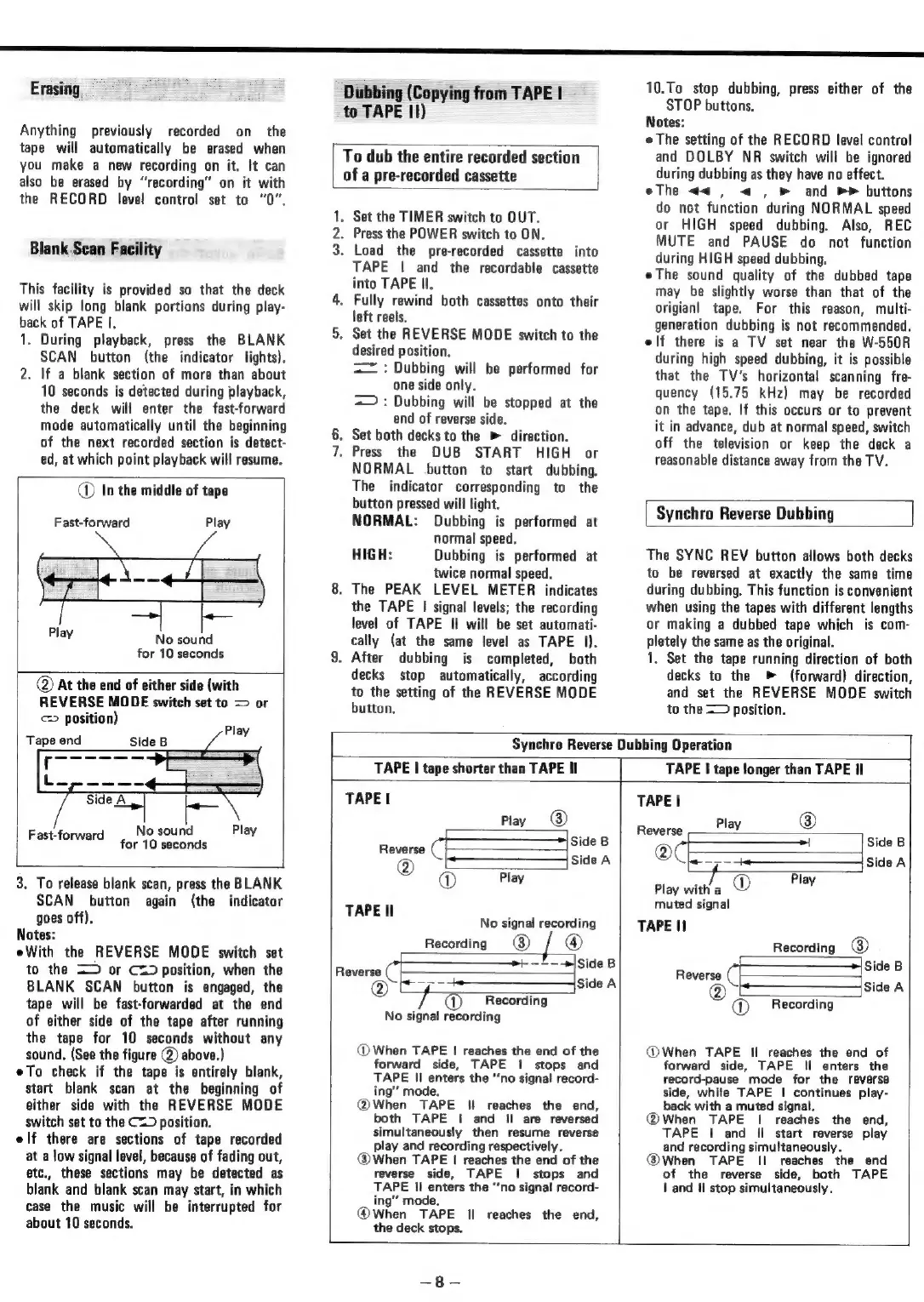
Erasing
Anything
previously
recorded
on
the
tape
will
automatically
be
erased
when
you
make
a
new
recording
on
it.
It
can
also
be
erased
by
“recording”
on
it
with
the
RECORD
level
control
set
to
“0”.
Blank
Scan
Facility
This
facility
is
provided
so
that
the
deck
will
skip
long
blank
portions
during
play-
back
of
TAPE
I.
1.
During
playback,
press
the
BLANK
SCAN
button
(the
indicator
lights).
2.
If
a
blank
section
of
more
than
about
10
seconds
is
detected
during
playback,
the
deck
will
enter
the
fast-forward
mode
automatically
until
the
beginning
of
the
next
recorded
section
is
detect-
ed,
at
which
point
playback
will
resume.
In
the
middle
of
tape
Fast-forward
Play
Play
No
sound
for
10
seconds
@
At
the
end
of
either
side
(with
REVERSE
MODE
switch
set
to
=>
or
>
position)
Tape
end
No
sound
Play
for
10
seconds
Fast-forward
3.
To
release
blank
scan, press
the
BLANK
SCAN
button
again
(the
indicator
goes
off).
Notes:
eWith
the
REVERSE
MODE
switch
set
to
the
=>
or
Cz)
position,
when
the
BLANK
SCAN
button
is
engaged,
the
tape
will
be
fast-forwarded
at
the
end
of
either
side
of
the
tape
after
running
the
tape
for
10
seconds
without
any
sound.
(See
the
figure
(2)
above.)
eTo
check
if
the
tape
is
entirely
blank,
start
blank
scan
at
the
beginning
of
either
side
with
the
REVERSE
MODE
switch
set
to
the
C=
position.
elf
there
are
sections
of
tape
recorded
at
a
low
signal
level,
because
of
fading
out,
etc.,
these
sections
may
be
detected
as
blank
and
blank
scan
may
start,
in
which
case
the
music
will
be interrupted
for
about
10
seconds.
Dubbing
(Copying
from
TAPE
|
to
TAPE
II)
To
dub
the
entire
recorded
section
ofa
pre-recorded
cassette
wn
NOD
.
Set
the
TIMER
switch
to
OUT.
.
Press
the
POWER
switch
to
ON.
.
Load
the
pre-recorded
cassette
into
TAPE
|
and
the
recordable
cassette
into
TAPE
Il.
4,
Fully
rewind
both
cassettes
onto
their
left
reels,
5.
Set
the
REVERSE
MODE
switch
to
the
desired
position.
==
:
Dubbing
will
be
performed
for
one
side
only.
=>:
Dubbing
will
be
stopped
at
the
end
of
reverse
side.
.
Set
both
decks
to
the
»
direction.
Press
the
DUB
START
HIGH
or
NORMAL
button
to
start
dubbing.
The
indicator
corresponding
to
the
button
pressed
will
light.
NORMAL:
Dubbing
is
performed
at
normal
speed.
HIGH:
Dubbing
is
performed
at
twice
normal
speed.
8.
The
PEAK
LEVEL
METER
indicates
the
TAPE
|
signal
levels;
the
recording
level
of
TAPE
II
will
be
set
automati-
cally
(at
the
same
level
as
TAPE
1).
9.
After
dubbing
is
completed,
both
decks
stop
automatically,
according
to
the
setting
of
the
REVERSE
MODE
button.
SS
10.To
stop
dubbing,
press
either
of
the
STOP
buttons.
Notes:
e
The
setting
of
the
RECORD
level
control
and
DOLBY
NR
switch
will
be
ignored
during
dubbing
as
they
have
no
effect.
eThe
<<
,
<
,
»
and
buttons
do
not
function
during
NORMAL
speed
or
HIGH
speed
dubbing.
Also,
REC
MUTE
and
PAUSE
do
not
function
during
HIGH
speed
dubbing.
eThe
sound
quality
of
the
dubbed
tape
may
be
slightly
worse
than
that
of
the
origian!
tape.
For
this
reason,
multi-
generation
dubbing
is
not
recommended.
elf
there
is
a
TV
set
near
the
W-550R
during
high
speed
dubbing,
it is
possible
that
the
TV's
horizontal
scanning
fre-
quency
(15.75
kHz)
may
be
recorded
on
the
tape.
If
this
occurs
or
to
prevent
it
in
advance,
dub
at
normal
speed,
switch
off
the
television
or
keep
the
deck
a
reasonable
distance
away
from
the
TV.
Synchro
Reverse
Dubbing
The
SYNC
REV
button
allows
both
decks
to
be
reversed
at
exactly
the
same
time
during
dubbing.
This
function
is
convenient
when
using
the
tapes
with
different
lengths
or
making
a
dubbed
tape
which
is
com-
pletely
the
same
as
the
original.
1.
Set the
tape
running
direction
of
both
decks
to
the
(forward)
direction,
and
set
the
REVERSE
MODE
switch
to
the
=
position.
Synchro
Reverse
Dubbing
Operation
TAPE
|
tape
shorter
than
TAPE
Il
TAPE
|
tape
longer
than
TAPE
Il
TAPE
|
Play
@
Side
B
oo
+
side
a
@
Play
TAPE
Il
7
f
No
signal
recording
Recording
®
®
———-»|Side
B
Reverse
_
a
ee
Side
A
Recording
No
signal
recording
@
When
TAPE
|
reaches
the
end
of
the
forward
side,
TAPE
|
stops
and
TAPE
II
enters
the
‘‘no
signal
record-
ing’
mode.
(@When
TAPE
Il
reaches
the
end,
both
TAPE
|
and
Il
are
reversed
simultaneously
then
resume
reverse
play
and
recording
respectively.
@When
TAPE
|
reaches
the
end
of
the
reverse
side,
TAPE
|
stops
and
TAPE
II
enters
the
“no
signal
record-
ing’
mode.
@When
TAPE
Il
reaches
the
end,
the
deck
stops.
TAPE
|
Reverse
Play
®
®
——=
Side
B
“4S,
OT
Side
Play
Play
with
a
®
.
muted
signal
TAPE
II
Recording
®
Side
B
Reverse
OSS
aiSide
A
@
Recording
@When
TAPE
Il
reaches
the
end
of
forward
side,
TAPE
ll
enters
the
record-pause
mode
for
the
reverse
side,
while
TAPE
|
continues
play-
back
with
a
muted
signal.
@When
TAPE
|
reaches
the
end,
TAPE
|
and
Il
start
reverse
play
and
recording
simultaneously.
@®When
TAPE
II
reaches
the
end
of
the
reverse
side,
both
TAPE
|
and
Il
stop
simultaneously.
=
8

Related product manuals