ENGLISH FRANÇAIS
Continuous Playback Lecture Continue
8
1
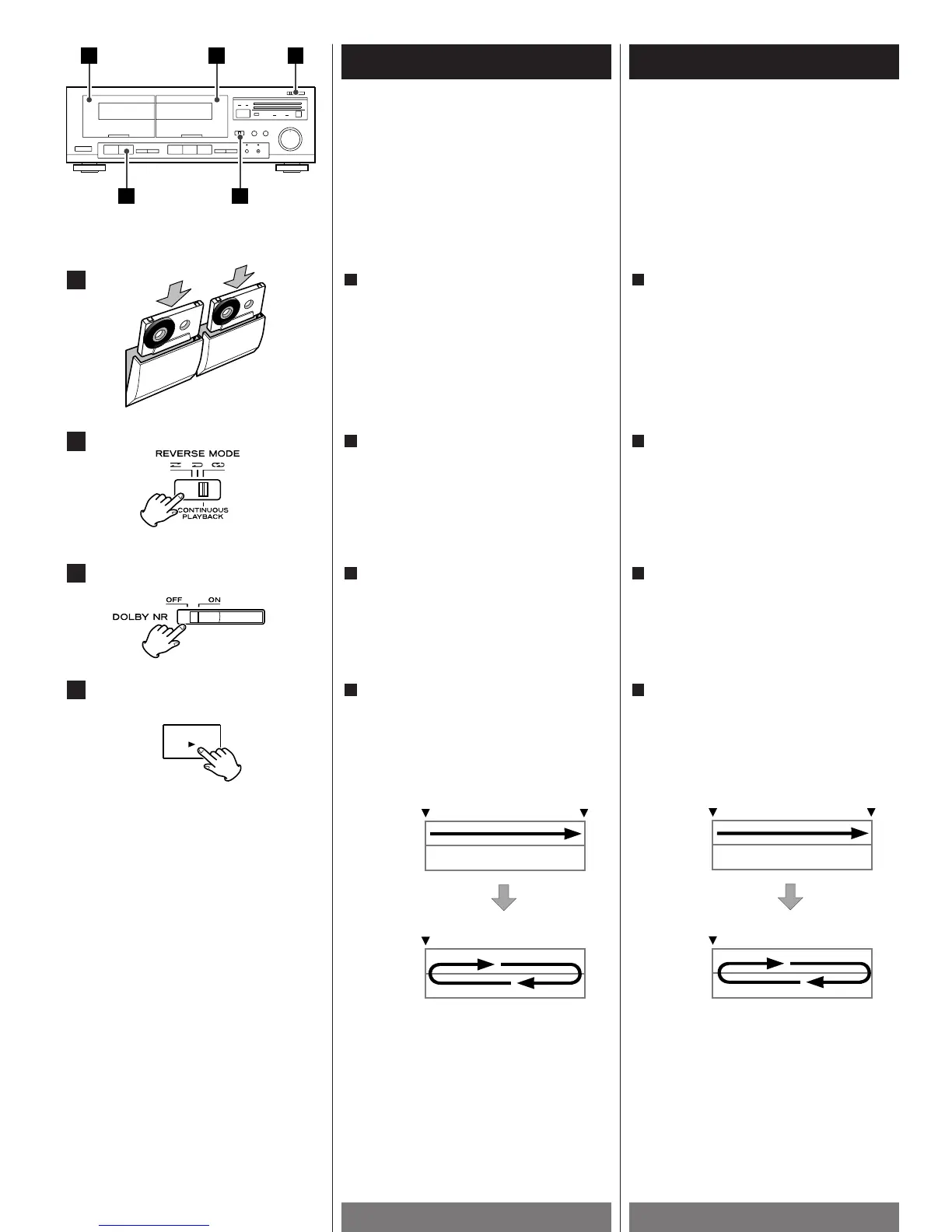
Insert cassette tapes into DECK ! and
DECK @
.
1
Mettre une cassette dans chacune des
deux platines (DECK !
et DECK @).
1
3
2
4
Side A and B of DECK @ will be played
back 5 times in total, then this function
will stop.
<
To stop continuous playback, press the
STOP button(H
) of the deck being played.
Face A et B de DECK @ sont lues un total
de 5 fois, puis cette fonction s’arrête.
<
Pour arrêter la lecture continue avant que
les bandes(DECK @
) soient lues 5 fois,
appuyer sur la touche STOP(H
) d’une des
platines.
Press the PLAY button(y) of DECK !.
When the playback of DECK !(Side A)is
finished, DECK @
starts playback.
4
Select ON or OFF of Dolby NR.
3
Set the REVERSE MODE switch to the
CONTINUOUS PLAYBACK position.
2
Appuyez sur la touche PLAY(y) de DECK !.
A la fin de la lecture de DECK ! (Face A),
la lecture de DECK @
démarre
automatiquement.
4
Sélectionnez ON ou OFF de Dolby NR.
3
Mettre la commande REVERSE MODE sur
la position CONTINUOUS PLAYBACK.
2



 To Next Page