Need help?
Do you have a question about the Team Blacksheep TBS UNIFY PRO 5G8 and is the answer not in the manual?
Enter menu by pressing the button for 3s. Red LED will flash 1 time. Select channels by simple short presses.
Press button for an additional 3s. Red LED will flash 2 times. Select band by simple short presses.
(FOR HAM USERS ONLY!) Press button for 20 to 25 seconds. The Red LED will flash 3 times to confirm. You have unlocked the video transmitter for use with all frequencies.
While in PitMode you can change channels and set power levels without affecting other pilots signal. Pit mode function explained HERE
Press button for 3 seconds. Blue LED will turn on, settings are saved and it will exit the menu.
The TBS UNIFY PRO 5G8 signals selected channel, band and power levels using a startup sequence of LED codes. The same sequence is also repeated in the menu.
If your CORE PRO supports TBS SmartAudio and the TBS UNIFY PRO is plugged in, you will see the “VIDEO TRANSMITTER” setting in the main OSD menu.
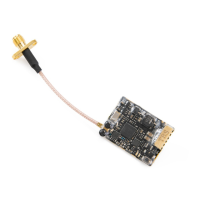
Despite being plug and play with the TBS CORE, TBS CORE PNP PRO, PNP25, PNP50 - the UNIFY PRO can also be directly soldered to cameras or custom power distribution boards.
The UNIFY PRO 5G8 HV comes with wires ready to be assembled into your own projects. Should you want to connect it to TBS products such as the TBS CORE,
A new feature introduced with the TBS UNIFY PRO 5G8 HV is PitMode. It allows racers to power up their video transmitters during race events without interfering with other racers.
This device complies with ANSI C63.4 and Part 15 Subpart C Paragraph 15.249 of the FCC Rules. Operation is subject to the following two conditions:
This device has been evaluated to meet the FCC RF exposure requirement when used in combination with the genuine TBS CORE accessoires and operated with a minimum distance of 20 cm between the antenna
 General
| Video Format | NTSC/PAL |
|---|---|
| Channels | 40 |
| Connector | MMCX |
| Operating Voltage | 7-24V |
| Current Consumption | 600mA |

 To Next Page