13
4. Installation and use
Fill water
Fill the tank with water before using the Cooler/Humidifier function
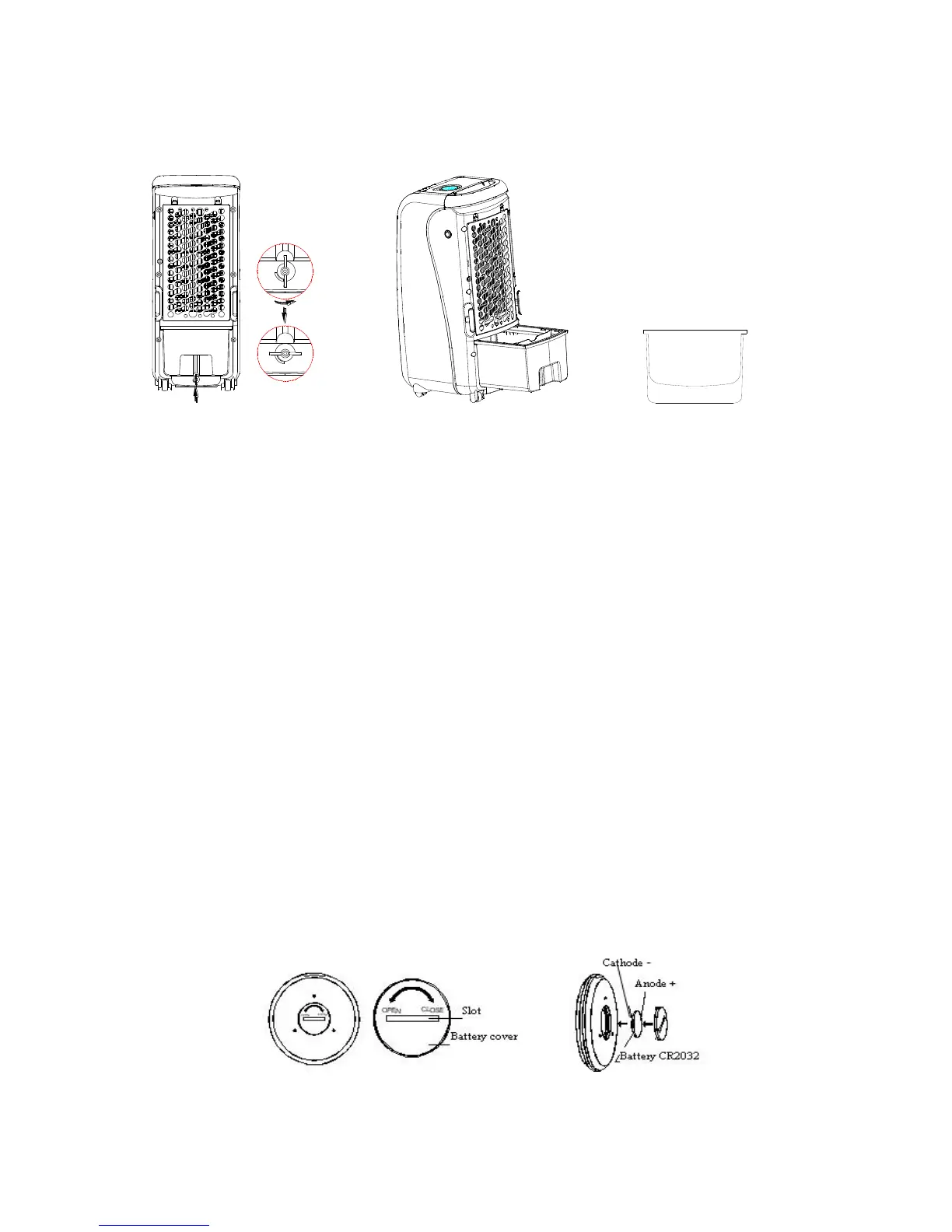
1. Turn the tank locking knob 90 ° counterclockwise and remove the water tank.
2. Note the Min and Max marks in the tank.
3. Always keep the water level above the MIN mark in order not to damage the pump.
4. When filling the tank do not exceed the MAX mark.
5. Always use clean water (drinking water)
6. Replace the water tank and lock knob
Note! At first use, scents may appear and the water may be discolored. This disappears after a
little use.
Ice-packs
Two packs are provided to ensure continuous operation. These contain a fluid with special
features to store cold. Note that the fluid is dangerous to drink or eat!
1. Place ice packs in the freezer until completely frozen.
2. Put the frozen ice pack in the water tank, replace the tank and lock knob. After 10 minutes
the water temperature will be lower than the ambient temperature. This lasts for approx. 4
hours.
Remote Control
1. Open the battery cover on the back of the remote. The battery cover can be opened by using
a coin or similar tool. Install a battery (type CR2032, not attached). Then close the battery
cover.
2. There are seven buttons on the remote control; their functions are the same as the keys on
the control panel on the unit.
3. Aim the remote at the unit and press the desired function. Range is approx. 6 meters.
4. Open by turning the battery cover counter clockwise and close by turning clockwise.


 To Next Page