5. INSTALLATION PROCEDURE
EO1-13016
5.1 Connecting the Power Cord and Interface Cable
5- 2
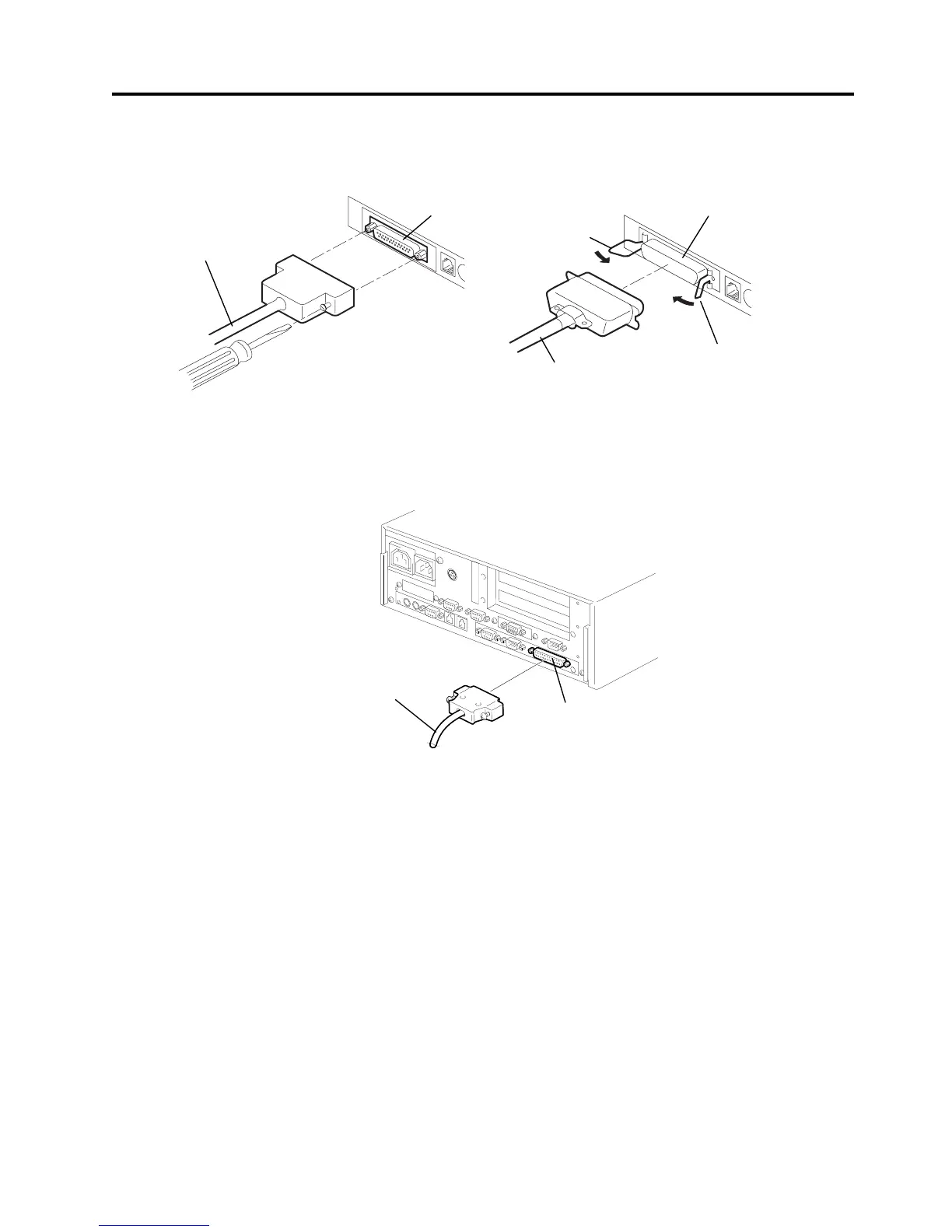
3) Connect and secure the interface cable to the interface connector in the correct orientation.
Serial interface: Secure the connector with the screws.
Parallel interface: Secure the connector with the locking tabs.
4) Connect the interface cable to the TOSHIBA TEC POS terminal, and then plug in the power cord
to the AC outlet.
NOTE: The above figure shows the example of the interface cable which is connected to the LPT1
port (Parallel interface) on the ST-5600 POS terminal.
Serial Interface Connector
Serial Interface Cable
Parallel Interface Cable
Parallel Interface Connector
Locking Tab
[Serial Interface Type]
[Parallel Interface Type]
LPT1
Interface Cable
Locking Tab


 To Next Page