EasyManua.ls Logo

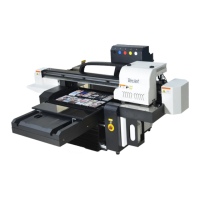
TEC tecjet 6090uv-xp600 - User Manual

TEC tecjet 6090uv-xp600
73 pages
Print Icon
To Next Page IconTo Next Page
Loading...
TJ UV Printer User Manual Confidential
Thanks for purchase our TEC TJ UV printers, this user manual will guide your the installation, using and maintain of TJ
digital flatbed printer , Please make sure you had read and full understand this manual before your installation and using. Please
keep this manual well for your reference in emergency, Thanks for your cooperation again.
TJ USER MANUAL
DIGITAL FLATBED PRINTER
DIGITAL UV PRINTER
Question and Answer IconNeed help?

Do you have a question about the TEC tecjet 6090uv-xp600 and is the answer not in the manual?

Summary

Introduction to TEC TJ UV Printers

Safe Information and Warnings

Important safety notices and warnings for printer operation.

Software Installation Guide

Control System Software Installation

Inserting the USB key and running the main control system executable file.

Printer Power-On Procedures

Flatbed Printing Power-On

Step-by-step guide to powering on the printer for flatbed printing mode.

Rotary Device Printing Power-On

Procedure for powering on and setting up the printer for rotary device printing.

Ink Loading and Nozzle Check

Printer Calibration Procedures

Calibrate X Motor Gear Ratio

Procedure to calibrate the X-axis motor gear ratio for accurate movement.

Calibrate Y Motor Gear Ratio

Procedure to calibrate the Y-axis motor gear ratio based on measurements.

Calibrate Print Head Vertical Alignment

Procedure for aligning print heads vertically using software and manual adjustments.

Calibrate Bi-direction Alignment

Procedure for adjusting bi-directional print alignment for optimal print quality.

Step Calibration

Procedure for calibrating step movement to ensure accurate print head positioning.

Printing Jobs with Photoshop and UltraRIP

Embossed Textured Printing from Photoshop

Creating an embossed effect in Photoshop by generating a special spot layer.

Process Job from UltraRIP (White;Embossed)

RIPping files for combined white, color, and embossed printing.

Loading Media and Starting Print

White Ink Print Settings

Toggling white ink printing on or off based on the RIP file's color configuration.

Printer Daily Maintenance

Summary

Introduction to TEC TJ UV Printers

Safe Information and Warnings

Important safety notices and warnings for printer operation.

Software Installation Guide

Control System Software Installation

Inserting the USB key and running the main control system executable file.

Printer Power-On Procedures

Flatbed Printing Power-On

Step-by-step guide to powering on the printer for flatbed printing mode.

Rotary Device Printing Power-On

Procedure for powering on and setting up the printer for rotary device printing.

Ink Loading and Nozzle Check

Printer Calibration Procedures

Calibrate X Motor Gear Ratio

Procedure to calibrate the X-axis motor gear ratio for accurate movement.

Calibrate Y Motor Gear Ratio

Procedure to calibrate the Y-axis motor gear ratio based on measurements.

Calibrate Print Head Vertical Alignment

Procedure for aligning print heads vertically using software and manual adjustments.

Calibrate Bi-direction Alignment

Procedure for adjusting bi-directional print alignment for optimal print quality.

Step Calibration

Procedure for calibrating step movement to ensure accurate print head positioning.

Printing Jobs with Photoshop and UltraRIP

Embossed Textured Printing from Photoshop

Creating an embossed effect in Photoshop by generating a special spot layer.

Process Job from UltraRIP (White;Embossed)

RIPping files for combined white, color, and embossed printing.

Loading Media and Starting Print

White Ink Print Settings

Toggling white ink printing on or off based on the RIP file's color configuration.

Printer Daily Maintenance

TEC tecjet 6090uv-xp600 Specifications

General IconGeneral
Printing Size600mm x 900mm
Printing HeightUp to 100mm
Ink TypeUV Ink
Print Width600mm
Operating System CompatibilityWindows
Machine Weight250kg
ColorCMYK+W
RIP SoftwareMaintop
Print TechnologyInkjet
Nozzle Configuration180 nozzles
Power Requirements220V, 50Hz

Related product manuals