EN
HDMI to RJ45
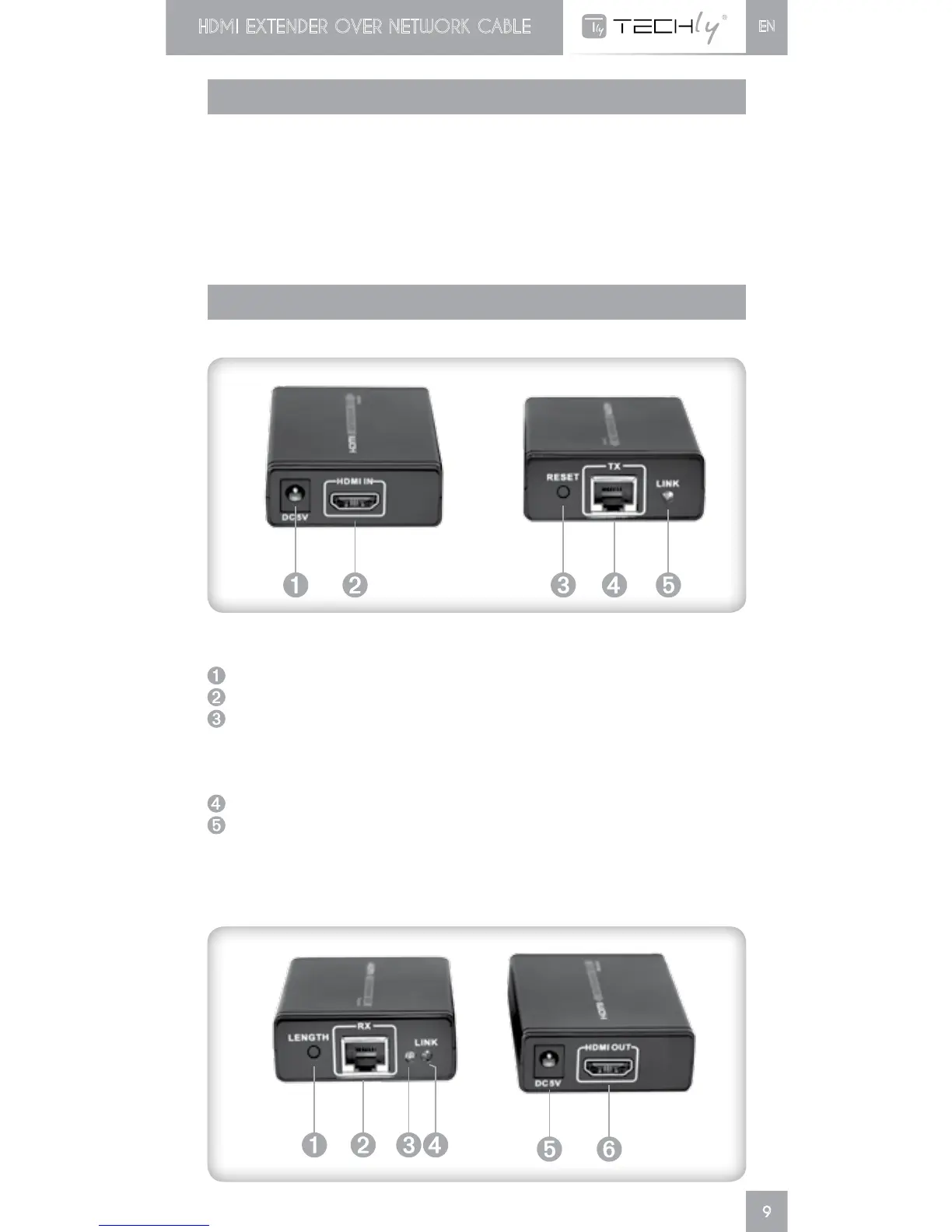
DC5Vpowerinput
HDMIsignalinput
RESET button: press this button to reset the device to default.
UsethisbuttonalsowhenthereisnoanyconnectionbetweenTX
andRX;holdthebuttonfor5secondsoruntiltheconnectionis
stablished(theindicatorLEDarelightedon).
RJ45signaloutput
LINK:HDMIsignalindicatorled.ItlightsonallthetimewithHDMI
signalinput,flasheswithnosignalinput.
INSTALLATION REQUIREMENTS
•HDMI source device like computer graphics card, DVD,PS1, HD
monitoring equipment etc.
•HDMI display device like SDTV, HDTV, projector with HDMI port
UTP/STP cat6/cat6A/cat7 cable with copper core and excelent
quality
•FollowstandardEIA/TIA-568B
INTERFACES













 To Next Page