EN
RJ45 to HDMI
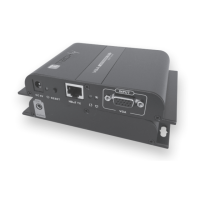
LENGHT: Network cable length adjust button, allows selecting
between12levelstofindthebestsettingbasedonthenetworking
cabletype.12levelscanbeswitchedcyclically,andthelevel1,
thelowest,isidentificablebythelightedREDLED(whichgoesoff
bygoingtothenextlevel,turnsonagainwhenitpassesbackto
level1).
This is a "LENGTH" button on the receiver end for adjusting
picturequalitywhenconnectedwithdifferentlengthofcat6/6A/7
cable,thelongerthecable,thehigherlevelitshouldset(themore
signalyoushouldmanuallygivetoit,bypushingthe"LENGTH"
button). Supports memory function and needs no setting after
poweroffifthecableisnotchanged.Ifyouchangethecablesyou
need to set once again to adjust the picture.
RJ45signalinput
LED light: when red LED is light, it indicates the first level of
amplification.Ifyouwanttomovetosecondlevel,pressagainthe
button,for thirdlevelpresstwiceandsoonuntillyoureachthe
correctadjustment.The”LENGTH"buttonhavetobepressedas
many times as you need to get the desired setting.
Connectionstatusindicatorled.ltlightsonallthetimewithHDMI
signaltransmission,flasheswithnosignaltransmission.
DC5Vpowerinput
HDMIsignaloutput
INSTALLATION PROCEDURES
How to make a Cat6 network cable?
FollowthestanardofEIA/TIA-568B
1-Orange/white
2-Orange
3-Green/White
4-Blue
5-Blue/white
6-Green
7-Brown/white
8-Brown













 To Next Page