HDMI 2.0 EXTENDER OVER CAT.6/7 CABLE 4K
EN
HDMI 2.0 EXTENDER OVER CAT.6/7 CABLE 4K
10
EN
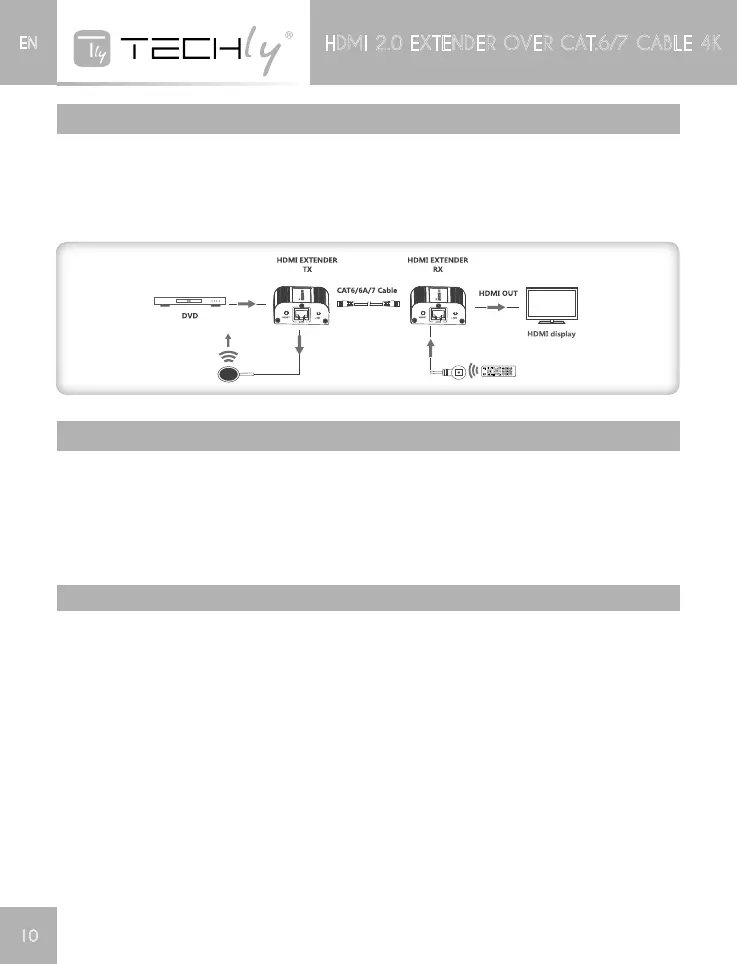
connEctIons
1) Connectsourcedevicetotransmitterunit(TX)anddisplaydevicetoreceiverunit(RX)viaHDM
cables.
2) Connecttransmitterunit(TX)andreceiverunit(RX)vianetworkcables(CAT6/CAT6A/CAT7)
3) Plugthepowersuppliestotransmitterandreceiver,theextenderworks.
Ir usEr guIdE
1) IRblasterextensioncableshouldplugintheIROUTportofTX(Sender)ofHDMIextenderandthe
IRreceiverextensioncableshouldintheIRINportoftheRX(Receiver)
2) TheemitteroftheIRblastershouldascloseaspossibletotheIRreceiverwindowofthesignal
source device.
3) UsingtheIRremotecontrollerofthesignalsourcedevicetowardstheIRreceiver(connectedto
thereceiver),toremotecontrolsourcemediaplayback.
FaQ
Q:Thereisnooutputonscreenwhenallconnectionsarecorrect
A:1)Pleasecheckandmakesurethedisplay/monitorsupportstheHDMIsignalwhichfedoutfrom
the source device.
2)PleasemakesuretheHDMIcablessupports4Kx2Kiftheoutputsignalfromthesourcedevice
is4Kx2Kresolution.
3)PleasecheckandmakesurethenetworkcableinserttotheRJ45portwell.
4)Restartthetransmitterorreceiverbypressingtheresetbutton.
Q:Blackscreenhappenedonthedisplay/monitor.
A:1)Pleasecheckandmakesurethelengthofthenetworkcablewithintheusablerange:
CAT6within60m@4Kx2K@30Hz
CAT6within30m@4Kx2K@60Hz.
2)Resetthetransmitterunitforre-builttheconnection.
Q:Thecolorcomesabnormityorthereisnoaudiooutput.
A:Resetthetransmitterunitforre-builttheconnection.














 To Next Page