13
EN
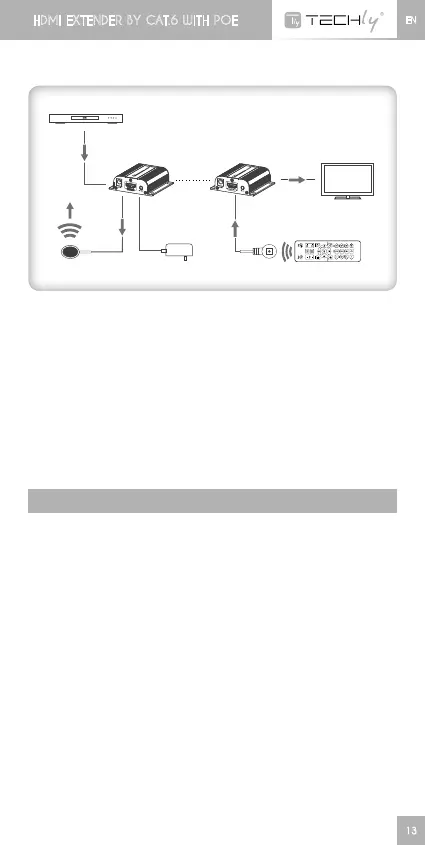
2. Connection
3. Connection instruction
1) Connect source device to the Transmitter unit (TX) and display
devicetoReceiverunit(RX)viaHDMIcables
2) ConnectTransmitterunit(TX)andReceiverunit (RX)via network
cables(cat.6/6A/7)
3) PlugthepowersupplytoTransmitterunitonly,eachunitwillpower
uptheinitializeitself,thisHDMIextenderworks
FAq
q: Noimageoutputoraudioandvideodisplayisnotnormal?
A: Press Receiver “LENGTH” button for adjusting this unit to self-
adapttothelengthofnetworkcable.
HDMI EXTENDER BY CAT.6 WITH POE
DVD
HDMI IN
Transmitter
Power Supply
Receiver
RXTX
Cable HDMI Cable
TV














 To Next Page