12
EN
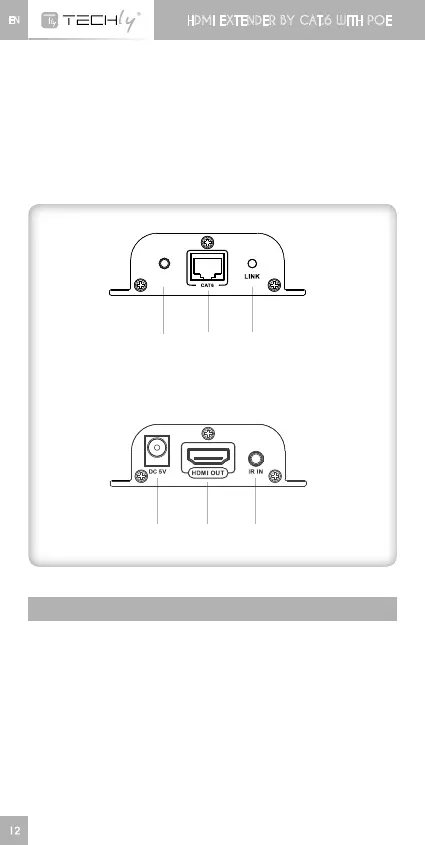
2. Receiver unit (RX)
➊
LENGTH:foradjustingthelengthofnetworkcable
➋
RJ45signalinput
➌
RJ45 indicator led: it lights on all the time with HDMI signal
transmission, flashes with no signal transmission
➍
DC5Vpowerinput(OPTIONAL)
➎
HDMIsignaloutput
➏
IRsignalinputtoconnectwithIRreceiverextensioncable
INSTALLATION AND CONNECTION
1. How to make a Cat.6/6A/7 network cable
FollowthestandardofIEEE-568B
1-whiteandorange
2-orange
3-whiteandgreen
4-blue
5-whiteandblue
6-green
7-whiteandbrown
8-brown
LENGTH
➊ ➋ ➌
➍ ➎ ➏
HDMI EXTENDER BY CAT.6 WITH POE














 To Next Page