HDMI EXTENDER OVER CAT.6/7 CABLE 40M
EN
HDMI EXTENDER OVER CAT.6/7 CABLE 40M
10
EN
connEctIons
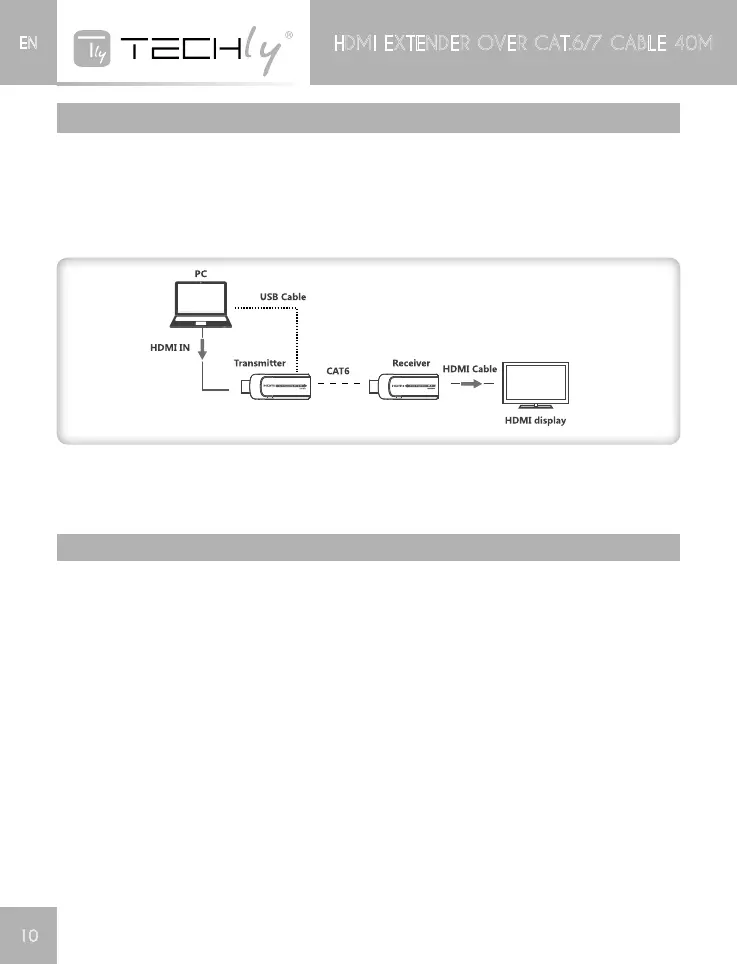
1) Plug the transmitter unit to the HDMI output port of the source device directly, and plug the
receivertotheHDMIinputportofthedisplaydevicedirectly.
2) Connecttransmitterunit(TX)andreceiverunit(RX)vianetworkcables(CAT6/CAT6A/CAT7)
3) Connect the USB cable to the transmitter unit only, each unit will be powered up, this HDMI
extenderworks
NOTE:Itisrecommendedtousealengthrangewithin15~40mnetworkcable.IftheCat.6cableis
tooshort,theremaybenodisplayoutputbecauseofthesignalistoostrong.IftheCat.6cableistoo
long,theoutputmaybewithpoorquality.
FaQ
Q:Noimageoutputoraudioandvideodisplayisnotnormal.
A:1)PressReceiver“LENGTH”buttonforadjustingthisunittoself–adapttothelengthofnetwork
cable.
Q: No image output.
1)MakesurenetworkcableconnectionfollowsthestandardofEIA-568B.
2)CheckandmakesurethereisHDMIsignalinputtothetransmitter.
3)Pressreceiver“LENGTH”buttontoadjustthisunittoself-adapttothelengthofnetworkcable.
4)MakesureHDMIcableiswellconnectedwithTV.
5)Makesurethenetworkcableisfinecopperwires.













 To Next Page