12
HDMI WALL PLATE EXTENDER
ENEN
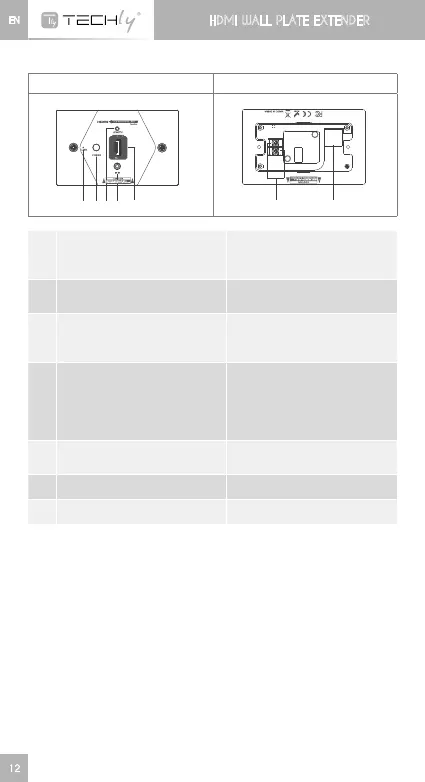
2. Receiver unit (RX)
Front panel Rear panel
➊ ➋➌➍ ➎
➏
➐
➊
HDMIsignalindicator
It turns on all the time when
HDMIsignalinput,but
flashes when no signal input
➋
Power switch
Press this button to turn on/
off the device
➌
LENGTHbutton
Foradjustingtheunittoself-
adapt to the length of the
network cable
➍
IRreceiverextensioncable
interface
ConnectswithIRreceiver
extensioncable.Please
make sure the remote control
is within the required range of
IRreceiver
➎
HDMIsignaloutput
Connectwiththedisplay
device
➏
Power line interface Connect power line
➐
RJ45signalinput InputencodedHDMIsignal
Remarks:Userscanpressbutton“LENGTH”toadjusttransmission
distanceofthisdeviceautomaticallyormanually.Ifusersdonotpress
this button when power on, then the device will work like last time
becauseofmemoryfunction.Ifuserspressthis button after power
on, the first two presses will make the device adjust the distance
accordingly to the network cable length automatically. After those
two presses, if users continue to press this button, then it will go to
themodeofadjustingtransmissiondistancemanually.Thereare10
levelstotallyandaddingonemorepressmeansanewlevel.When
usersfinishthe10levelsadjustingmanuallyitwillbebacktoadjust
transmissiondistanceautomaticallymodeandintonewloop.













 To Next Page