13
HDMI WALL PLATE EXTENDER
ENEN
INSTALLATION PROCEDURES
Note: please shut off power before installation
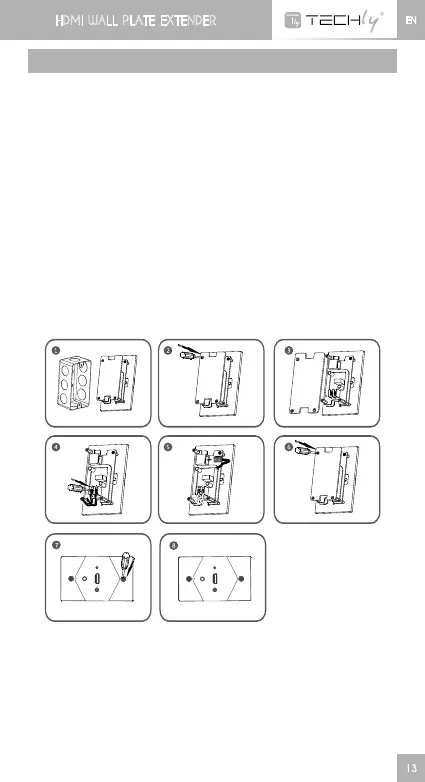
1) Removetheextenderwallplatefromthebackbox(pleasereferto
figure1).
2) Removetheextenderinsulatingbase(pleaserefertofigure2,3).
Connect power line: use screw driver to unscrew and connect
powerlineaccordingtothemarkonthebase.“L”islivelineand
“N”isneutralline(pleaserefertofigure4).
3) Connect network cable: make network crystal head as per
the standard EIA-568B, connect crystal hear to receiver RJ45
interface(pleaserefertofigure5).
4) Installtheinsultingbase(pleaserefertofigure6).
5) Installtheaccessoryscrewstothecorrespondingpositionstofix
theextenderwallplatetothebackbox(pleaserefertofigure7).
6) Installationisdone(asfigure8).
7) Topreventpersonalelectricshock,thisdeviceisforbiddentobe
installedbynon-professionalpersonnel.













 To Next Page