11
HDMI WALL PLATE EXTENDER
ENEN
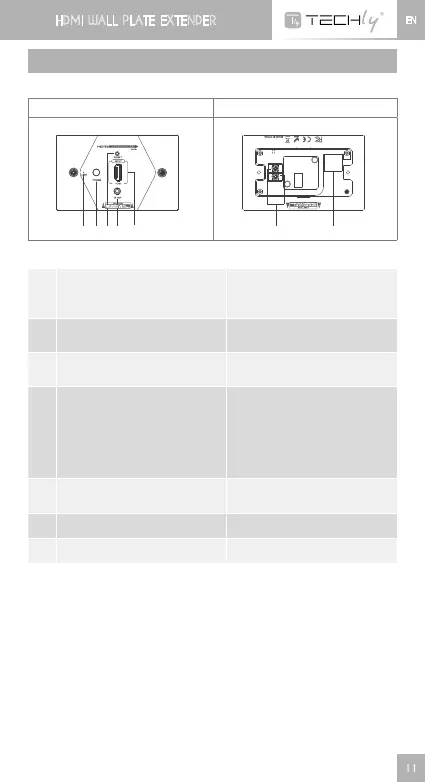
PANEL DESCRIPTION
1. Transmitter unit (TX)
Front panel Rear panel
➊ ➋➌➍ ➎
➏
➐
➊
HDMIsignalindicator
It turns on all the time when
HDMIsignalinput,but
flashes when no signal input
➋
Power switch
Press this button to turn on/
off the device
➌
Resetbutton
Press reset button to restart
the device
➍
IRblasterextensioncable
interface
ConnectswithIRblaster
extensioncable.Pleaseput
theIRblasterclosetothe
source device to get the best
IRsignaltransmissionfrom
receiver
➎
HDMIsignalinput
Connect with the source
device
➏
Power line interface Connect power line
➐
RJ45signaloutput OutputencodedHDMIsignal













 To Next Page