14
HDMI WALL PLATE EXTENDER
EN
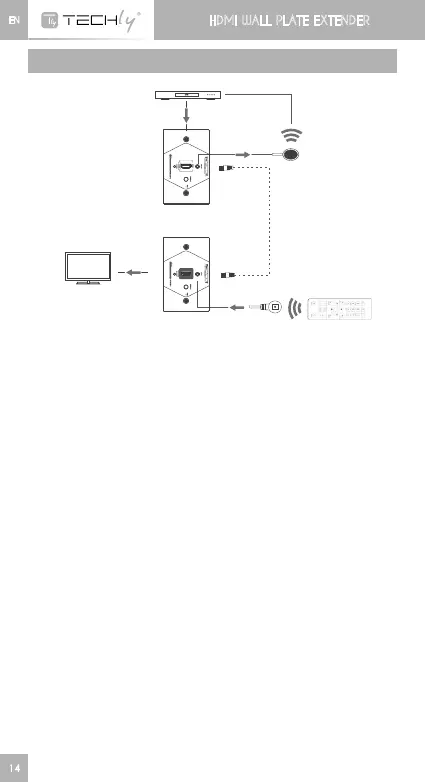
CONNECTIONS
CA T6 C able
H D M I E X T EN D E R
S en de r
D V D
H D M I I N
H D M I O U T
H D M I E X T EN D E R
R e c ei v er
HDMI display
FAQ
Q:Noimageoutputoraudioandvideodisplayisnotnormal?
A:1)Pressreceiver“LENGTH”buttonforadjustingthisunittoself-
adapt to the length of network cable.
Q:RX“LINK”ledisflashingallthetime?
A:1)MakesurenetworkcableconnectionfollowsthestandardEIA/
TIA-568B.
2)CheckwhetherTransmitterhasHDMIsignalinput.
3)ResetTransmitterandReceiverandreconnect.
Q:Receiver“LINK”ledlightsonallthetimebutnoimageoutput?
A:1)PressReceiver“LENGTH”buttonforadjustingthisunittoselfto
the length of network cable.
2)MakesureHDMIcableiswellconnectedwithTV.
3)Plugout/innetworkcableorre-powerReceiver













 To Next Page