CONNECTIONS
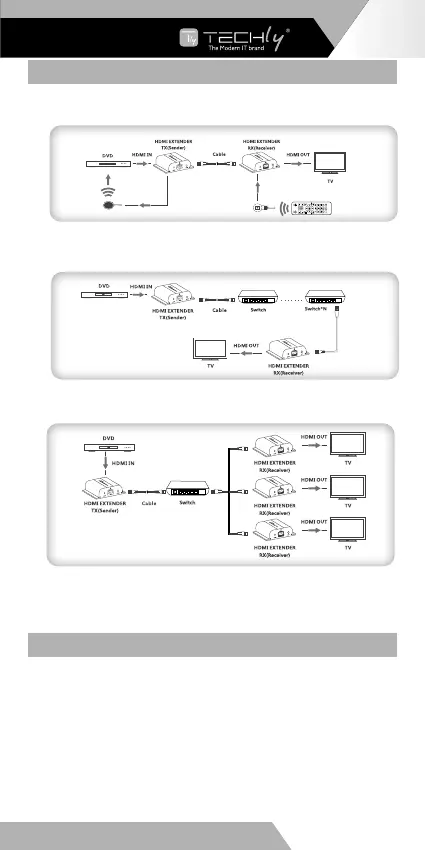
a Point to point connection: Up to 120 meters transmission distance
over single CAT6.
b Router connection: By using network router/repeater, realize
unlimited extension.
c One-to-many connection: By using network router/switch, one
sender to several receivers, realize extender & splitter function.
Note: Gigabit (1000Mbps) switcher is recommended in LAN
transmission. Fast Ethernet switches (100Mbps) and Gigabit Ethernet
switches (1000Mbps) can not be mixed-use in cascade.
IR USER GUIDE
1) IR blaster extension cable should plug-in the IR-out port of TX
(Sender) of HDMI extender and the IR receiver extension cable
should plug-in the IR-Out port of the RX (Receiver) of HDMI
extender.
2) The emitter of IR blaster should as close as possible to the IR
receiver of the signal source device.
3) Using the IR remote controller of the signal source device
towards the IR receiver (connected to the RX of HDMI extender),
to remote control source media playback.
EN - 5
WWW.TECHLY.COM
HDMI EXTENDER OVER IP











 To Next Page