P-5
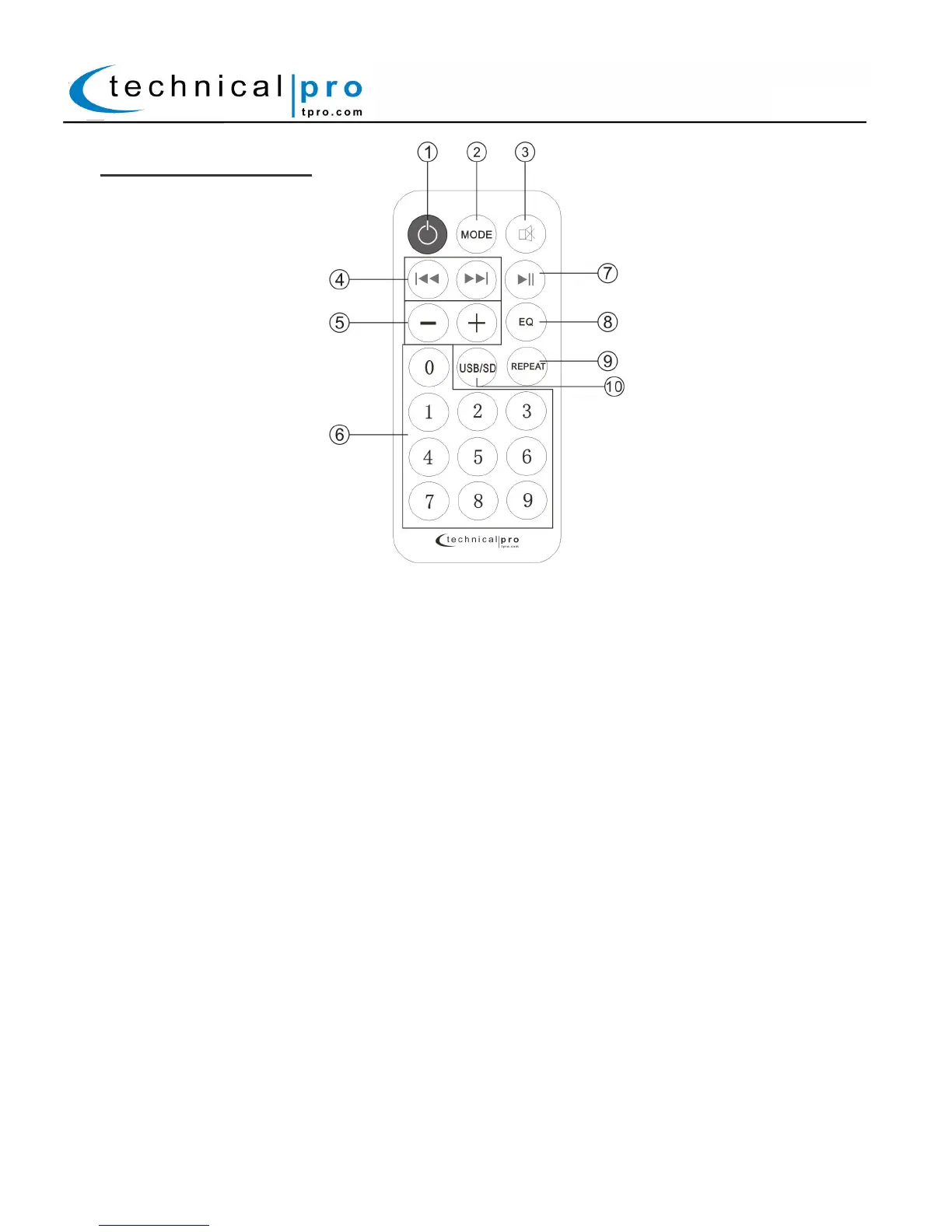
BLUET32LG Remote:
1. USB / SD / Bluetooth Power Button: Press this button to turn on and off the USB/SD/Bluetooth module on
the rear of the unit.
2. Input Selector: Use this button to switch between all the inputs.
3. Mute
4. Previous Track Button: Press this button to go back to the beginning of the previous track on either the USB
flash drive or SD Card input. Press and hold down this button to decrease the volume.
Next Track Button: Press this button to go back to the beginning of the next track on either the USB flash
drive or SD Card input. Press and hold down this button to increase the volume.
5. Master Volume: Press these buttons to increase or decrease the master volume.
6. Number Keys: The number keys are used to input the track number when using the USB / SD Card inputs. For
example if you press 9, the unit will go to track number 9 on either the USB flash drive, SD Card. If you press 1
then 9 the unit will go to track 19.
7. Play / Pause: Press this button to pause the signal from the USB flash drive, SD Card, press again to play.
8. EQ Mode Selector: The unit has five built-in pre-set equalization modes. Press this button to switch among the
pre-set equalization modes when using the USB or SD Card inputs.
9. Repeat Control: Press this button to repeat the current track, all tracks on the USB flash drive, SD Card.
10. USB / SD Card Mode Selector: Press this button to switch between the USB flash drive input and SD
Card input.
BLUET32LG


 To Previous Page
 Loading...