Page7
2.6 Wire Your System
2.6.1 Stereo Mode
Make sure the amplifier is turned off and the level controls
are turned down before you wire the system. Make sure the
stereo/bridge switch is set to stereo.
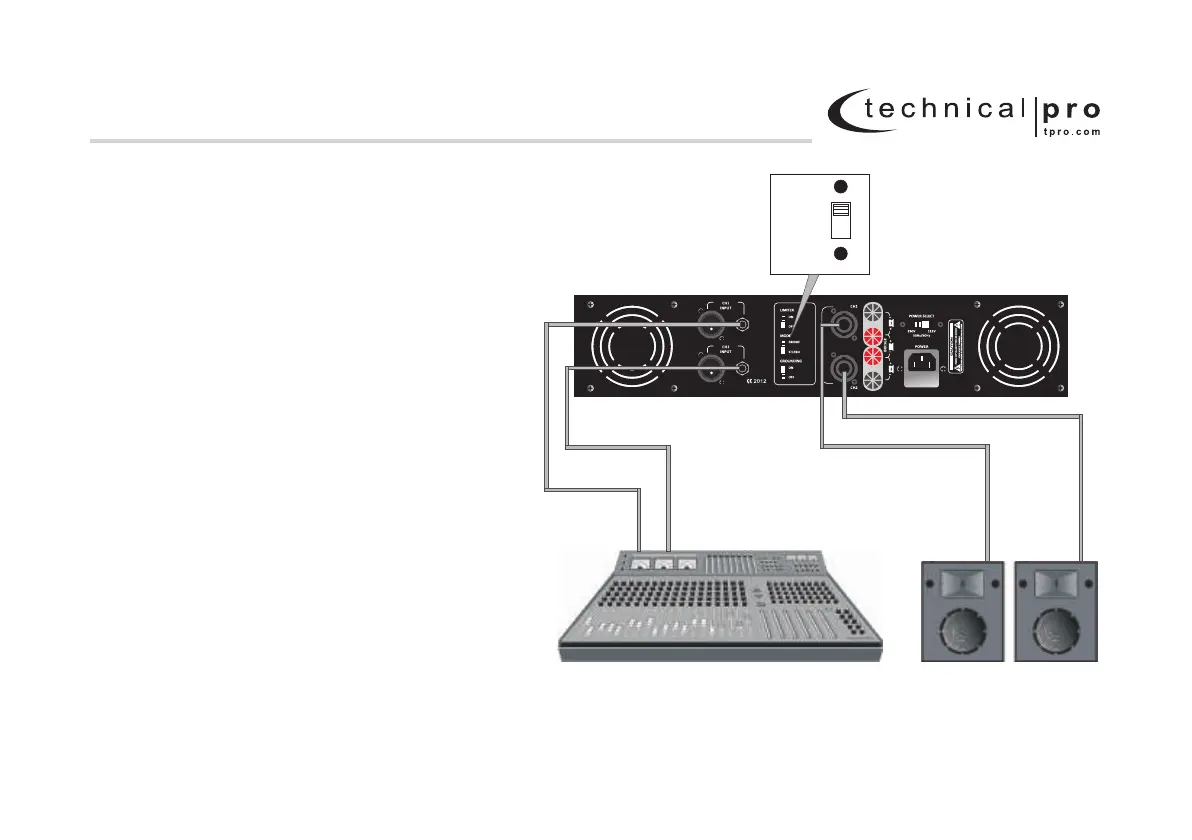
Typical input and output wiring is shown in Figure 2.6.1.
INPUTS: Connect the input wiring for each desired channel
using either the XLR or 1/4" jacks. Never used both the XLR
and 1/4" jacks simultaneously on a single channel.
OUTPUTS: Maintain proper polarity (+/-) on output connectors.
In Stereo mode the banana plugs should be connected
vertically in the CH.1 jacks (one wire in the positive and
one in the negative jack). Be sure to maintain the positive
/negative polarity when connecting your amplifier to the
speaker. Positive terminal on the amplifier should be connected
to a positive terminal on the speaker. The same should be done
for the negative terminals.
2.6.2 How to Parallel the Inputs
There are two ways to feed the same signal to each
amplifier channel:
1. Buy a "Y" cable. Plug the female end into your signal cable,
and plug the split male ends into both amplifier inputs.
2. Feed your signal to the Channel-1 input screw terminals.
Using a mic cable or phone-to-phone cable, connect Channel-1
combo jack to Channel-2 combo jack.
See the next page for Bridge-Mono wiring.
Figure 2.6 .1 Typical System Wiring, Stereo Mode
STEREOSTEREO
BRIDGEBRIDGE
MONOMONO
L - SERIES 2U Professional Amplifier
2 Setup
CH1 CH2 CH1 CH2
MIXER
SPEAKER
MODEL: LZ10K
www.tpro.com


 To Next Page