STEREOSTEREO
BRIDGEBRIDGE
MONOMONO
Page8
2.6.3 Bridge-Mono Mode
Make sure the amplifier is turned off and the level
controls are turned down before you wire the system.
Make sure the stereo/bridge switch is set to bridge.
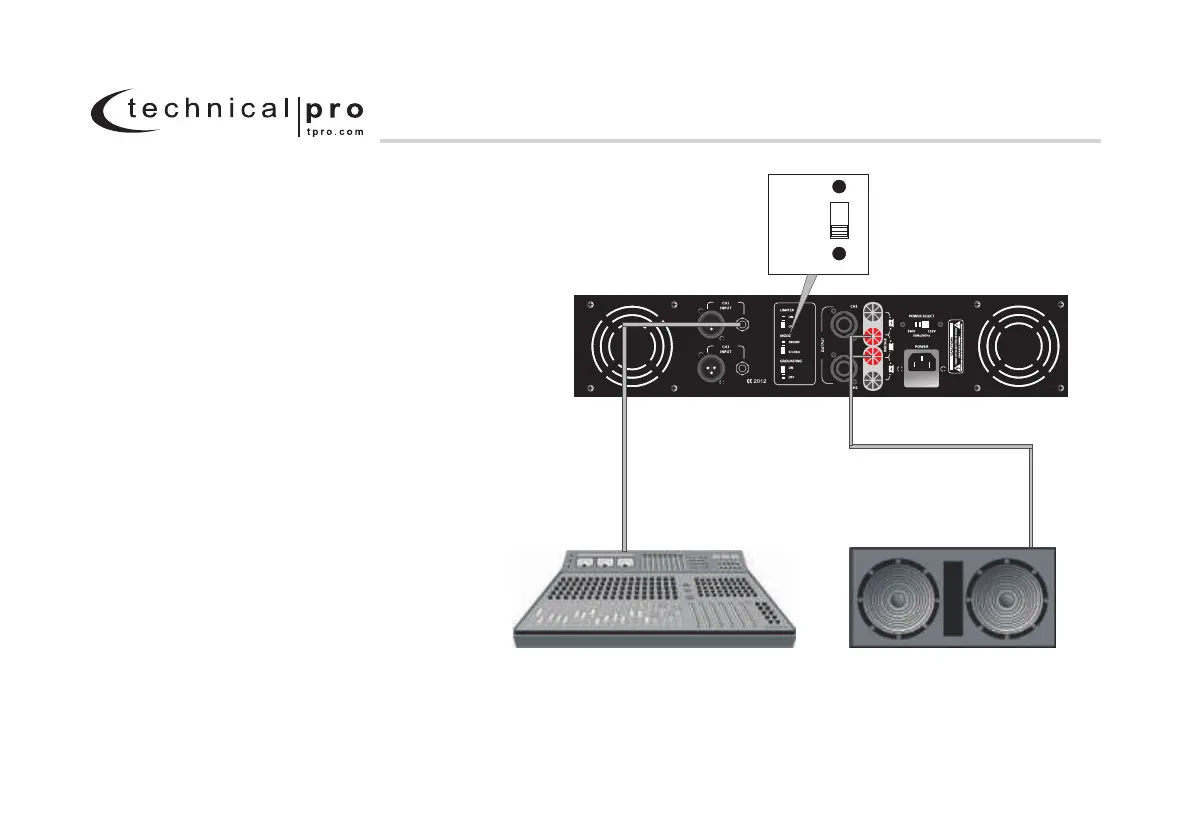
Typical input and output wiring is shown in Figure 2.6.3.
INPUTS: Connect input wiring to CH.1. Never used
both the XLR and 1/4" jacks simultaneously on a
single channel.
OUTPUTS: Connect the speaker across the positive
(+) output terminals when amplifier is being operated
in Bridge-Mono mode. Refer to Section 2.5 for output
connector pin assignments. Make sure the Mode switch
is set to the "Bridge Mono" position when operating
in Bridge-Mono mode.
NOTE: Turn down the Channel 2 level control when
operating the channel pair in Bridge-Mono mode,
as the Channel 1 level control works both channels.
.
.
Figure 2.6 .3 Typical System Wiring, Bridge-Mono Mode
2 Setup
L - SERIES 2U Professional Amplifier
CH1
MIXER SPEAKER
MODEL: LZ10K
www.tpro.com


 To Next Page