EasyManua.ls Logo

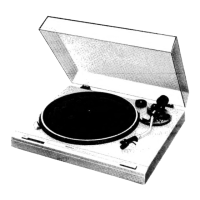
Technics Direct Drive SL-DD33 - Notes

Technics Direct Drive SL-DD33
6 pages
Print Icon
To Next Page IconTo Next Page
To Previous Page IconTo Previous Page
Loading...
Notes:
The
unitis
in
the
“stand-by”
condition
when
the
AC
power
supply
cord
is
connected.
The
primary
circuit
is
always
“live”
as
long
as
the
power
cord
is
connected
to
an
electrical
outlet.
1
Place
a
dise
on
the
platter
mat.
For
a
17-cm
(7”)
(large
center
hole)
disc
"a
Ce
Dis¢
45-rpm
adaptor
Platter
mat
45-rpm
adaptor
Strobe
lines
When
the
platter
rotates,
the
strobe
lines
form
a
stripe
pattern
according
to
the
rotation
speed.
Strobe-illuminator/
pilot
lamp
Record
size
detector
Set
to
disc’s
speed.
3
[hem
com]
Remove
the
arm
clamp.
Tonearm
Detects
the
size
of
the
record
on
the
platter
automatically.
Repeat
switch
(repeat)
Set
to
the
on
position
to
repeat
the
play.
To
stop
repeat
play,
set
to
the
off
position.
Cartridge
(TaD)
is
the
standard
mark
for
the
“P-mount”
plug-in-connector
system.
Products
carrying
this
mark
are
interchangeable
and
compatible
with
each
other.
Tonearm
The
following
types
of
discs
shouldbe
played
1.
While
the
tonearm
is
moving,
don’t
touch
manually.
@Discs
other
than
17-
or
30-cm
discs
e
Lightweight
discs
such
as
“Sonosheets”
eBadly
warped
discs
—_
Follow
the
steps
1~
4of
the
automatic
play.
Set
the
cueing
control
to
the
“Y”
position.
3.
Move
the
tonearm
to
the
desired
position
by
hand.
(The
platter
will
start
turning.)
N
4,
Set
the
cueing
control
to
the
"Y”
position.
(Play
will
start.)
the
repeat
switch
or
the
tonearm.
The
platter
may
start
turning
or
keep
turning
in
some
cases
like
those
listed
below.
Press
the
start/stop
switch
to
make
the
platter
stop.
eWhen
the
power
cord
is
connected.
if
the
start/stop
switch
is
pressed
when
there
is
no
disc
on
the
platter
mat.
2.
Attach
the
stylus
(The
tape
on
side
of
cartridge
prevents
the
stylus
assembly
from
shaking
loose
during
shipment.)
af
Protector
Start/stop
switch
(start/stop)
Press.
(The
platter
will
start
turning,
then
play
will
start.)
(The
tonearm
won't
move
if
there
is
no
disc
on
the
platter
mat.)
@
When
play
ends
1.
The
tonearm
will
automatically
return
to
the
arm
rest
(the
automatic
return
feature).
2.
Rotation
will
stop.
Press
to
step
the
play.
Cueing
control
(cueing)
Set
to
“Y"
to
stop
the
play
temporarily.
Set
to
“¥"
to
resume
the
play.
1.
Clamp
the
tonearm.
Tonearm
protector.
Protector
(

Related product manuals