EasyManua.ls Logo

Technics SC-EH750 - CD Playback Modes (SC-EH750); Direct Access, Repeat, and Random Play

Technics SC-EH750
51 pages
Print Icon
To Next Page IconTo Next Page
To Previous Page IconTo Previous Page
Loading...
RANDOM
Listening
to
compact
discs
EEEGRTIED
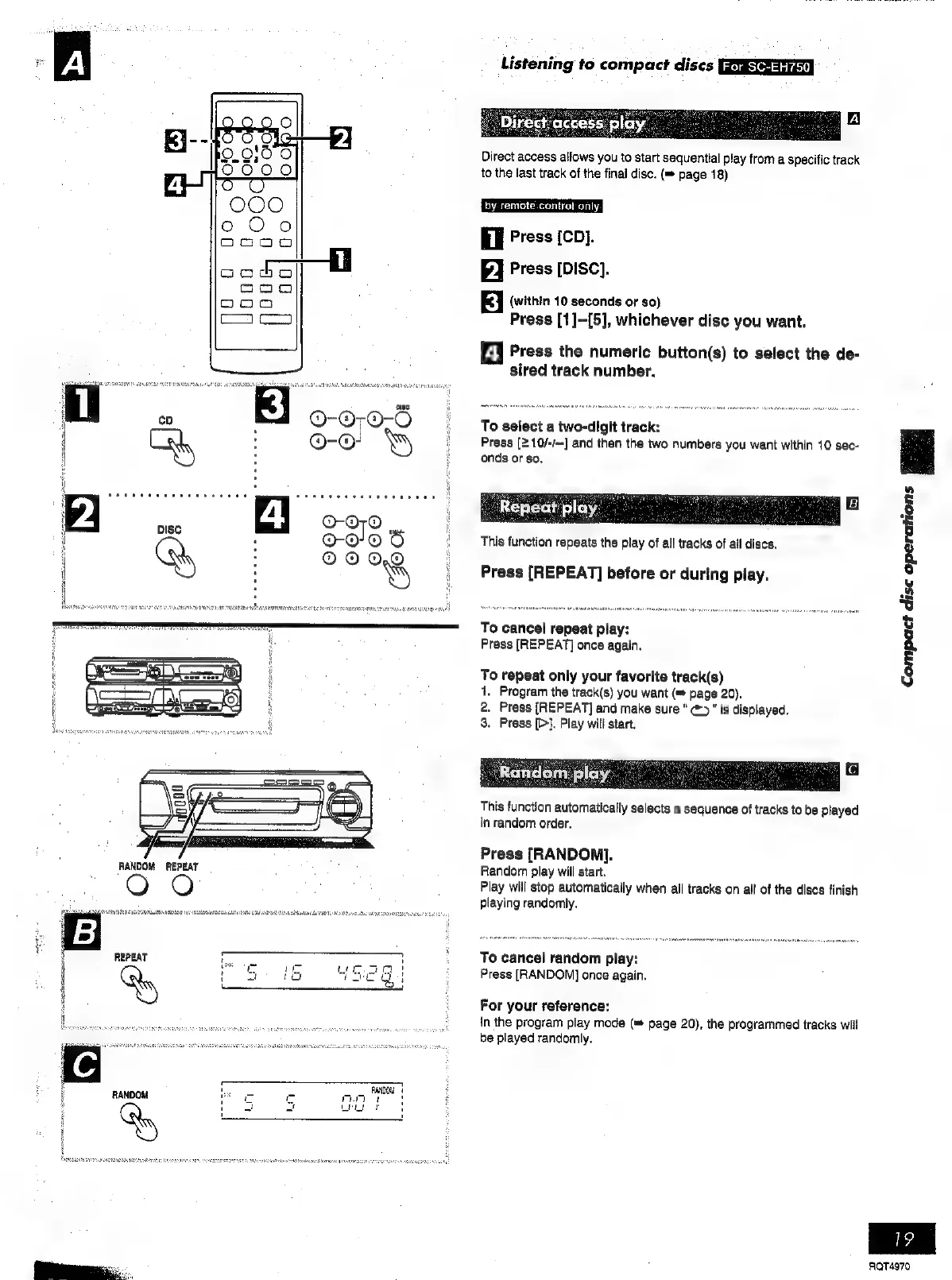
Direct
access
allows
you
to
start
sequential
play
from
a
specific
track
to
the
last
track
of
the
final
disc.
(=
page
18)
hy.
remote.contrat
only.
il
Press
[CD].
P]
Press
[Disc].
Ei
(within
10
seconds
or
so)
Press
[1]-[5],
whichever
disc
you
want.
4
Press
the
numeric
button(s)
to
select
the
de-
sired
track
number.
To
select
a
two-digit
track:
Press
[2
10/-/—]
and
then
the
two
numbers
you
want
within
10
sec-
onds
or
so.
Rene
ly
This
function
repeats
the
play
of
all
tracks
of
all
discs.
Press
[REPEAT]
before
or
during
play.
To
cancel
repeat
play:
Press
[REPEAT]
once
again.
To
repeat
only
your
favorite
track(s)
1.
Program
the
track(s)
you
want
(=
page
20).
2.
Press
[REPEAT]
and
make
sure
ā€œ
@>"
is
displayed.
3.
Press
[>}.
Play
will
start.
This
function
automatically
selects
a
sequence
of
tracks
to
be
played
in
random
order.
Press
[RANDON].
Random
play
will
start.
Play
will
stop
automatically
when
all
tracks
on
all
of
the
discs
finish
playing
randomly.
To
cancel
random
play:
Press
[RANDOM]
once
again.
For
your
reference:
in
the
program
play
mode
(=
page
20),
the
programmed
tracks
will
be
played
randomly.
Compact
disc
operations
Bod
RQT4970

Related product manuals