CD changer
////
/
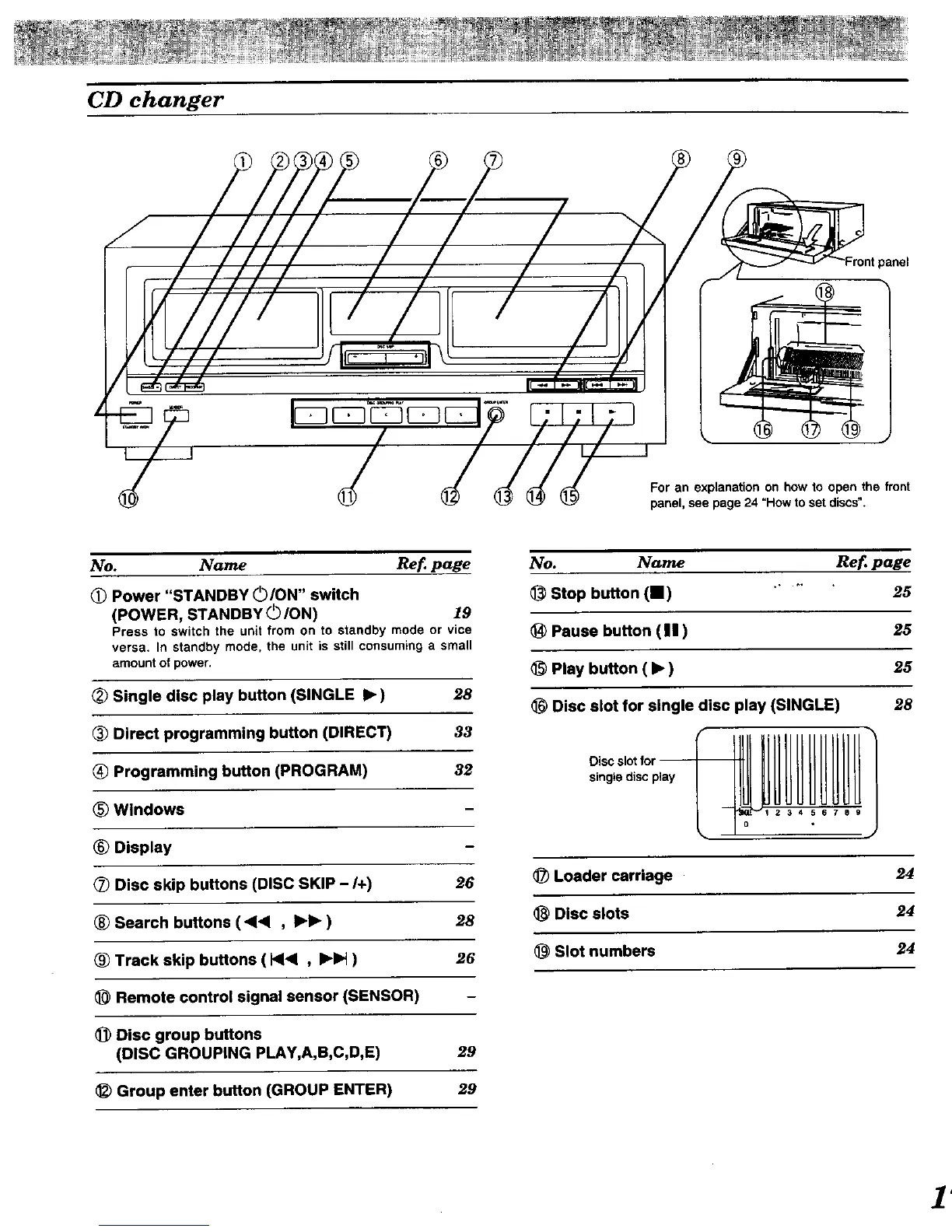
panel
For an explanationon how to open the front
panel, see page24 "How to set discs".
No. Name Ref page
Power "STANDBY OION" switch
(POWER, STANDBY (._ION) 19
Pressto switchthe unitfromon to standby modeor vice
versa. In standby mode.the unitis stillconsuming a small
amountofpower.
Single disc play button (SINGLE • ) 28
Direct programming button (DIRECT) 33
_) Programming button (PROGRAM) 32
_) Windows
® Display
_) Disc skip buttons (DISC SKIP - I+) 26
® Search buttons (<1,< , •• ) 28
Track skip buttons ( HI< , •1_ ) 26
Remote control signal sensor (SENSOR)
_) Disc group buttons
(DISC GROUPING PLAY,A,B,C,D,E) 29
Group enter button (GROUP ENTER) 29
No. Name
Stop button (11) .....
Pause button (11)
Play button ( • )
Disc slot for single disc play (SINGLE)
single disc play
34 567 B 9
Ref page
25
25
25
28
_) Loader carriage 24
Disc slots 24
Slot numbers 24


 To Next Page