m
! I
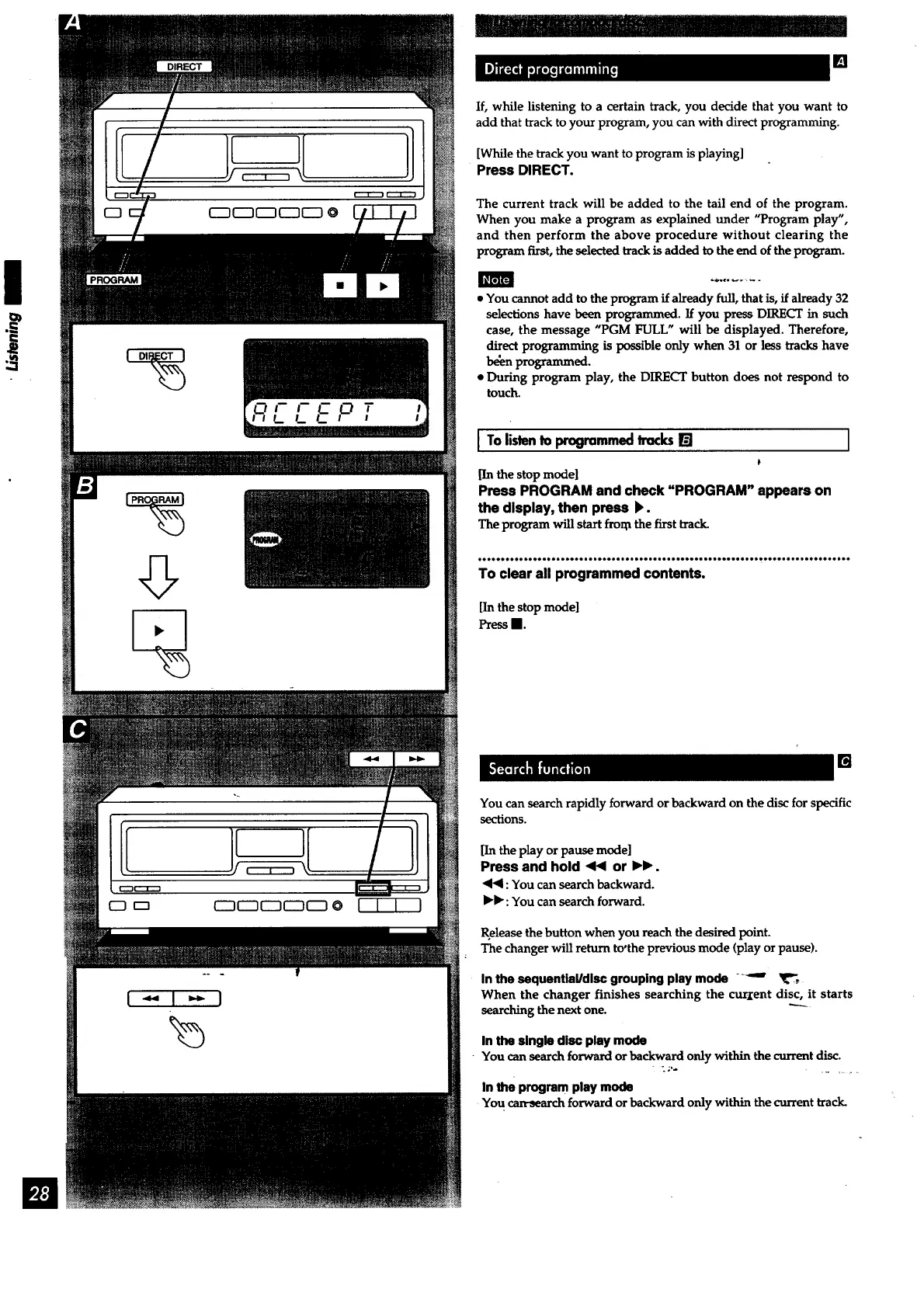
If, while listening to a certain track, you decide that you want to
add that track to your program, you can with direct programming.
[While the trackyou want to program is playing]
Press DIRECT.
The current track will be added to the tail end of the program.
When you make a program as explained under "Program play",
and then perform the above procedure without clearing the
program first, the selected track is added to the end of the program.
• You cannot add to the program if already full, that is, if already 32
selections have been programmed. If you press DIRECT in such
case, the message "PGM FULL" will be displayed. Therefore,
direct programming is ix)ssible only when 31 or less tracks have
be_n programmed.
• During program play, the DIRECT button does not respond to
touch.
I Tolistento programmedhacks[]
[In the stop model
Press PROGRAM and check "PROGRAM" appears on
the display, then press _.
The program will start fro_ the first track.
I
_ee_e_e_oe_e_ee_eee_e_oo_oe_e_D_oee_eeee_o
To clear all programmed contents.
[In the stop mode]
PressII.
[]
You can search rapidly forward or backward on the disc for specific
sections.
[Inthe playorpause mode]
Press and hold <HIor IH_.
4<1: Youcansearch backward.
IH_:Youcan searchforward.
Release the button when you reach the desired point.
The changer will return to'the previous mode (play or pause).
In the sequentlaMdlsc grouping play mode _--"
When the changer finishes searching the curxent disc, it starts
searching the next one.
In the single disc play mode
You can search forward or backward only within the current disc.
In the program play mode
You can-seal_:h forward or backward only within the cun'ent track.



 To Next Page