t
O
DECK1/2
%
SYNCHRO
START
%
!_I?I1N
• REC PAUSE
%
I Torecordselected!_=1_ [] I
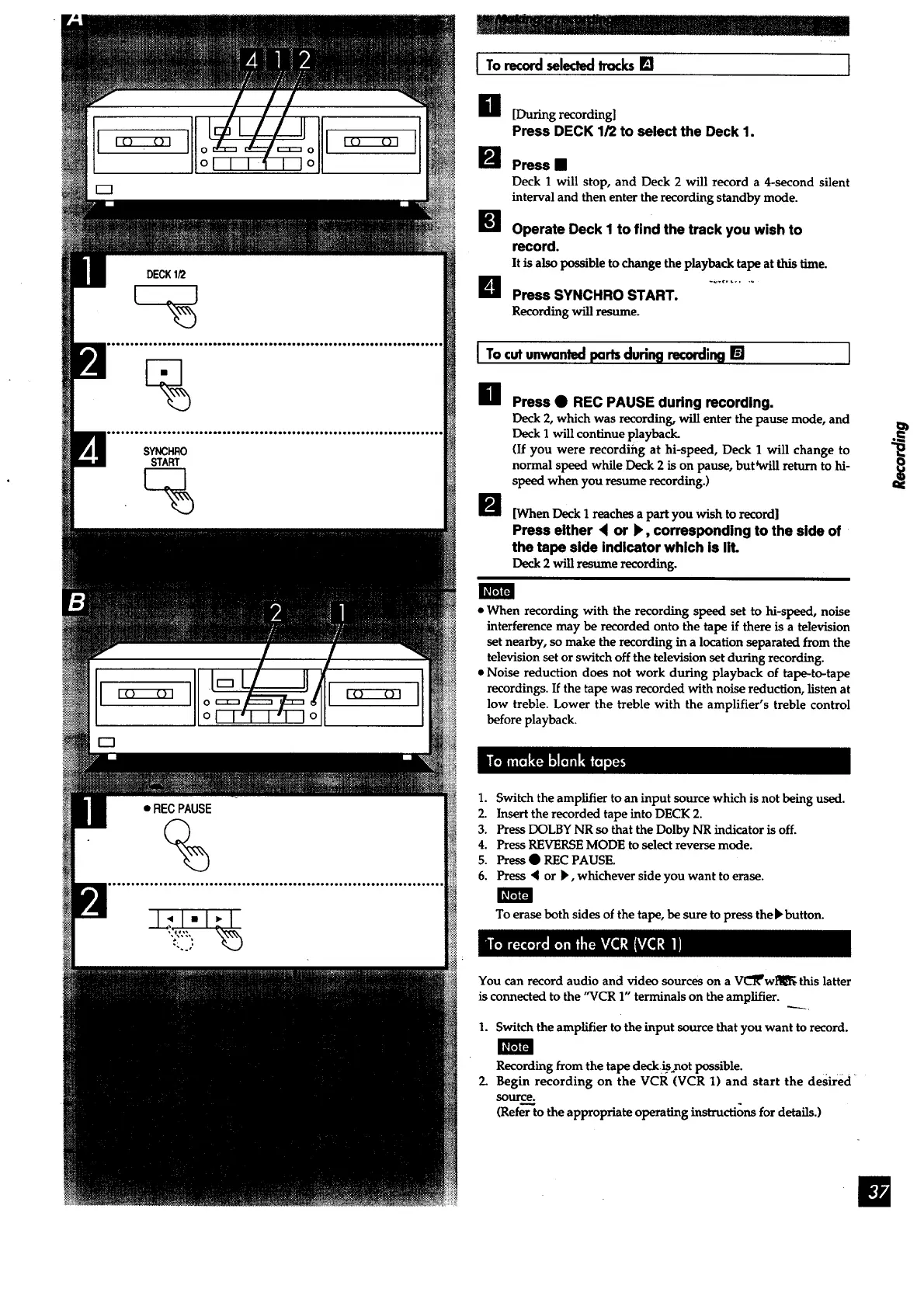
H [During recording]
Press DECK 1/2 to select the Deck 1.
m Press==
Deck 1 will stop, and Deck 2 will record a 4-second silent
interval and then enter the recording standby mode.
Operate Deck I to find the track you wish to
record.
It is also possible to change the playback tape at this thne.
B Press SYNCHRO START.
Recording will resume.
I Tocutunwantedpartsdurin9 recording[]
Ill
m
I
Press • REC PAUSE during recording.
Deck 2, which was recording, will enter the pause mode, and
Deck I will continue playback.
(If you were recordiilg at hi-speed, Deck 1 will change to
normal speed while Deck 2 is on pause, but _vill return to hi-
speed when you resume recording.)
[When Deck I reaches a part you wish to record]
Press either < or I_, corresponding to the side of
the tape side indicator which is lit.
Deck 2 will resume recording.
• When recording with the recording speed set to hi-speed, noise
interference may be recorded onto the tape if there is a television
set nearby, so make the recording in a location separated from the
television set or switch off the television set during recording.
• Noise reduction does not work during playback of tape-to-tape
recordings. If the tape was recorded with noise reduction, listen at
low treble. Lower the treble with the amplifier's treble control
before playback.
1. Switch the amplifier to an input source which is not being used.
2. Insert the recorded tape into DECK 2.
3. Press DOLBY NR so that the Dolby NR indicator is off.
4. Press REVERSE MODE to select reverse mode.
5. Press • REC PAUSE.
6. Press '4 or b', whichever side you want to erase.
To erase both sides of the tape, be sure to press the F button.
You can record audio and video sources on a VL'_wl_l_ this latter
is connected to the "VCR 1" terminals on the amplifier.
1. Switch the amplifier to the input source that you want to record.
Recording from the tape deck _ not possible.
2. Begin recording on the VCR (VCR 1) and start the desired
source.
(Refe_o the appropriate operating instructions for details.)



 To Next Page