ii.,IIII
llIllIII
Equalization-preset indicator
DI I I
i .......
i Torelrievethememorizedconlenb[]
il
B
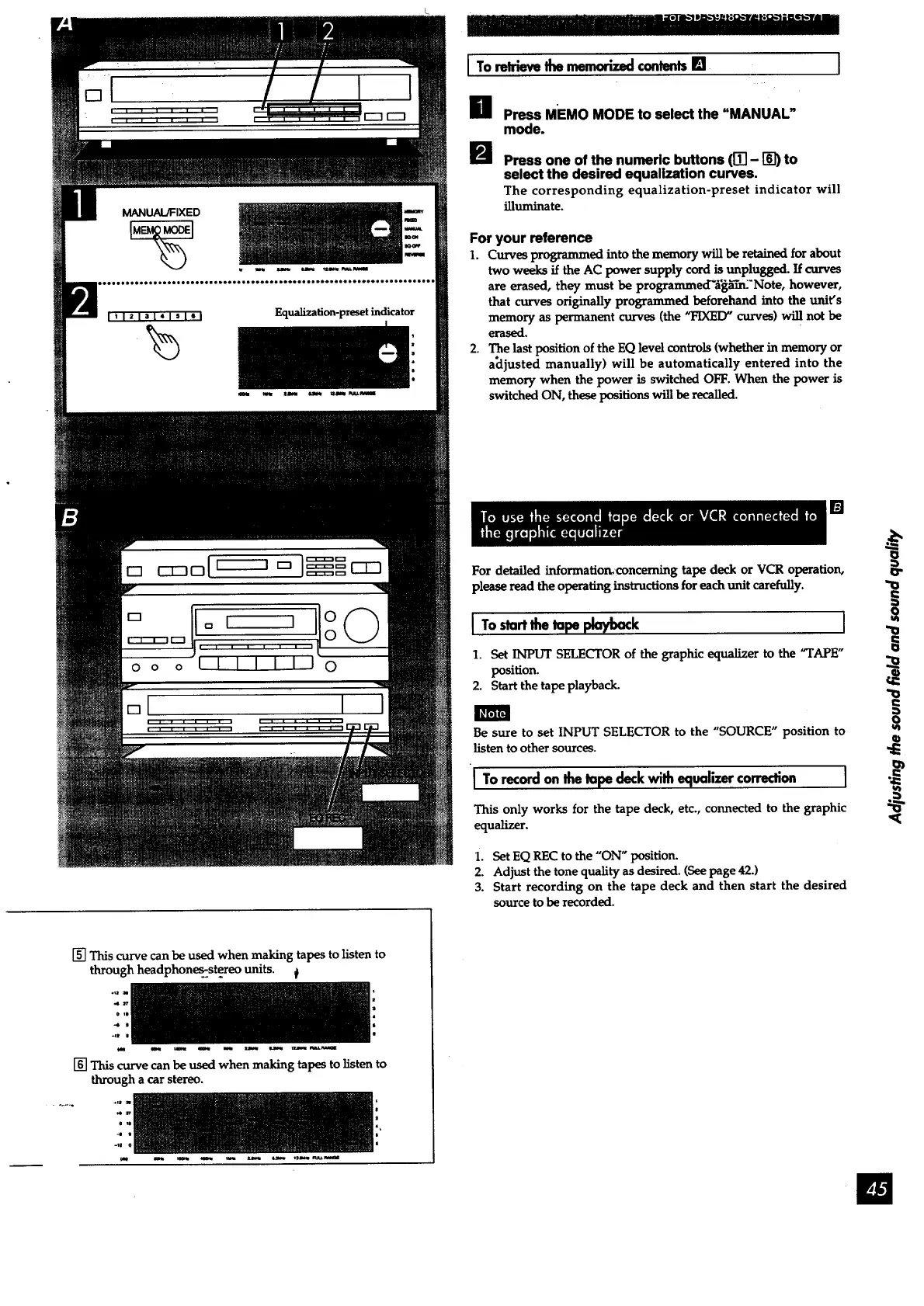
Press MEMO MODE to select the "MANUAL"
mode.
Press one of the numeric buttons (IT] - D_) to
select the desired equalization curves.
The corresponding equalization-preset indicator will
illuminate.
For your reference
1. Curves programmed into the memory will be retained for about
two weeks if the AC power supply cord is unplugged. If curves
are erased, they must be programmed"6_'m:'Note, however,
that curves originally programmed beforehand into the unit's
memory as permanent curves (the "FIXED" curves) will not be
erased.
2. The last position of the EQ level controls (whether in memory or
a_ijusted manually) will be automatically entered into the
memory when the power is switched OFF. When the power is
switched ON, these positions will be recalled.
[]
For detailed information_concerning tape deck or VCR operation,
please read theoperating instructions for each unit carefully.
I To topept:/ k l
1. Set INPUT SELECTOR of the graphic equalizer to the "TAPE"
position.
2. Start the tape playback.
I_,tnt_
Be sure to set INPUT SELECTOR to the "SOURCE" position to
listen to other sources.
I TorecordonIhe tapedeckwith equalizercorrection ]
This only works for the tape deck, etc., connected to the graphic
equalizer.
i. Set EQ REC to the "ON" position.
2. Adjust the tone quality as desired. (See page 42.)
3. Start recording on the tape deck and then start the desired
source to be recorded.
"O
€
o
tel
[] This curve can be used when making tapes to listen to
through headphone_..st_eo units.
.n
o
m, m _ *me m _ _ raw* _tt_
[] This curve can be used when making tapes to listen to
through a car stereo.
e
4
tat m _ _ _ uwl _ talwl P._wam



 To Next Page