EasyManua.ls Logo

Technics SL-P222A - Page 5

Technics SL-P222A
47 pages
Print Icon
To Next Page IconTo Next Page
To Previous Page IconTo Previous Page
Loading...
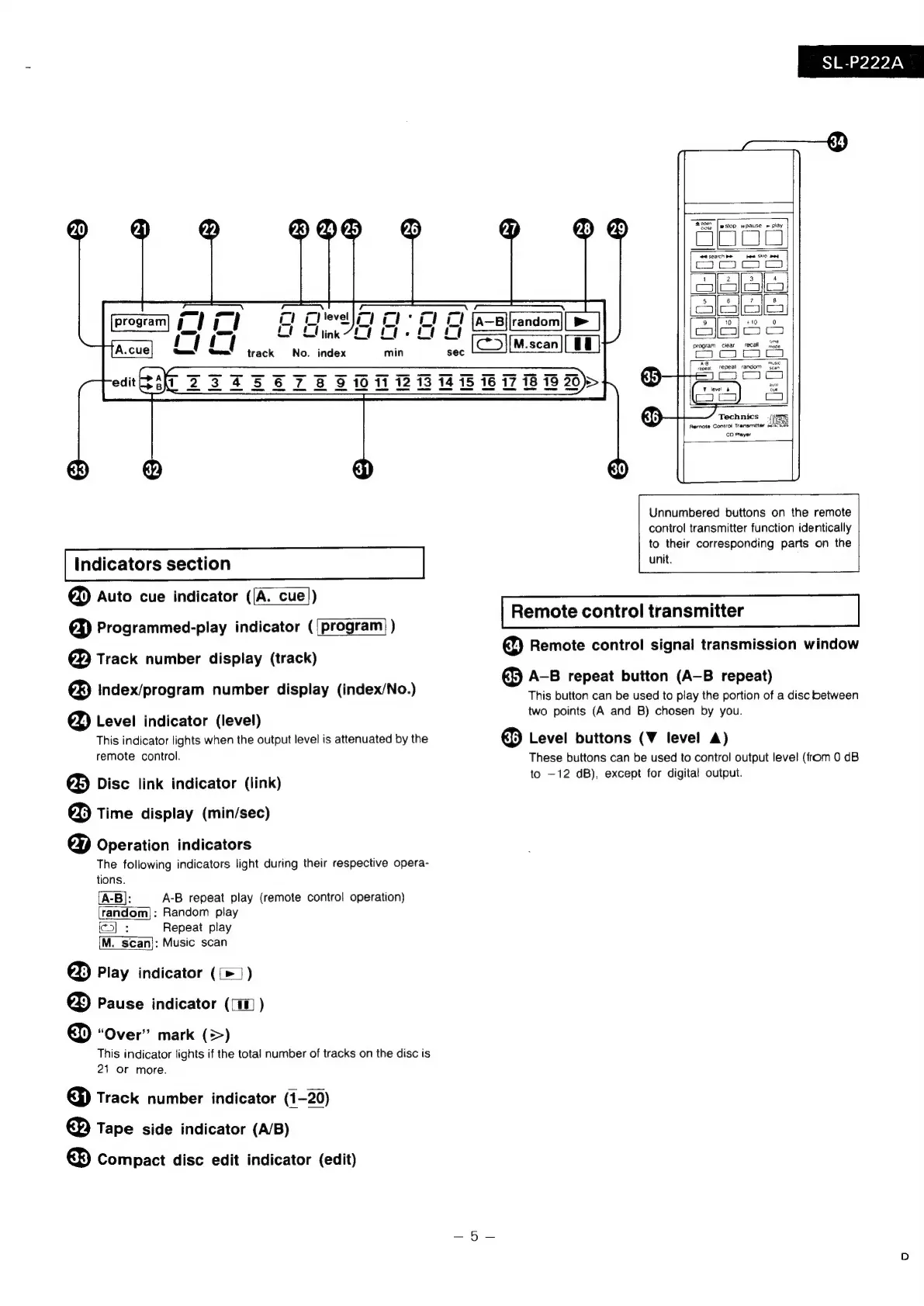
Indicators
section
@)
Auto
cue
indicator
([A.
cue])
€)
Programmed-play
indicator
({program)
)
€D
Track
number
display
(track)
®
Index/program
number
display
(index/No.)
€%)
Level
indicator
(level)
This
indicator
lights
when
the
output
level
is
attenuated
by
the
remote
control.
@
Disc
link
indicator
(link)
&
Time
display
(min/sec)
&D
Operation
indicators
The
following
indicators
light
during
their
respective
opera-
tions.
(A-B]:
A-B
repeat
play
(remote
control
operation)
random]:
Random
play
ic]
:
Repeat
play
M.
scan}:
Music
scan
@)
Play
indicator
(
[>
)
€&
Pause
indicator
(1
)
€&}
“Over”
mark
(=>)
This
indicator
lights
if
the
total
number
of
tracks
on
the
disc
is
21
or
more.
€)
Track
number
indicator
(1-20)
€)
Tape
side
indicator
(A/B)
€&
Compact
disc
edit
indicator
(edit)
SL-P222A
cee,
|
wstop
wpause
»
play
program
clear
recall
noge
repeat
repeal
random
gc;
v
level
&
Technics
ISB
Remote
Control
Transmitter
miaci
CD
Prayer
Ls
Unnumbered
buttons
on
the
remote
control
transmitter
function
identically
to
their
corresponding
parts
on
the
unit.
Remote
control
transmitter
€2)
Remote
control
signal
transmission
window
€B
A-B
repeat
button
(A-B
repeat)
This
button
can
be
used
to
play
the
portion
of
a
disc
between
two
points
(A
and
B)
chosen
by
you.
&
Level
buttons
(V
level
A)
These
buttons
can
be
used
to
control
output
level
(from
0
dB
to
—12
dB),
except
for
digital
output.

Related product manuals