EasyManua.ls Logo

Technics SL-P222A - Page 6

Technics SL-P222A
47 pages
Print Icon
To Next Page IconTo Next Page
To Previous Page IconTo Previous Page
Loading...
SL-P222A
m
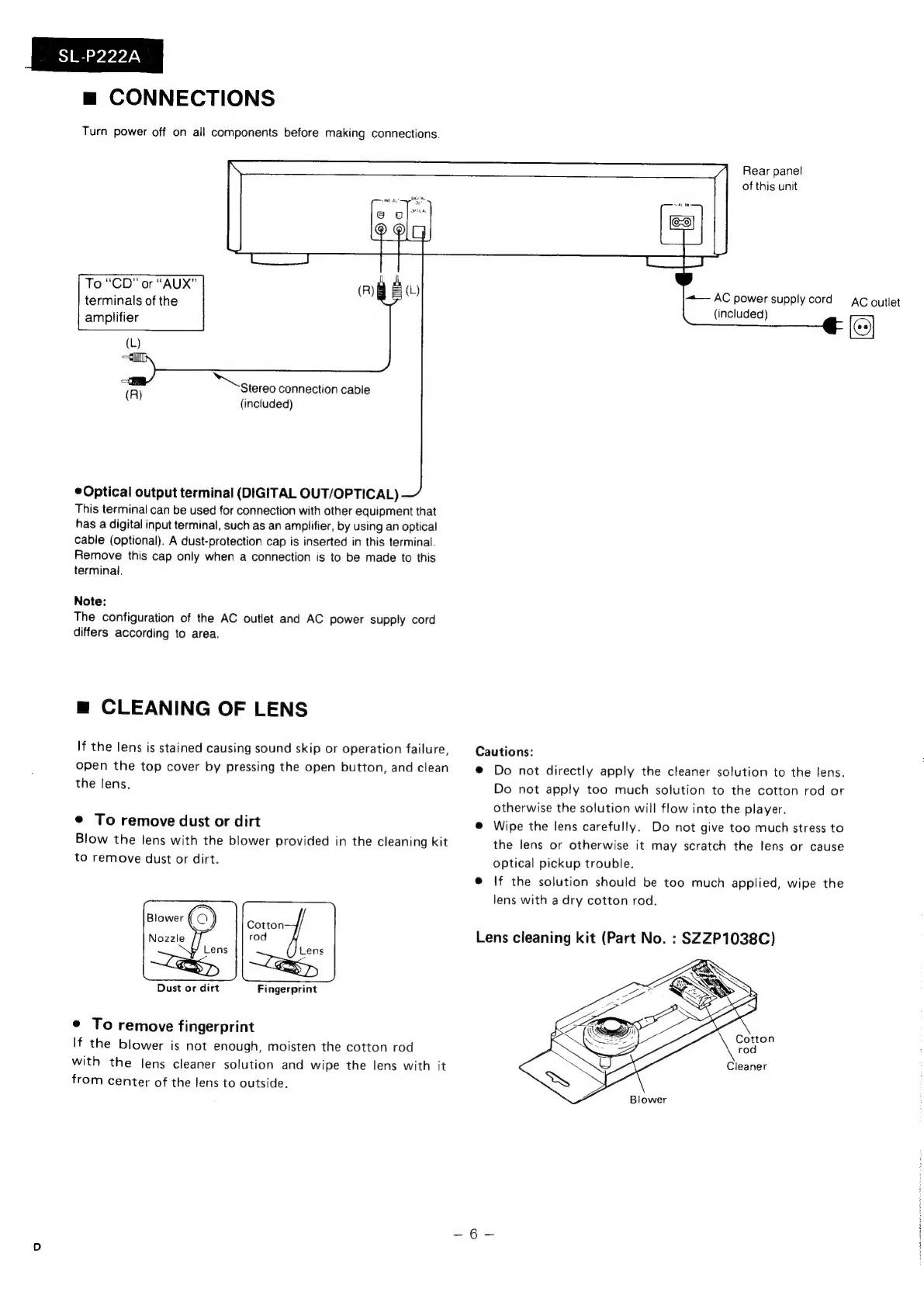
CONNECTIONS
Turn
power
off
on
all
components
before
making
connections.
Rear
panel
of
this
unit
To
“CD”
or
“AUX”
terminals
of
the
amplifier
+—
AC
power
supply
cord
Ac
outlet
(included)
Stereo
connection
cable
(included)
©
Optical
output
terminal
(DIGITAL
OUT/OPTICAL)
This
terminal
can
be
used
for
connection
with
other
equipment
that
has
a
digital
input
terminal,
such
as
an
amplifier,
by
using
an
optical
cable
(optional).
A
dust-protection
cap
is
inserted
in
this
terminal.
Remove
this
cap
only
when
a
connection
is
to
be
made
to
this
terminal.
Note:
The
configuration
of
the
AC
outlet
and
AC
power
supply
cord
differs
according
to
area.
m
CLEANING
OF
LENS
If
the
lens
is
stained
causing
sound
skip
or
operation
failure,
Cautions:
open
the
top
cover
by
pressing
the
open
button,
and
clean
@
Do
not
directly
apply
the
cleaner
solution
to
the
lens.
the
lens.
Do
not
apply
too
much
solution
to
the
cotton
rod
or
otherwise
the
solution
will
flow
into
the
player.
¢
To
remove
dust
or
dirt
@
Wipe
the
lens
carefully.
Do
not
give
too
much
stress
to
Blow
the
lens
with
the
blower
provided
in
the
cleaning
kit
the
lens
or
otherwise
it
may
scratch
the
lens
or
cause
to
remove
dust
or
dirt.
optical
pickup
trouble.
@
If
the
solution
should
be
too
much
applied,
wipe
the
lens
with
a
dry
cotton
rod.
Lens
cleaning
kit
(Part
No.
:
SZZP1038C)
Dust
or
dirt
Fingerprint
e
To
remove
fingerprint
If
the
blower
is
not
enough,
moisten
the
cotton
rod
with
the
lens
cleaner
solution
and
wipe
the
lens
with
it
from
center
of
the
lens
to
outside.

Related product manuals