EasyManua.ls Logo

Technics SL-PG350 - Page 18

Technics SL-PG350
48 pages
Print Icon
To Next Page IconTo Next Page
To Previous Page IconTo Previous Page
Loading...
Pr
°
gmm
Pla
>'
Reproduction
programado
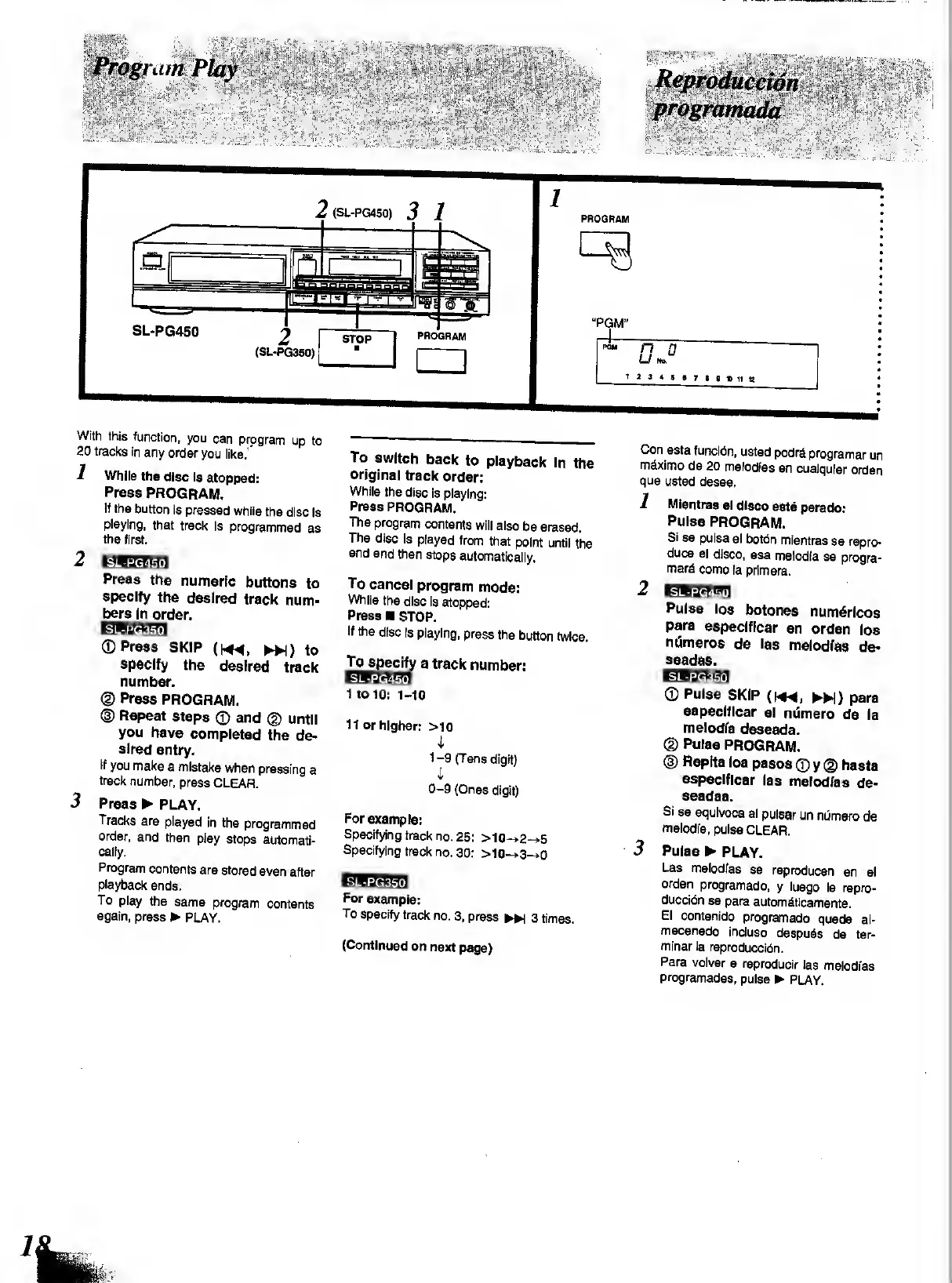
With
this
function,
you
can
program
up
to
20
tracks
in
any
order
you
like.’*
1
While
the
disc
Is
stopped:
Press
PROGRAM.
If
the
button
is
pressed
while
the
disc
is
playing,
that
track
is
programmed
as
the
first.
2
EW
3dlW.
I
Press
the
numeric
buttons
to
specify
the
desired
track
num-
bers
in
ord
er.
©Press
SKIP
(HM,
*)
to
specify
the
desired
track
number.
<D
Press
PROGRAM.
®
Repeat
steps
©
and
©
until
you
have
completed
the
de¬
sired
entry.
If
you
make
a
mistake
when
pressing
a
track
number,
press
CLEAR.
3
Press
PLAY.
Tracks
are
played
in
the
programmed
order,
and
then
play
stops
automati¬
cally.
Program
contents
are
stored
even
after
playback
ends.
To
play
the
same
program
contents
again,
press
PLAY.
To
switch
back
to
playback
in
the
original
track
order:
While
the
disc
is
playing:
Press
PROGRAM.
The
program
contents
will
also
be
erased.
The
disc
is
played
from
that
point
until
the
end
and
then
stops
automatically.
To
cancel
program
mode:
While
the
disc
is
stopped:
Press
STOP.
If
the
disc
is
playing,
press
the
button
twice.
To
specify
a
track
number:
Egikl-ffl
I
to
10:
i-io
II
or
higher:
>10
I
1-9
(Tens
digit)
i
0-9
(Ones
digit)
For
example:
Specifying
track
no.
25:
>10-»2-»5
Specifying
track
no.
30:
>10->3-»0
For
example:
To
specify
track
no.
3,
press
^
3
times.
(Continued
on
next
page)
Con
esta
funcidn,
usted
podr&
programar
un
m^ximo
de
20
melodias
en
cualquier
orden
que
usted
desee.
1
Mientras
el
disco
esta
parado:
Pulse
PROGRAM.
Si
se
pulsa
el
botdn
mientras
se
repro¬
duce
el
disco,
esa
melodfa
se
progra-
mara
como
la
primera.
2
EBiMHil
Pulse
ios
botones
num6ricos
para
especlficar
en
orden
ios
ntimeros
de
las
melodfas
de-
seadas.
EBBaaa
©
Pulse
SKIP
(h*
4,
H)
para
especlficar
el
numero
de
la
melodfa
deseada.
©
Pulse
PROGRAM.
©
Replta
Ios
pasos
©
y
©
hasta
especlficar
las
melodfas
de-
seadas.
Si
se
equivoca
al
pulsar
un
nOmero
de
melodfa,
pulse
CLEAR.
3
Pulse
PLAY.
Las
melodfas
se
reproducen
en
el
orden
programado,
y
luego
la
repro-
duccidn
se
para
autombticamente.
El
contenido
programado
queda
al-
macenado
incluso
despubs
de
ter-
minarla
reproduced.
Para
volver
a
reproducir
las
melodfas
programadas,
pulse
PLAY.

Related product manuals