EasyManua.ls Logo

Technics SL-PJ27 - Page 10

Technics SL-PJ27
36 pages
Print Icon
To Next Page IconTo Next Page
To Previous Page IconTo Previous Page
Loading...
SL-PJ27
Ref.
No.
12
Removal
of
the
optical
pickup
13
Removal
of
the
power
supply
P.C.B.
Procedure
1-2-4
313
Procedure
10-12
Refer
to
the
handling
precautions
for
optical
pickup
and
instructions
for
traverse
oil
(See
page
6).
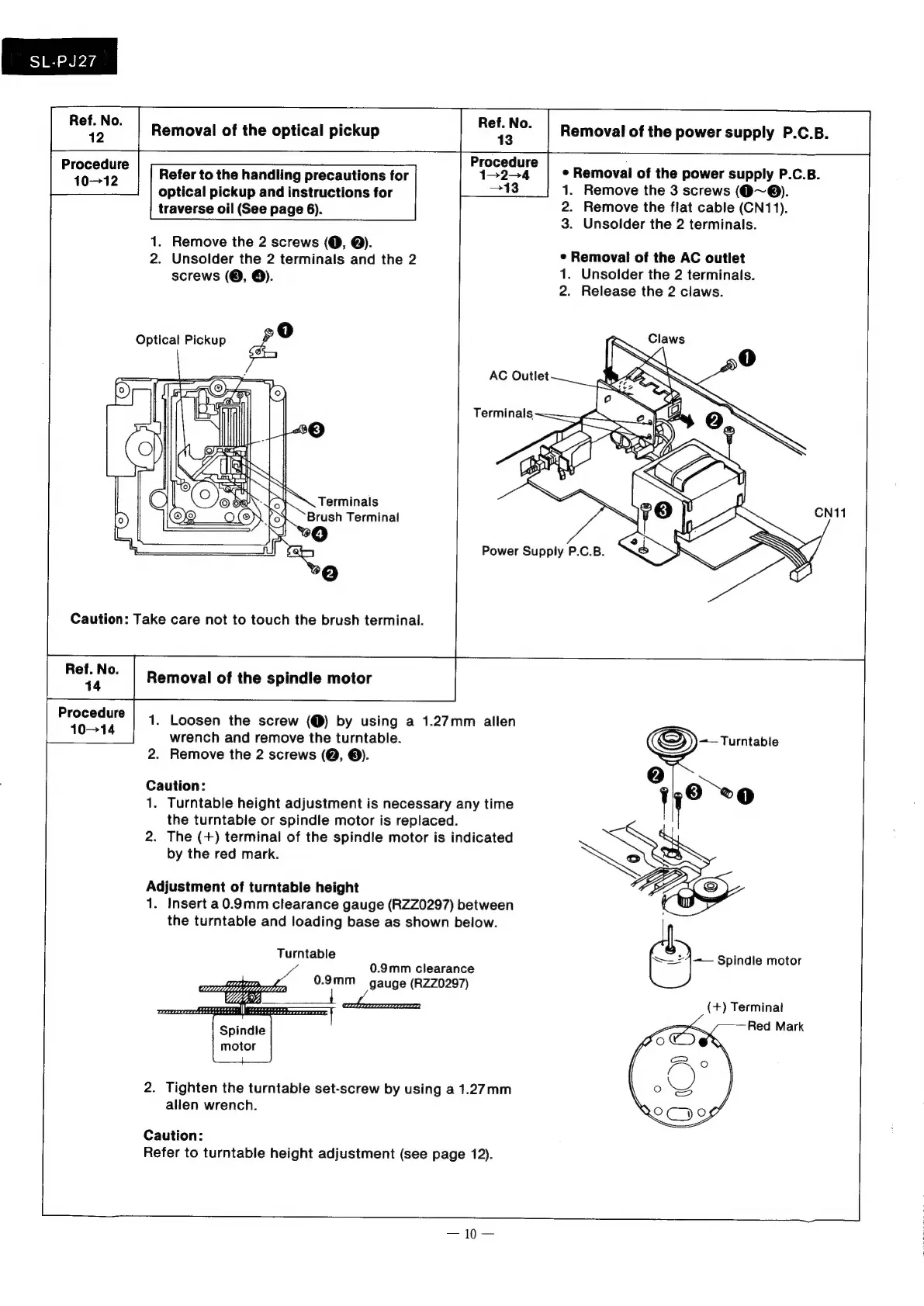
1.
Remove
the
2
screws
(@,
@).
2.
Unsolder
the
2
terminals
and
the
2
screws
(©,
6).
Optical
Pickup
AC
Outlet
Terminals
Caution:
Take
care
not
to
touch
the
brush
terminal.
Removal
of
the
spindle
motor
eee
1.
Loosen
the
screw
(@)
by
using
a
1.27mm
allen
wrench
and
remove
the
turntable.
2.
Remove
the
2
screws
(Q, ©).
Caution:
1.
Turntable
height
adjustment
is
necessary
any
time
the
turntable
or
spindle
motor
is
replaced.
2.
The
(+)
terminal
of
the
spindle
motor
is
indicated
by
the
red
mark.
Adjustment
of
turntable
height
1.
Insert
a0.9mm
clearance
gauge
(RZZ0297)
between
the
turntable
and
loading
base
as
shown
below.
Turntable
0.9mm
clearance
0.9mm
gauge
(RZZ0297)
Spindle
motor
a:
:
SY
2.
Tighten
the
turntable
set-screw
by
using
a
1.27mm
allen
wrench.
Caution:
Refer
to
turntable
height
adjustment
(see
page
12).
2.
Remove
the
flat
cable
(CN11).
3.
Unsolder
the
2
terminals.
¢
Removal
of
the
AC
outlet
1.
Unsolder
the
2
terminals.
2.
Release
the
2
claws.
¢
Removal
of
the
power
supply
P.C.B.
1.
Remove
the
3
screws
(@~®).

Related product manuals