EasyManua.ls Logo

Technics SL-PJ27 - Page 13

Technics SL-PJ27
36 pages
Print Icon
To Next Page IconTo Next Page
To Previous Page IconTo Previous Page
Loading...
(3)
.
Connect
the
oscilloscope’s
CH.
1
probe
across
@
Bien!
SL-PJ27
BEST
EYE
(PD
BALANCE)
ADJUSTMENT
(+)
and
BuNBwers
(—)
on
the
Servo
P.C.B.
Oscilloscope
setting:
VOLT..........
100
mV
Input
coupling...
AC
.
Switch
the
player
power
ON,
and
play
the
1kHz
(track
1)
on
the
test
disc
(SZZP1054C).
.
Adjust
VR101
until
the
vertical
fluctuation
of
RF
signal
is
minimized
and
the
eye
pattern
is
most
stretched.
f
T
ai
B\\NSSES
ROO
RAIA
AA
A
TAA
aang
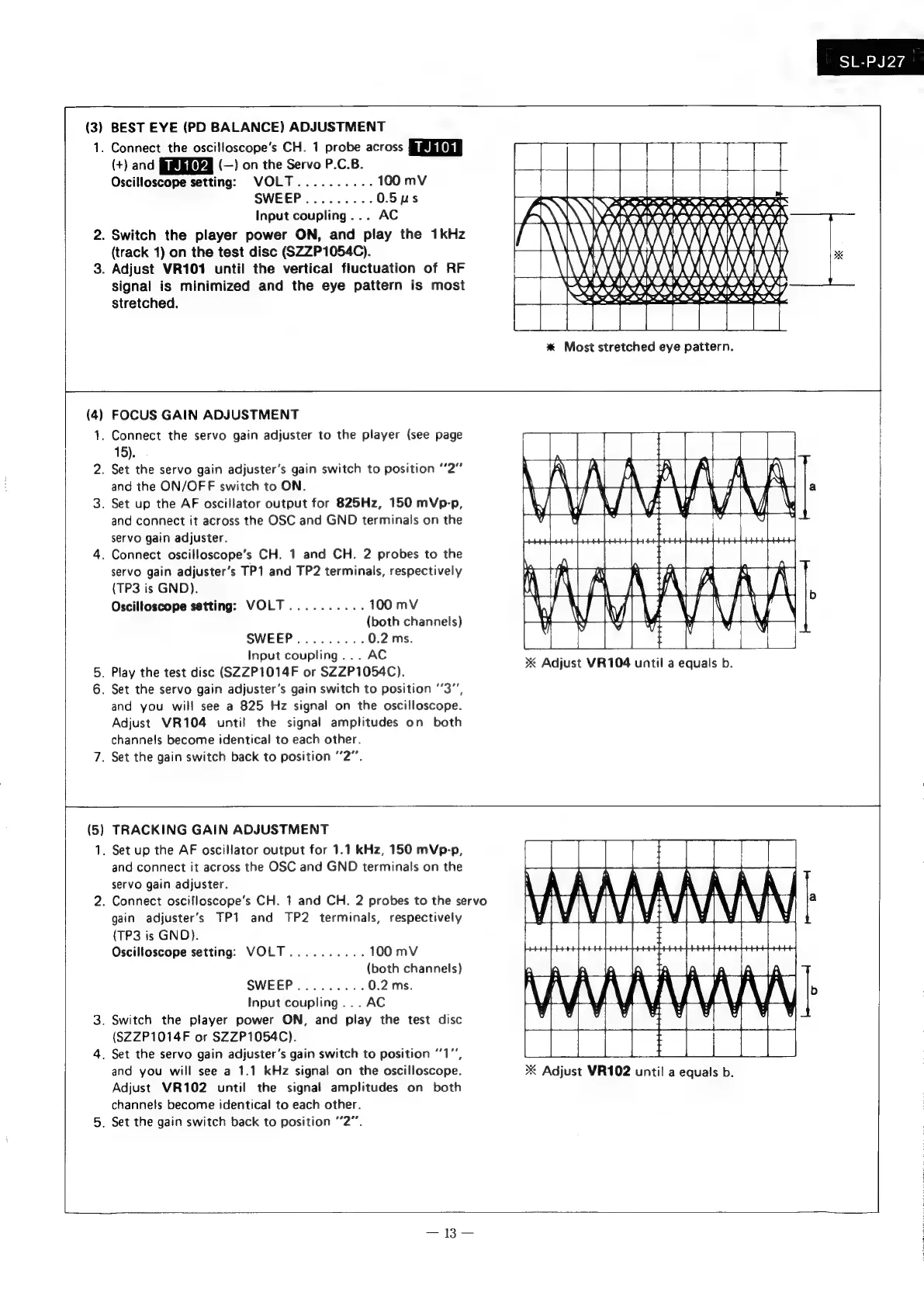
*
Most
stretched
eye
pattern.
(4)
on
FOCUS
GAIN
ADJUSTMENT
.
Connect
the
servo
gain
adjuster
to
the
player
(see
page
15).
.
Set
the
servo
gain
adjuster’s
gain
switch
to
position
“2”
and
the
ON/OFF
switch
to
ON.
.
Set
up
the
AF
oscillator
output
for
825Hz,
150
mVp-p,
and
connect
it
across
the
OSC
and
GND
terminals
on
the
servo
gain
adjuster.
.
Connect
oscilloscope’s
CH.
1
and
CH.
2
probes
to
the
servo
gain
adjuster’s
TP1
and
TP2
terminals,
respectively
(TP3
is
GND).
Oscilloscope
setting:
VOLT..........
100
mV
(both
channels)
SWEEP.........
0.2
ms.
Input
coupling...
AC
.
Play
the
test
disc
(SZZP1014F
or
SZZP1054C).
.
Set
the
servo
gain
adjuster’s
gain
switch
to
position
‘’3”,
and
you
will
see
a
825
Hz
signal
on
the
oscilloscope.
Adjust
VR104
until
the
signal
amplitudes
on
both
channels
become
identical
to
each
other.
.
Set
the
gain
switch
back
to
position
2”.
4
W
x
Adjust
VR104
until
a
equals
b.
(5
TRACKING
GAIN
ADJUSTMENT
.
Set
up
the
AF
oscillator
output
for
1.1
kHz,
150
mVp-p,
and
connect
it
across
the
OSC
and
GND
terminals
on
the
servo
gain
adjuster.
.
Connect
oscifloscope’s
CH.
1
and
CH.
2
probes
to
the
servo
gain
adjuster’s
TP1
and
TP2
terminals,
respectively
(TP3
is
GND).
Oscilloscope
setting:
VOLT
..........
100
mV
(both
channels)
SWEEP.........
0.2
ms
Input
coupling...
AC
.
Switch
the
player
power
ON,
and
play
the
test
disc
(SZZP1014F
or
SZZP1054C).
.
Set
the
servo
gain
adjuster’s
gain
switch
to
position
‘1’,
and
you
will
see
a
1.1
kHz
signal
on
the
oscilloscope.
Adjust
VR102
until
the
signal
amplitudes
on
both
channels
become
identical
to
each
other.
.
Set
the
gain
switch
back
to
position
“2°.
XK
Adjust
VR102
until
a
equals
b.

Related product manuals