EasyManua.ls Logo

Technics SL-PJ27 - Page 15

Technics SL-PJ27
36 pages
Print Icon
To Next Page IconTo Next Page
To Previous Page IconTo Previous Page
Loading...
SL-PJ27
(9)
CHECK
OF
PLAY
OPERATION
AFTER
ADJUSTMENT
*
Checking
Skip
Search
*
Checking
Using
Defect
Disc
1.
Play
an
ordinary
musical
program
disc.
1.
Play
the
0.7
mm
black
dot
and
the
0.7
mm
wedge
on
the
2.
Press
the
skip
button
to
check
for
normal
skip
search
defect
test
disc
(SZZP1054C)
and
verify
that
no
sound
operation
(in
both
the
forward
and
reverse
directions).
skip
or
noise
occurs.
*
Checking
Manual
Search
2.
Play
the
middle
tracks
of
the
uneven
test
disc
and
verify
1.
Play
an
ordinary
musical
program
disc.
that
no
sound
skip
or
noise
occurs.
2.
Press
the
manual
search
button
to
check
for
smooth
manual
search
operations
at
either
low
or
high
speed
(in
both
the
forward
and
reverse
directions).
¢
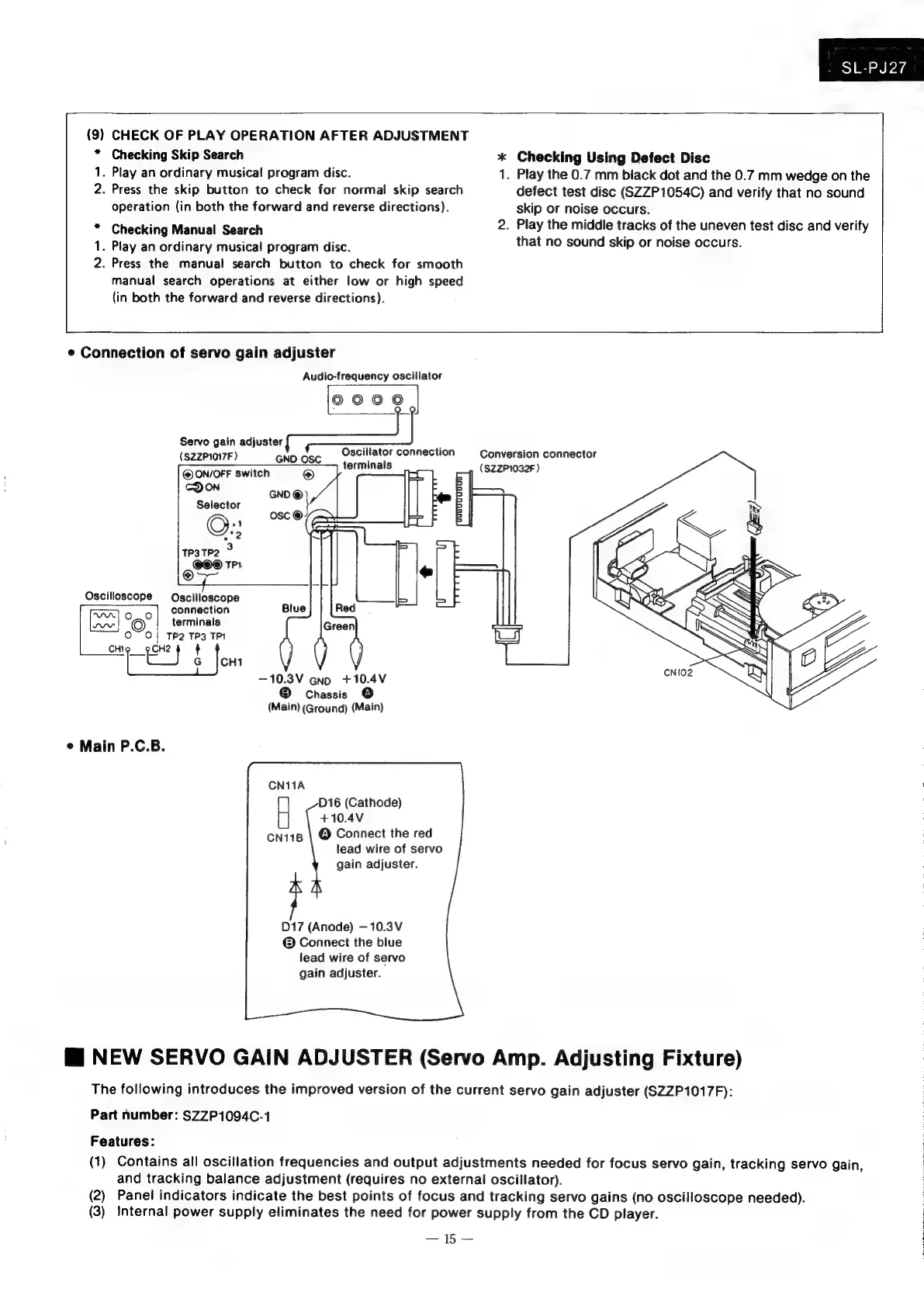
Connection
of
servo
gain
adjuster
Audio-frequency
oscillator
©000
Servo
gain
adjuster
(SZZP1017F
)
GNO
OSC
@
ON/OFF
switch
@
Oscillator
connection
Conversion
connector
terminals
(SZZP1032F
)
COON
GNO
©
Selector
}
)
F
osc
©
22
TP3TP2
3
on
TPA
Oscilloscope
Oscilloscope
connection
Vara
roo
terminals
O~
0}
Tp2 TP3
TPI
ee
4
es
G
|CH1
—10.3V
Ggno
+10.4V
®
Chassis
©
(Main)
(Ground)
(Main)
¢
Main
P.C.B.
CN11A
D16
(Cathode)
+10.4V
cn118
\
@
Connect
the
red
lead
wire
of
servo
gain
adjuster.
D17
(Anode)
—10.3V
©
Connect
the
blue
lead
wire
of
servo
gain
adjuster.
Wi
NEW
SERVO
GAIN
ADJUSTER
(Servo
Amp.
Adjusting
Fixture)
The
following
introduces
the
improved
version
of
the
current
servo
gain
adjuster
(SZZP1017F):
Part
number:
SZZP1094C-1
Features:
(1)
Contains
all
oscillation
frequencies
and
output
adjustments
needed
for
focus
servo
gain,
tracking
servo
gain,
and
tracking
balance
adjustment
(requires
no
external
oscillator).
(2)
Panel
indicators
indicate
the
best
points
of
focus
and
tracking
servo
gains
(no
oscilloscope
needed).
(3)
Internal
power
supply
eliminates
the
need
for
power
supply
from
the
CD
player.

Related product manuals