EasyManua.ls Logo

Technics SL-PJ33 - Page 15

Technics SL-PJ33
36 pages
Print Icon
To Next Page IconTo Next Page
To Previous Page IconTo Previous Page
Loading...
1.
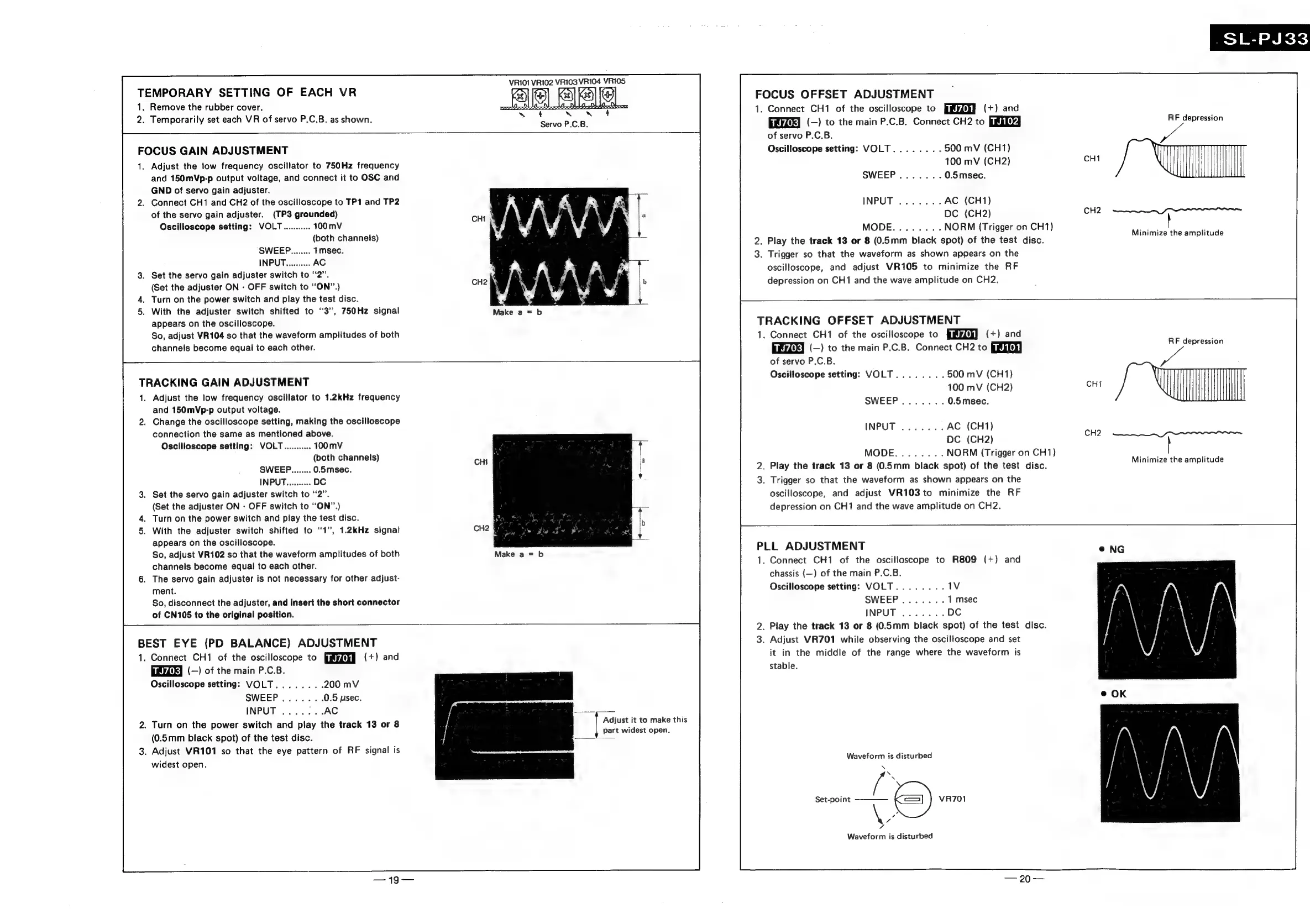
TRACKING
GAIN
ADJUSTMENT
1.
2.
TEMPORARY
SETTING
OF
EACH
VR
1,
2.
Temporarily
set
each
VR
of
servo
P.C.B.
as
shown.
FOCUS
GAIN
ADJUSTMENT
VRIO1
VR102 VR103
VR104
VRI05
Se]
Ses
Aaa}
LOPLI
P
IE
ODDIE
DEEP
4
~
w~
4
Servo
P.C.B.
Remove
the
rubber
cover.
Adjust
the
low
frequency
oscillator
to
750Hz
frequency
and
150mVp-p
output
voltage,
and
connect
it
to
OSC
and
GND
of
servo
gain
adjuster.
Connect
CH1
and
CH2
of
the
oscilloscope
to
TP1 and
TP2
of
the
servo
gain
adjuster.
(TP3
grounded)
Oscilloscope
setting:
VOLT...........
100
mV
(both
channels)
SWEEP........
1msec.
INPUT..........
AC
Set
the
servo
gain
adjuster
switch
to
“2”.
(Set
the
adjuster
ON
-
OFF
switch
to
“ON”.)
Turn
on
the
power
switch
and
play
the
test
disc.
With
the
adjuster
switch
shifted
to
3”,
750Hz
signal
appears
on
the
oscilloscope.
So,
adjust
VR104
so
that
the
waveform
amplitudes
of
both
channels
become
equal
to
each
other.
CH2
hy
Adjust
the
low
frequency
oscillator
to
1.2kHz
frequency
and
150mVp-p
output
voltage.
Change
the
oscilloscope
setting,
making
the
oscilloscope
connection
the
same
as
mentioned
above.
Oscilloscope
setting:
VOLT...........
100
mV
(both
channels)
CHI
SWEEP........
0.5msec.
INPUT..........
DC
Set
the
servo
gain
adjuster
switch
to
“2”.
(Set
the
adjuster
ON
-
OFF
switch
to
“ON”.)
Turn
on
the
power
switch
and
play
the
test
disc.
wa,
With
the
adjuster
switch
shifted
to
“1”,
1.2kHz
signal
CH2
§
:
appears
on
the
oscilloscope.
So,
adjust
VR102
so
that
the
waveform
amplitudes
of
both
channels
become
equal
to
each
other.
The
servo
gain
adjuster
is
not
necessary
for
other
adjust-
ment.
So,
disconnect
the
adjuster,
and
insert
the
short
connector
of
CN105
to
the
original
position.
BEST
EYE
(PD
BALANCE)
ADJUSTMENT
1.
2.
Turn
on
the
power
switch
and
play
the
track
13
or
8
3.
Connect
CH1
of
the
oscilloscope
to
Bayi
(+)
and
smydiky
(—)
of
the
main
P.C.B.
Oscilloscope
setting:
VOLT........
200
mV
SWEEP.......
0.5
psec.
INPUT
.......AC
Adjust
it
to
make
this
id
.
(0.5mm
black
spot)
of
the
test
disc.
a
oer
Adjust
VR101
so
that
the
eye
pattern
of
RF
signal
is
widest
open.
FOCUS
OFFSET
ADJUSTMENT
1.
Connect
CH1
of
the
oscilloscope
to
(+)
and
(—)
to
the
main
P.C.B.
Connect
CH2
to
of
servo
P.C.B.
Oscilloscope
setting:
VOLT
500
mV
(CH1)
100
mV
(CH2)
0.5msec.
AC
(CH1)
DC
(CH2)
CH2
NORM
(Trigger
on
CH1)
.
Play
the
track
13
or
8
(0.5mm
black
spot)
of
the
test
disc.
.
Trigger
so
that
the
waveform
as
shown
appears
on
the
oscilloscope,
and
adjust
VR105
to
minimize
the
RF
depression
on
CH1
and
the
wave
amplitude
on
CH2.
SL-PJ33
RF
depression
—_—_—$$
rrr
Minimize
the
amplitude
TRACKING
OFFSET
ADJUSTMENT
1.
Connect
CH1
of
the
oscilloscope
to
(+)
and
(—)
to
the
main
P.C.B.
Connect
CH2
to
of
servo
P.C.B.
Oscilloscope
setting:
VOLT
500
mV
(CH1)
100
mV
(CH2)
0.5msec.
AC
(CH1)
DC
(CH2)
NORM
(Trigger
on
CH1)
.
Play
the
track
13
or
8
(0.5mm
black
spot)
of
the
test
disc.
.
Trigger
so
that
the
waveform
as
shown
appears
on
the
oscilloscope,
and
adjust
VR103to
minimize
the
RF
depression
on
CH1
and
the
wave
amplitude
on
CH2.
RF
depression
———
errr
Minimize
the
amplitude
PLL
ADJUSTMENT
1.
Connect
CH1
of
the
oscilloscope
to
R809
(+)
and
chassis
(—)
of
the
main
P.C.B.
Oscilloscope
setting:
VOLT
.
Play
the
track
13
or
8
(0.5mm
black
spot)
of
the
test
disc.
.
Adjust
VR701
while
observing
the
oscilloscope
and
set
it
in
the
middle
of
the
range
where
the
waveform
is
stable.
Waveform
is
disturbed
N
®.
b
ae:
c=)
VR701
MZ
7
Waveform
is
disturbed
Set-point

Related product manuals