EasyManua.ls Logo

Technics SL-PJ33 - Page 16

Technics SL-PJ33
36 pages
Print Icon
To Next Page IconTo Next Page
To Previous Page IconTo Previous Page
Loading...
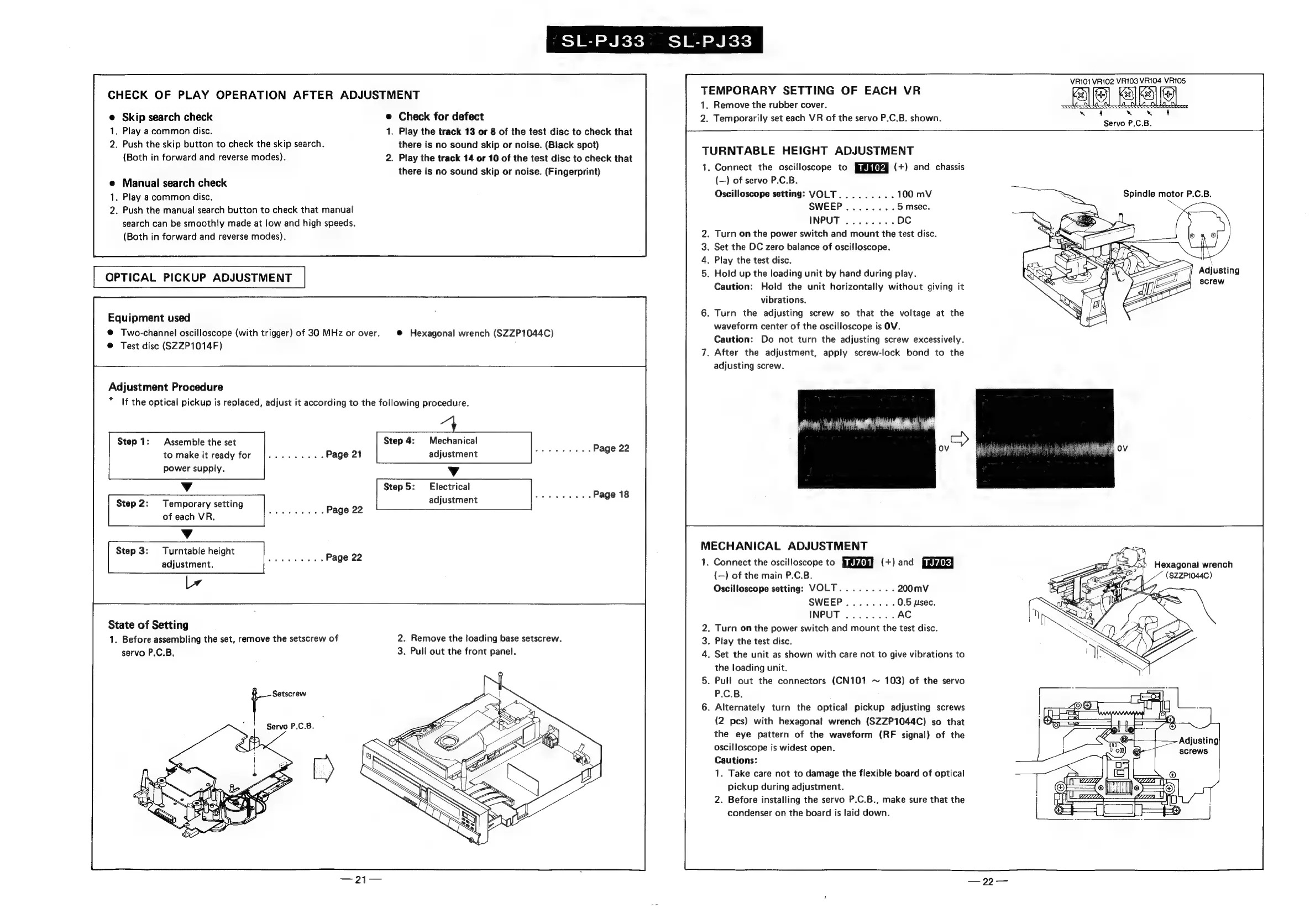
SL-PJ33
SL-PJ33
CHECK
OF
PLAY
OPERATION
AFTER
ADJUSTMENT
Skip
search
check
.
Play
a
common
disc.
.
Push
the
skip
button
to
check
the
skip
search.
(Both
in
forward
and
reverse
modes).
Manual
search
check
.
Play
a
common
disc.
.
Push
the
manual
search
button
to
check
that
manual
search
can
be
smoothly
made
at
low
and
high
speeds.
(Both
in
forward
and
reverse
modes).
OPTICAL
PICKUP
ADJUSTMENT
Equipment
used
@
Two-channel
oscilloscope
(with
trigger)
of
30
MHz
or
over.
@
Test
disc
(SZZP1014F)
Adjustment
Procedure
*
Step
1:
Assemble
the
set
to
make
it
ready
for
power
supply.
Vv
Step
2:
Temporary
setting
of
each
VR.
Vv
Step
3:
Turntable
height
adjustment.
lv
Check
for
defect
.
Play
the
track
13
or
8
of
the
test
disc
to
check
that
there
is
no
sound
skip
or
noise.
(Black
spot)
.
Play
the
track
14
or
10
of
the
test
disc
to
check
that
there
is
no
sound
skip
or
noise.
(Fingerprint)
@
Hexagonal
wrench
(SZZP1044C)
If
the
optical
pickup
is
replaced,
adjust
it
according
to
the
following
procedure.
Step
4:
Mechanical
adjustment
Vv
Step
5:
Electrical
adjustment
State
of
Setting
1.
Before
assembling
the
set,
remove
the
setscrew
of
servo
P.C.B,
Setscrew
2.
Remove
the
loading
base
setscrew.
3.
Pull
out
the
front
panel.
TEMPORARY
SETTING
OF
EACH
VR
1.
Remove
the
rubber
cover.
2.
Temporarily
set
each
VR
of
the
servo
P.C.B.
shown.
TURNTABLE
HEIGHT
ADJUSTMENT
1.
Connect
the
oscilloscope
to
(+)
and
chassis
(—)
of
servo
P.C.B.
Oscilloscope
setting:
VOLT
.
Turn
on
the
power
switch
and
mount
the
test
disc.
.
Set
the
DC
zero
balance
of
oscilloscope.
.
Play
the
test
disc.
.
Hold
up
the
loading
unit
by
hand
during
play.
Caution:
Hold
the
unit
horizontally
without
giving
it
vibrations.
.
Turn
the
adjusting
screw
so
that
the
voltage
at
the
waveform
center
of
the
oscilloscope
is
OV.
Caution:
Do
not
turn
the
adjusting
screw
excessively.
.
After
the
adjustment,
apply
screw-lock
bond
to
the
adjusting
screw.
MECHANICAL ADJUSTMENT
1.
Connect
the
oscilloscope
to
MRR
(+)
and
[UuNysiK}
(—)
of
the
main
P.C.B.
Oscilloscope
setting:
VOLT
.
Turn
on
the
power
switch
and
mount
the
test
disc.
.
Play
the
test
disc.
.
Set
the
unit
as
shown
with
care
not
to
give
vibrations
to
the
loading
unit.
.
Pull
out
the
connectors
(CN101
~
103)
of
the
servo
P.C.B.
.
Alternately
turn
the
optical
pickup
adjusting
screws
(2
pcs)
with
hexagonal
wrench
(SZZP1044C)
so
that
the
eye
pattern
of
the
waveform
(RF
signal)
of
the
oscilloscope
is
widest
open.
Cautions:
1.
Take
care
not
to
damage
the
flexible
board
of
optical
pickup
during
adjustment.
2.
Before
installing
the
servo
P.C.B.,
make
sure
that
the
condenser
on
the
board
is
laid
down.
Servo
P.C.B.
Spindle
motor
P.C.B.
Adjusting

Related product manuals