EasyManua.ls Logo

Technics SL-PJ33 - Page 7

Technics SL-PJ33
36 pages
Print Icon
To Next Page IconTo Next Page
To Previous Page IconTo Previous Page
Loading...
SL-PJ33
SL-PJ33
M@
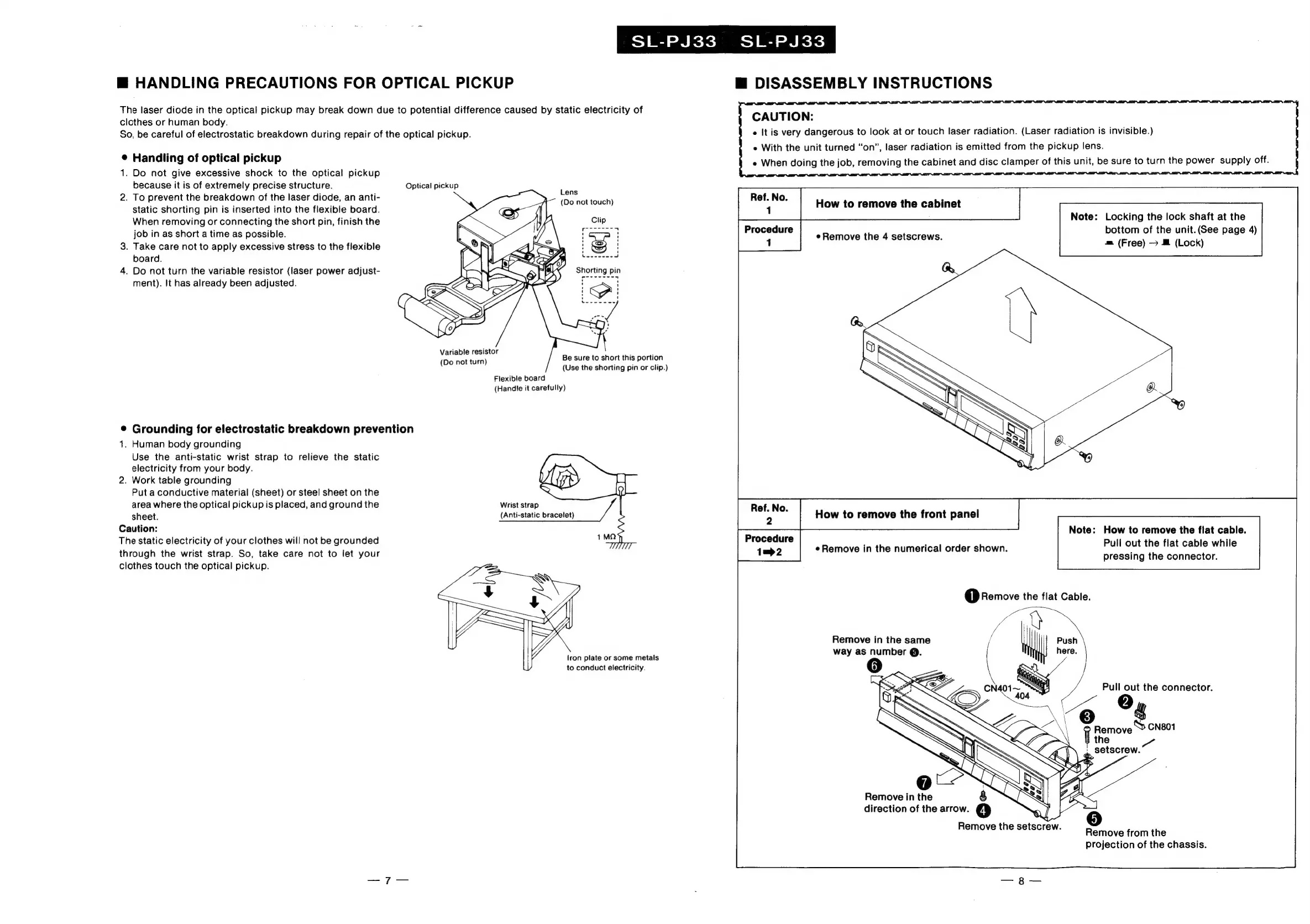
HANDLING
PRECAUTIONS
FOR
OPTICAL
PICKUP
The
laser
diode
in
the
optical
pickup
may
break
down
due
to
potential
difference
caused
by
static
electricity
of
clothes
or
human
body.
So,
be
careful
of
electrostatic
breakdown
during
repair
of
the
optical
pickup.
®
Handling
of
optical
pickup
1.
Do
not
give
excessive
shock
to
the
optical
pickup
because
it
is
of
extremely
precise
structure.
Optical
pickup
2.
To
prevent
the
breakdown
of
the
laser
diode,
an
anti-
static
shorting
pin
is
inserted
into
the
flexible
board.
When
removing
or
connecting
the
short
pin,
finish
the
job
in
as
short
a
time
as
possible.
3.
Take
care
not
to
apply
excessive
stress
to
the
flexible
board.
4.
Do
not
turn
the
variable
resistor
(laser
power
adjust-
ment).
It
has
already
been
adjusted.
Lens
(Do
not
touch)
Variable
resistor
(Do
not
turn)
Be
sure
to
short
this
portion
(Use
the
shorting
pin
or
clip.)
Flexible
board
(Handie
it
carefully)
¢
Grounding
for
electrostatic
breakdown
prevention
1.
Human
body
grounding
Use
the
anti-static
wrist
strap
to
relieve
the
static
electricity
from
your
body.
2.
Work
table
grounding
Put
a
conductive
material
(sheet)
or
steel
sheet
on
the
area
where
the
optical
pickup
is
placed,
and
ground
the
Wrist
strap
sheet.
(Anti-static
bracelet)
Caution:
The
static
electricity
of
your
clothes
will
not
be
grounded
through
the
wrist
strap.
So,
take
care
not
to
let
your
clothes
touch
the
optical
pickup.
iron
plate
or
some
metals
to
conduct
electricity.
@
DISASSEMBLY
INSTRUCTIONS
CAUTION:
e
It
is
very
dangerous
to
look
at
or
touch
laser
radiation.
(Laser
radiation
is
invisible.)
e
With
the
unit
turned
“on”,
laser
radiation
is
emitted
from
the
pickup
lens.
e
When
doing
the
job,
removing
the
cabinet
and
disc
clamper
of
this
unit,
be
sure
to
turn
the
power
supply
off.
How
to
remove
the
cabinet
Procedure
bottom
of
the
unit.
(See
page
4)
Note:
Locking
the
lock
shaft
at
the
1
eRemove
the
4
setscrews.
m
(Free)
@
(Lock)
Note:
How
to
remove
the
flat
cable.
Procedure
Pull
out
the
flat
cable
while
1mp>2
pressing
the
connector.
Remove
in
the
same
way
as
number
@.
Remove
in
the
direction
of
the
arrow.
4
Remove
the
setscrew.
Remove
from
the
projection
of
the
chassis.

Related product manuals