EasyManua.ls Logo

Technics SL-PJ33 - Page 8

Technics SL-PJ33
36 pages
Print Icon
To Next Page IconTo Next Page
To Previous Page IconTo Previous Page
Loading...
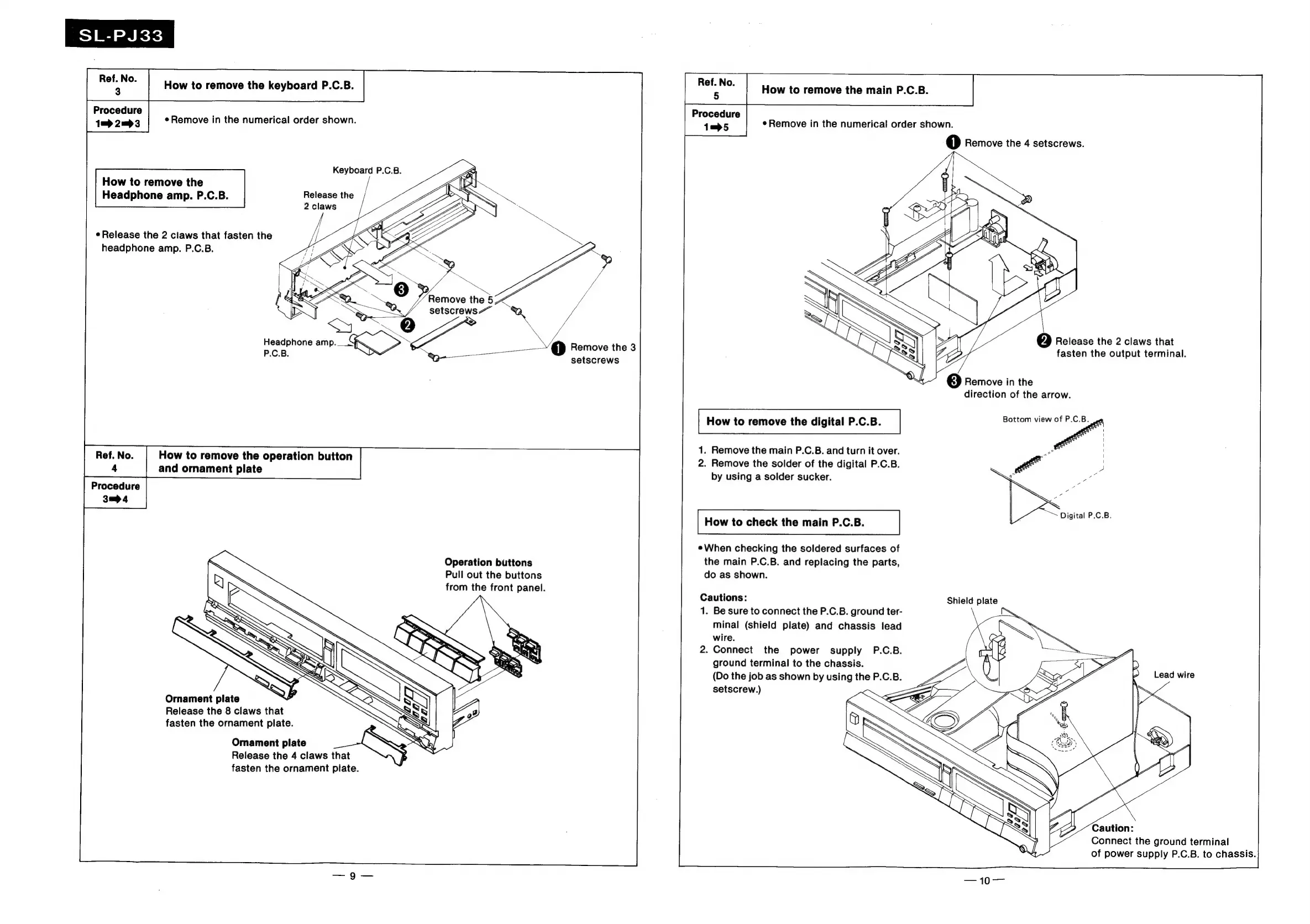
SL-PJ33
a
How
to
remove
the
keyboard
P.C.B.
Procedure
1m
2m>3
Remove
in
the
numerical
order
shown.
How
to
remove
the
acti
How
to
remove
the
main
P.C.B.
Procedure
1—5
¢Remove
in
the
numerical
order
shown.
1)
Remove
the
4
setscrews.
Keyboard
P.C.B.
CHITA
}
Release
the
2
claws
Headphone
amp.
P.C.B.
NTN
\
WV
ey)
KY
e
Release
the
2
claws
that
fasten
the
headphone
amp.
P.C.B.
Ll
are
bs
id
;
YO
Release
the
2
claws
that
EZ
fasten
the
output
terminal.
\
Y
‘<
enim
}=-/\
\
=
\
)
Remove
the
3
setscrews
ee
Headphone
mo.
ESS
P.C.B.
of
3]
Remove
in
the
direction
of
the
arrow.
How
to
remove
the
digital
P.C.B.
Bottom
ee
1.
Remove
the
main
P.C.B.
and
turn
it
over.
2.
Remove
the
solder
of
the
digital
P.C.B.
NE
St
Se
Ref.
No.
How
to
remove
the
operation
button
4
and
ornament
plate
by
using
a
solder
sucker.
wee
:
3p
4
Digital
P.C.B.
How
to
check
the
main
P.C.B.
eWhen
checking
the
soldered
surfaces
of
Operation
buttons
Pull
out
the
buttons
from
the
front
panel.
Ornament
plate
Release
the
8
claws
that
fasten
the
ornament
plate.
Omament
plate
Release
the
4
claws
that
fasten
the
ornament
plate.
the
main
P.C.B.
and
replacing
the
parts,
do
as
shown.
Cautions:
1.
Be
sure
to
connect
the
P.C.B.
ground
ter-
minal
(shield
plate)
and
chassis
lead
wire.
2.
Connect
the
power
supply
P.C.B.
ground
terminal
to
the
chassis.
(Do
the
job
as
shown
by
using
the
P.C.B.
setscrew.)
Shield
plate
Connect
the
ground
terminal
of
power
supply
P.C.B.
to
chassis.

Related product manuals