EasyManua.ls Logo

Technics SU-X911 - Page 7

Technics SU-X911
23 pages
Print Icon
To Next Page IconTo Next Page
To Previous Page IconTo Previous Page
Loading...
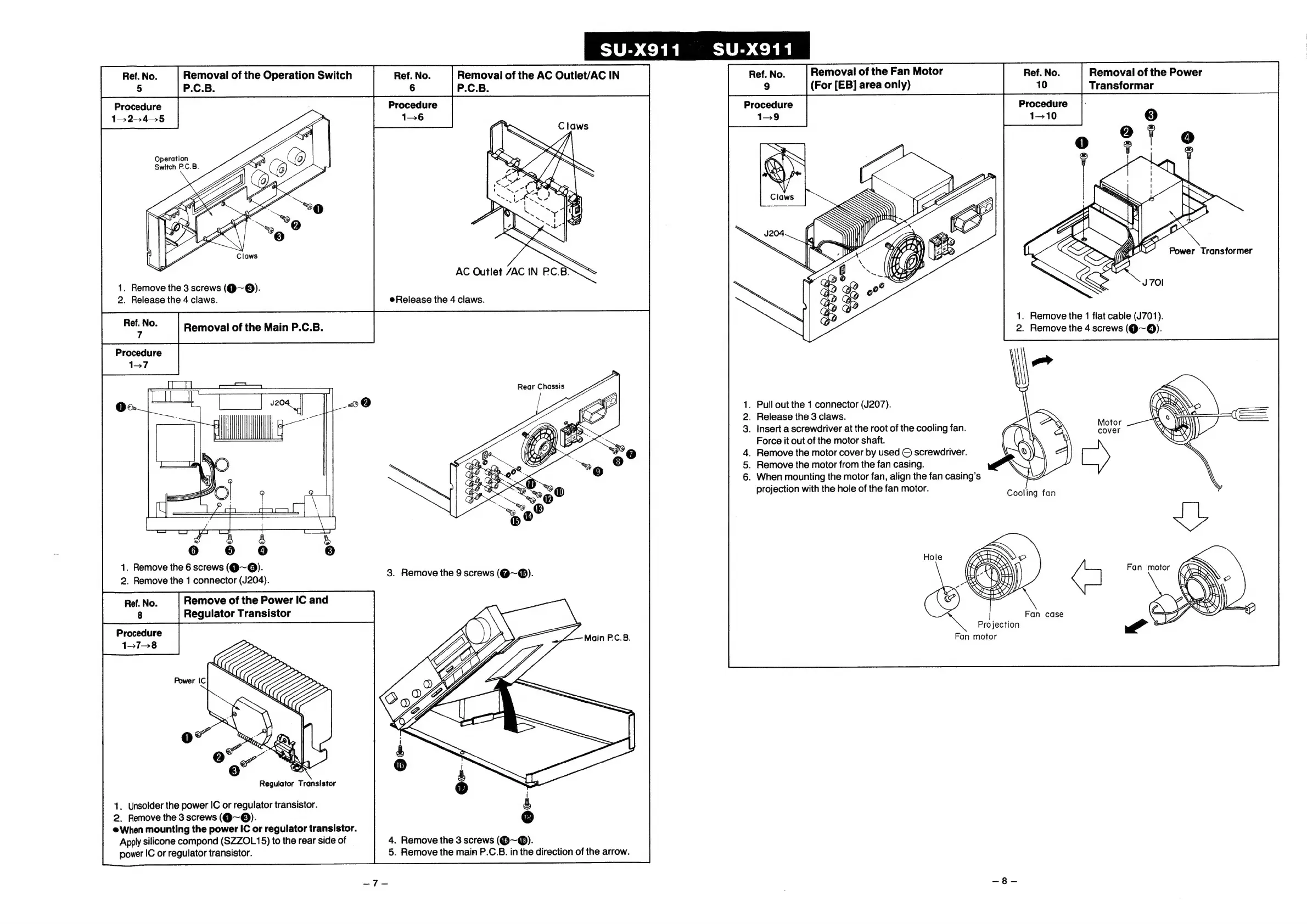
Ref.
No.
Removal
of
the
AC
Outlet/AC
IN
6
P.C.B.
Procedure
1-6
Procedure
1-245
Operation
Removal
of
the
Operation
Switch
P.C.B.
SS
AC
Outlet
/AC
IN
PC.B?
1.
Remove
the
3
screws
(@~®).
2.
Release
the
4
claws.
Release
the
4
claws.
Rear
Chassis
1.
Remove
the
6
screws
(@~@).
2.
Remove
the
1
connector
(J204).
Regulator
Transistor
1.
Unsolder
the
power
IC
or
regulator
transistor.
2.
Remove
the
3
screws
(@~®).
@When
mounting
the
power
IC
or
regulator
transistor.
Apply
silicone
compond
(SZZOL15)
to
the
rear
side
of
power
IC
or
regulator
transistor.
4.
Remove
the
3
screws
(@~®).
5.
Remove
the
main
P.C.B.
in
the
direction
of
the
arrow.
Procedure
1—10
1.
Remove
the
1
flat
cable
(J701).
2.
Remove
the
4
screws
(@~@).
.
Pullout
the
1
connector
(J207).
.
Release
the
3
claws.
.
Insert
a
screwdriver
at
the
root
of
the
cooling
fan.
Force
it
out
of
the
motor
shaft.
.
Remove
the
motor
cover
by
used
©
screwdriver.
.
Remove
the
motor
from
the
fan
casing.
.
When
mounting
the
motor
fan,
align
the
fan
casing’s
projection
with
the
hole
of
the
fan
motor.
Fan
case
Projection
Fan
motor

Related product manuals