EasyManua.ls Logo

Technics SX-G5 - Page 10

Technics SX-G5
44 pages
Print Icon
To Next Page IconTo Next Page
To Previous Page IconTo Previous Page
Loading...
Harmonic
Coupler
upper
harmonic
coupler
lower
harmonic
coupier
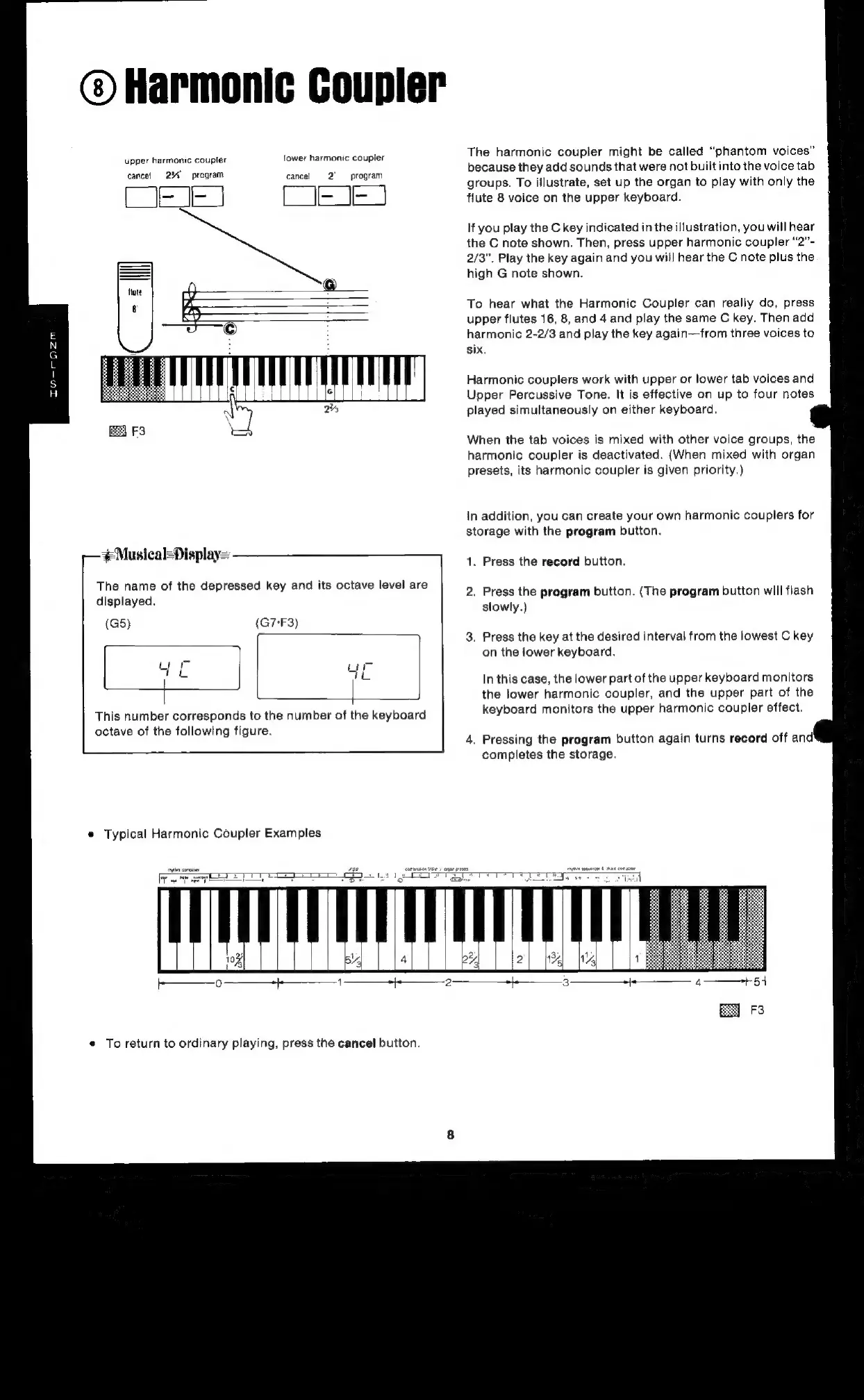
The
harmonic
coupler
might
be
called
“phantom
voices”
because
they
add
sounds
that
were
not
built
into
the
voice
tab
groups.
To
illustrate,
set
up
the
organ
to
play
with
only
the
SOE
[
[=
IE
|
flute
8
voice
on
the
upper
keyboard.
cancel
2%
program
cancel
~~
program
If
you
play
the
C
key
indicated
in
the
illustration,
you
will
hear
the
C
note
shown.
Then,
press
upper
harmonic
coupler
“2”-
2/3”.
Play
the
key
again
and you
will
hear
the
C
note
plus
the
high
G
note
shown.
To
hear
what
the
Harmonic
Coupler
can
really
do,
press
upper
flutes
16,
8,
and
4
and
play
the
same
C
key.
Then
add
harmonic
2-2/3
and
play
the
key
again—from
three
voices
to
six.
ET
Harmonic
couplers
work
with
upper
or
lower
tab
voices
and
Upper
Percussive
Tone.
It
is
effective
on
up
to
four
notes
played
simultaneously
on
either
keyboard.
When
the
tab
voices
is
mixed
with
other
voice
groups,
the
harmonic
coupler
is
deactivated.
(When
mixed
with
organ
presets,
its
harmonic
coupler
is
given
priority.)
In
addition,
you
can
create
your
own
harmonic
couplers
for
storage
with
the
program
button.
#Musical-Display=
1.
Press
the
record
button.
The
name
of
the
depressed
key
and
its
octave
level
are
2.
Press
the
program
button.
(The
program
button
will
flash
displayed.
slowly.)
(G5)
(G7-F3)
.
Press
the
key
at
the
desired
interval
from
the
lowest
C
key
on
the
lower
keyboard.
Lt
re
In
this
case,
the
lower
part
of
the
upper
keyboard
monitors
edi
the
lower
harmonic
coupler,
and
the
upper
part
of
the
This
number
corresponds
to
the
number
of
the
keyboard
keyboard
monitors
the
upper
harmonic
coupler
effect.
octave
of
the
following
figure.
;
:
.
Pressing
the
program
button
again
turns
record
off
and
completes
the
storage.
©
Typical
Harmonic
Coupler
Examples
e
To
return
to
ordinary
playing,
press
the
cancel
button.

Related product manuals