EasyManua.ls Logo

Technics SX-G5 - Page 26

Technics SX-G5
44 pages
Print Icon
To Next Page IconTo Next Page
To Previous Page IconTo Previous Page
Loading...
Voice,
Fill
in
&
Intro
Storage
This
Program
Chord
Computer
stores
not
only
chords
but
voices
from
the
Voice
Setting
Computer,
as
well
as
Fill
in
&
intro
and
arrange
percussion.
¢
For
Voice
storage:
Before
storing
a
chord,
press
the
voice
setting
computer
button.
This
stores
the
selected
voice
at
the
beginning
of
the
next
measure.
The
voice
will
continue
until
the
next
voice
is
selected.
¢For
Fill
in
&
Intro
storage:
Pressing
the
fill
in
&
intro
button
at
the
beginning
of
a
song
stores
intro,
Pressing
the
button
after
storage
of
a
chord
stores
the
fill-in
for
a
measure
at
the
beginning
of
the
chord.
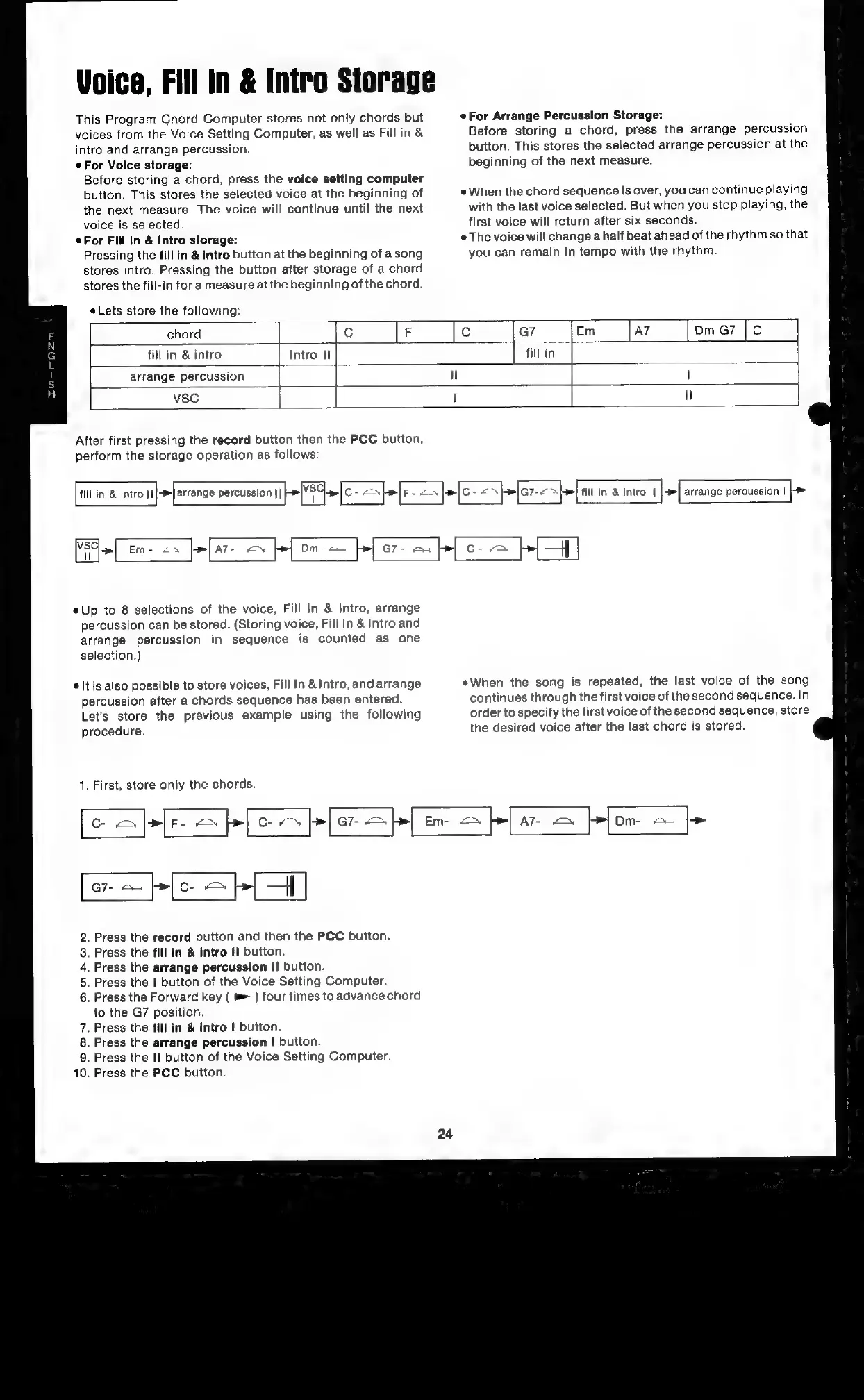
Lets
store
the
following:
eFor
Arrange
Percussion
Storage:
Before
storing
a
chord,
press
the
arrange
percussion
button.
This
stores
the
selected
arrange
percussion
at
the
beginning
of
the
next
measure.
e
When
the
chord
sequence
is
over,
you
can
continue
playing
with
the
last
voice
selected.
But
when
you
stop
playing,
the
first
voice
will
return
after
six
seconds.
The
voice
will
change
a
half
beat
ahead
of
the
rhythm
so
that
you
can
remain
in
tempo
with
the
rhythm.
chord
fill
in
&
intro
Intro
11
|
arrange
percussion
vsC
|
After
first
pressing
the
record
button
then
the
PCC
button,
perform
the
storage
operation
as
follows:
fill
in
&
intro
|||
arrange
percussion
||
>So
>
C-
Nel
FE
we}
C--
>[a7--
~
Let
i
in
&
intro
|
>[
arrange
percussion
|)
VSC|
|
Em-
2s
>|
a7-
=
>|
Dm-
a
|>|
G7-
=
b|
C-
=
>|
HH
|
Up
to
8
selections
of
the
voice,
Fill
In
&
Intro,
arrange
percussion
can
be
stored.
(Storing
voice,
Fill
In
&
Intro
and
arrange
percussion
in
sequence
is
counted
as
one
selection.)
®
It
is
also
possible
to
store
voices,
Fill
In
&
Intro,
and
arrange
percussion
after
a
chords
sequence
has
been
entered.
Let’s
store
the
previous
example
using
the
following
procedure.
1.
First,
store
only
the
chords.
eWhen
the
song
is
repeated,
the
last
voice
of
the
song
continues
through
the
first
voice
of
the
second
sequence.
In
order
to
specify
the
first
voice
of
the
second
sequence,
store
the
desired
voice
after
the
last
chord
is
stored.
|
c
<>
>([F-
=
>|
CoN
|
>
a7
||
Em-
<>
[|
A7-
Nm
Dm-
ee
PL
.
Press
the
record
button
and
then
the
PCC
button.
.
Press
the
fill
in
&
intro
I
button.
.
Press
the
arrange
percussion
Il
button.
.
Press
the
|
button
of
the
Voice
Setting
Computer.
.
Press
the
Forward
key
(
=
)
four
times
to
advance
chord
to
the
G7
position.
.
Press
the
fill
in
&
intro
I
button.
.
Press
the
arrange
percussion
|
button.
.
Press
the
II]
button
of
the
Voice
Setting
Computer.
.
Press
the
PCC
button.

Related product manuals