EasyManua.ls Logo

Technics SX-G5 - Page 25

Technics SX-G5
44 pages
Print Icon
To Next Page IconTo Next Page
To Previous Page IconTo Previous Page
Loading...
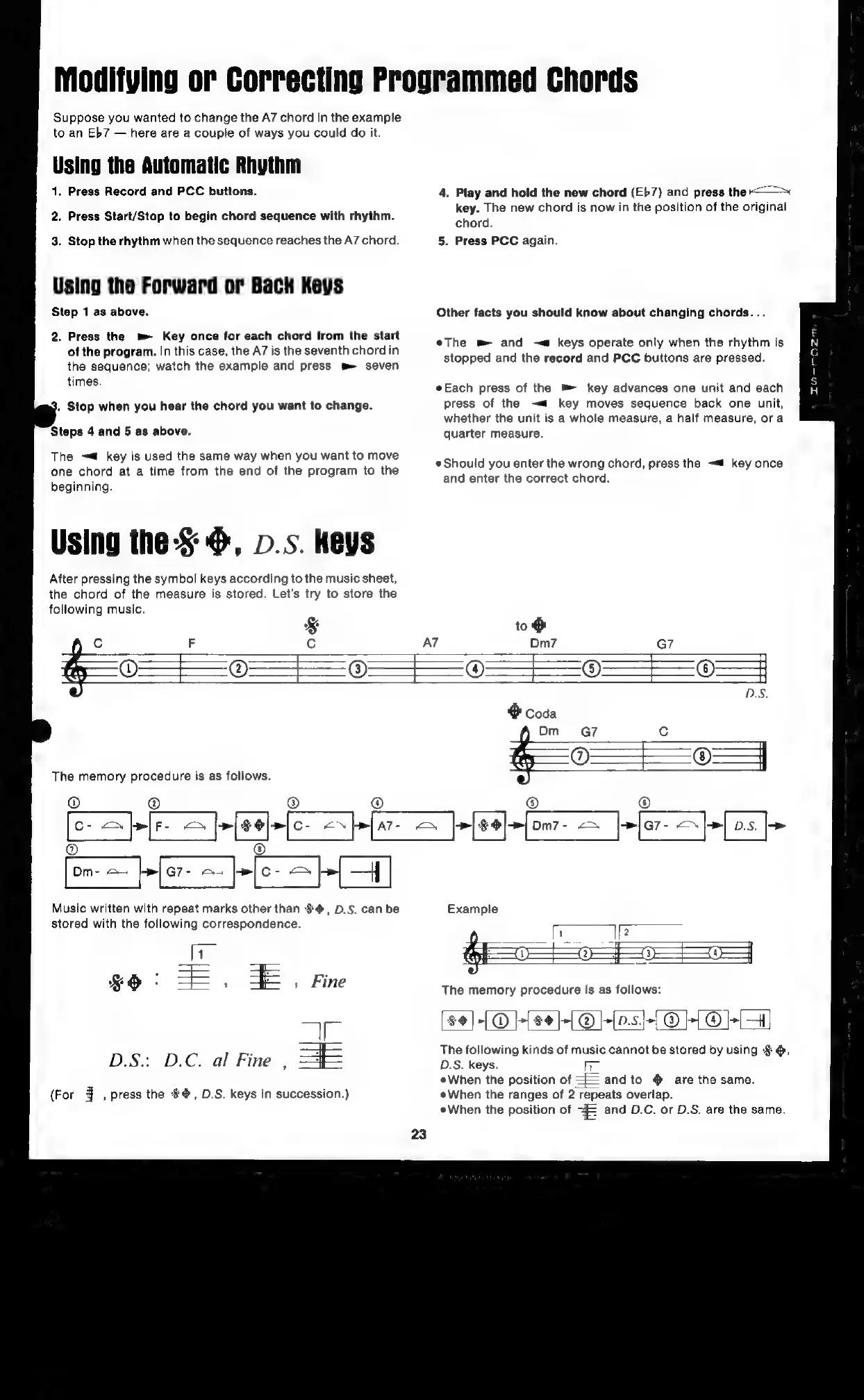
Modifying
or
Correcting
Programmed
Chords
Suppose
you
wanted
to
change
the
A7
chord
in
the
example
to
an
Eb7
here
are
a
couple
of
ways
you
could
do
it.
1.
Press
Record
and
PCC
buttons.
4,
Play
and
hold
the
new
chord
(Eb7)
and
press
the
A
i i
iti
th
iginal
2.
Press
Start/Stop
to
begin
chord
sequence
with
rhythm.
ae
ee
new
chord
is
now
in
the
position
of
the
origina
3.
Stop
the
rhythm
when
the
sequence
reaches
the
A7
chord.
5.
Press
PCC
again.
Using
the
Forward
or
Back
Keys
Step
1
as
above.
Other
facts
you
should
know
about
changing
chords.
..
2.
Press
the
m
Key
once
for
each
chord
from
the
start
5
of
the
program.
In
this
case,
the
A7
is
the
seventh
chord
in
site
se
Eli
ema
pisdiceo
sa
Ul
Ramla
eA
7
the
sequence;
watch
the
example
and
press
m
seven
PP
P
times:
Each
press
of
the
key
advances
one
unit
and
each
press
of
the
—«
key
moves
sequence
back
one
unit,
.
Stop
when
you
hear
the
chord
you
want
to
change.
whether
the
unit
is
a
whole
measure,
a
half
measure,
ora
Steps
4
and
5
as
above.
quarter
measure.
The
~t
key
is
used
the
same
way
when
you
want
to
move
one
chord
a
a
time
from
the
ie
of
ie
program
to
the
Should
you
enter
the
wrong
chord,
press
the
key
once
beginning
and
enter
the
correct
chord.
Using
the:§
6,
p.s.
Keys
After
pressing
the
symbol
keys
according
to
the
music
sheet,
the
chord
of
the
measure
is
stored.
Let’s
try
to
store
the
following
music.
&
to
&
c
F
AT
Dm7
G7
02
f=
6}
9
=
|
=
=
3
The
memory
procedure
is
as
follows.
0)
Music
written
with
repeat
marks
other
than
$@,
D.S.
can
be
Example
stored
with
the
following
correspondence.
7
=,
Eun
¥O
=F=
3 »
Fine
The
memory
procedure
is
as
follows:
$4]|-(@
}-{se}-[@]-[as5}-[@]}{@O+
a
=i.
z
The
following
kin:
f
i
ing
D.S:
D.C.
al
Fine
,
=F
il
One
g
kinds
of
music
cannot
be
stored
by
using
§@,
When
the
position
of
andto
@
are
the
same.
(For
4
,
press
the
$4,
D.S.
keys
in
succession.)
When
the
ranges
of
2
repeats
overlap.
eWhen
the
position
of
=
and
D.C.
or
D.S.
are
the
same.
23

Related product manuals