EasyManua.ls Logo

Technics SX-G5 - Page 24

Technics SX-G5
44 pages
Print Icon
To Next Page IconTo Next Page
To Previous Page IconTo Previous Page
Loading...
E
N
G
LE
fl
Ss
H
Storing
Chords
In
the
Computer
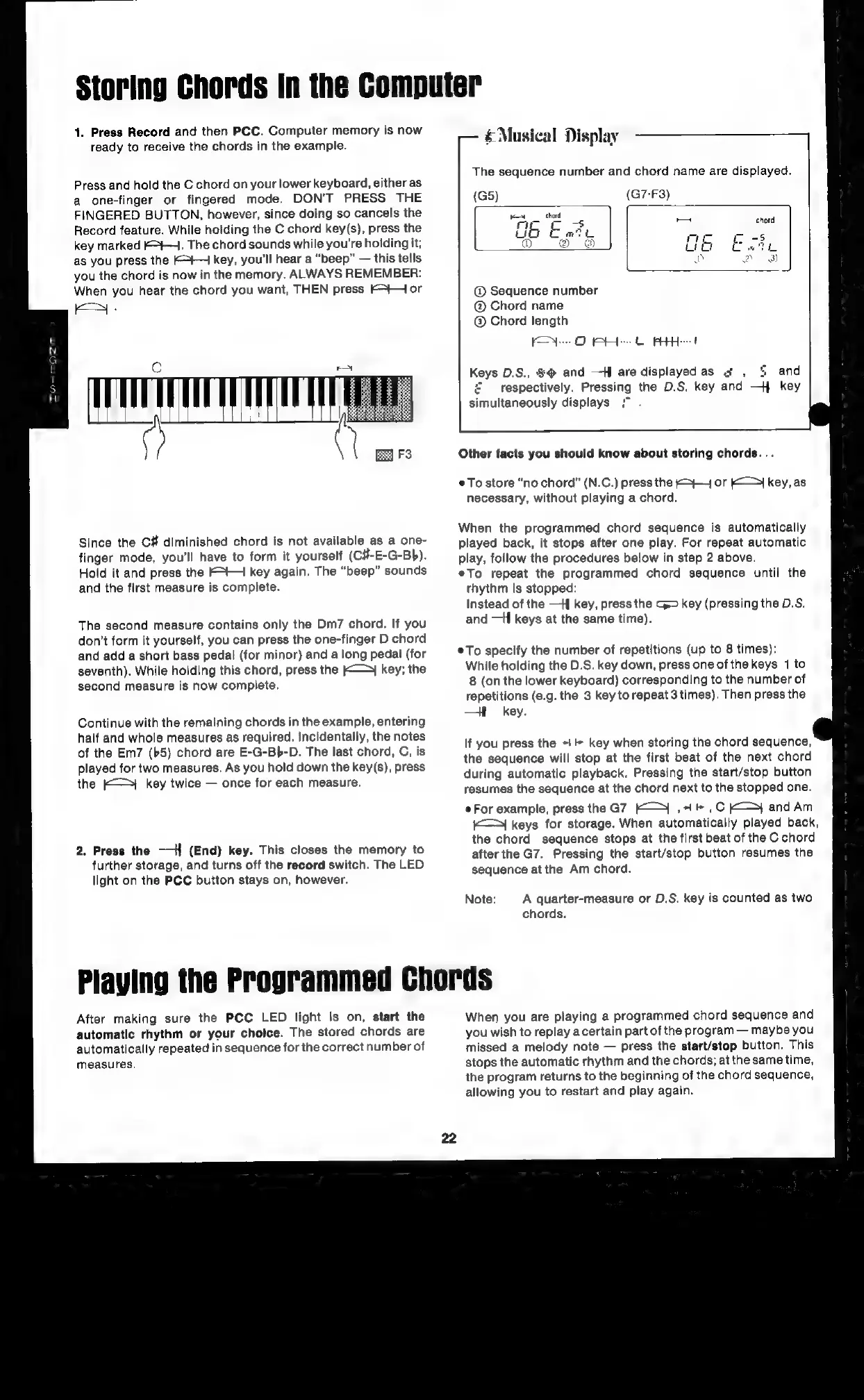
1.
Press
Record
and
then
PCC.
Computer
memory
is
now
ready
to
receive
the
chords
in
the
example.
Press
and
hold
the
C
chord
on
your
lower
keyboard,
either
as
a
one-finger
or
fingered
mode.
DON'T
PRESS
THE
FINGERED
BUTTON,
however,
since
doing
so
cancels
the
Record
feature.
While
holding
the
C
chord
key(s),
press
the
key
marked
F-+4.
The
chord
sounds
while
you're
holding
it;
as
you
press
the
Kt
key,
you'll
hear
a
“beep”
this
teils
you
the
chord
is
now
in
the
memory.
ALWAYS
REMEMBER:
When
you
hear
the
chord
you
want,
THEN
press
Ft
or
Since
the
C#
diminished
chord
is
not
available
as
a
one-
finger
mode,
you'll
have
to
form
it
yourself
(C8-E-G-Bb).
Hold
it
and
press
the
Ft
4
key
again.
The
“beep”
sounds
and
the
first
measure
is
complete.
The
second
measure
contains
only
the
Dm7
chord.
If
you
don’t
form
it
yourself,
you
can
press
the
one-finger
D
chord
and
add
a
short
bass
pedal
(for
minor)
and
a
long
pedal
(for
seventh).
While
holding
this
chord,
press
the
K—y
key;
the
second
measure
is
now
complete.
Continue
with
the
remaining
chords
in
the
example,
entering
half
and
whole
measures
as
required.
Incidentally,
the
notes
of
the
Em7
(b5)
chord
are
E-G-Bb-D.
The
last
chord,
C,
is
played
for
two
measures.
As
you
hold
down
the
key(s),
press
the
(-—
key
twice
once
for
each
measure.
2.
Press
the
——{
(End)
key.
This
closes
the
memory
to
further
storage,
and
turns
off
the
record
switch.
The
LED
light
on
the
PCC
button
stays
on,
however.
Musical-Display=
The
sequence
number
and
chord
name
are
displayed.
(G7-F3)
@
Sequence
number
Chord
name
Chord
length
KON
GO
RAH
OR
Keys
D.S.,
%@
and
—H
are
displayed
as
¢
,
%
and
£
respectively.
Pressing
the
D.S,
key and
—}
key
simultaneously
displays
Other
facts
you
should
know
about
storing
chords...
®
To
store
“no
chord”
(N.C.)
press
the
K>}+~
or
>}
key,
as
necessary,
without
playing
a
chord.
When
the
programmed
chord
sequence
is
automatically
played
back,
it
stops
after
one
play.
For
repeat
automatic
play,
follow
the
procedures
below
in
step
2
above.
eTo
repeat
the
programmed
chord
sequence
until
the
rhythm
is
stopped:
Instead
of
the
-H
key,
press
the
G>
key
(pressing
the
D.S.
and
-H
keys
at
the
same
time).
To
specify
the
number
of
repetitions
(up
to
8
times):
While
holding
the
D.S.
key
down,
press
one
ofthe
keys
1
to
8
(on
the
lower
keyboard)
corresponding
to
the
number
of
repetitions
(e.g.
the
3
key
to
repeat
3
times).
Then
press
the
—H
key.
If
you
press
the
+
key
when
storing
the
chord
sequence,
the
sequence
will
stop
at
the
first
beat
of
the
next
chord
during
automatic
playback.
Pressing
the
start/stop
button
resumes
the
sequence
at
the
chord
next
to
the
stopped
one.
¢For
example,
press
the
G7
K&—¥_,
1
*
,
C
Ky}
and
Am
K—
>I
keys
for
storage.
When
automatically
played
back,
the
chord
sequence
stops
at
the
first
beat
of
the
C
chord
after
the
G7.
Pressing
the
start/stop
button
resumes
the
sequence
at
the
Am
chord.
Note:
A
quarter-measure
or
D.S.
key
is
counted
as
two
chords.
Playing
the
Programmed
Chords
After
making
sure
the
PCC
LED
light
is
on,
start
the
automatic
rhythm
or
your
cholce.
The
stored
chords
are
automatically
repeated
in
sequence
for
the
correct
number
of
measures.
22
When
you
are
playing
a
programmed
chord
sequence
and
you
wish
to
replay
a
certain
part
of
the
program
maybe
you
missed
a
melody
note
press
the
start/stop
button.
This
stops
the
automatic
rhythm
and
the
chords;
at
the
same
time,
the
program
returns
to
the
beginning
of
the
chord
sequence,
allowing
you
to
restart
and
play
again.

Related product manuals