EasyManua.ls Logo

Technics SX-G5 - Page 23

Technics SX-G5
44 pages
Print Icon
To Next Page IconTo Next Page
To Previous Page IconTo Previous Page
Loading...
@)
Program
Chord
Computer
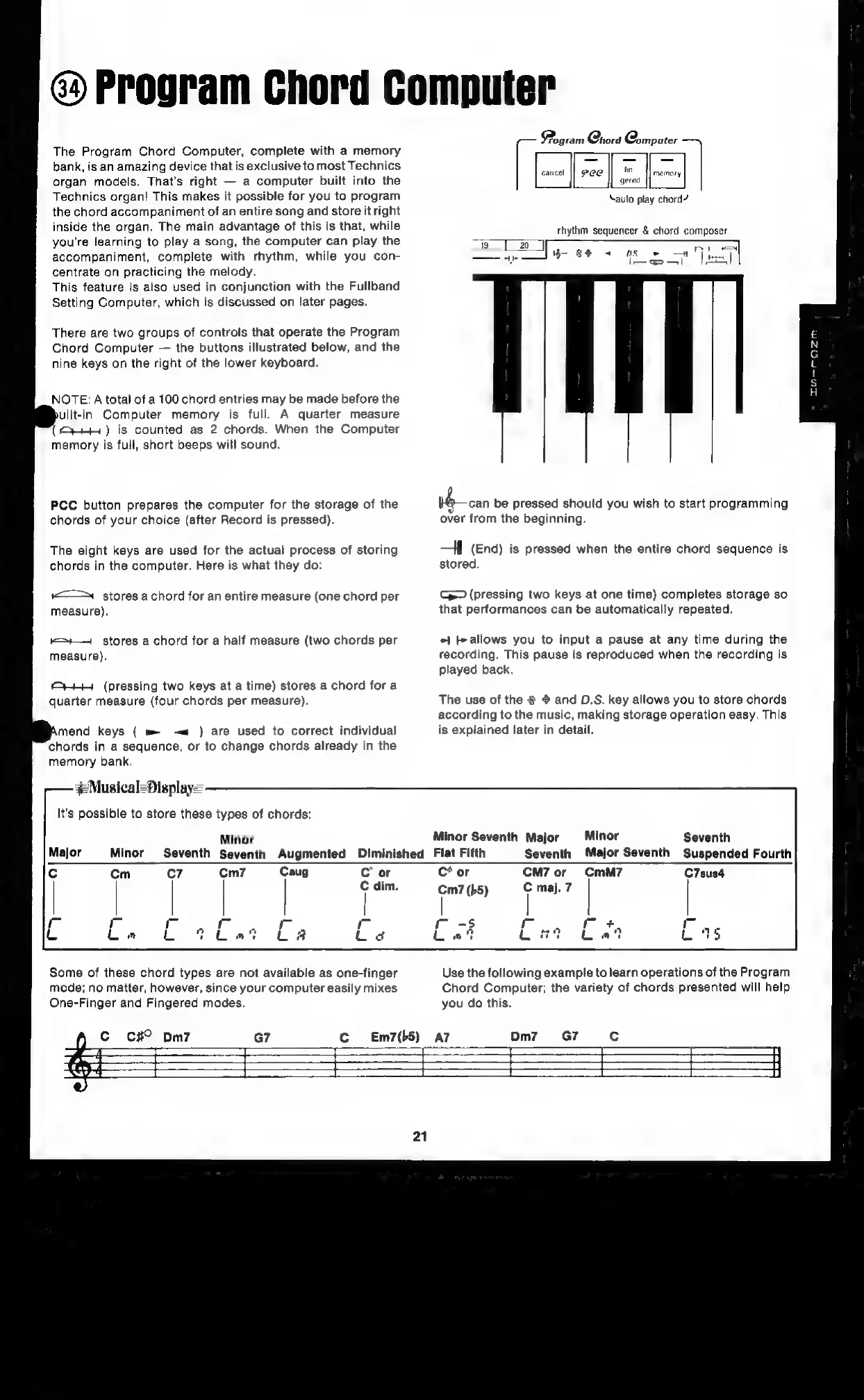
The
Program
Chord
Computer,
complete
with
a
memory
bank,
is
an
amazing
device
that
is
exclusive
to
most
Technics
organ
models.
That's
right
a
computer
built
into
the
Technics
organ!
This
makes
it
possible
for
you
to
program
the
chord
accompaniment
of
an
entire
song
and
store
it
right
inside
the
organ.
The
main
advantage
of
this
is
that,
while
you’re
learning
to
play
a
song,
the
computer
can
play
the
accompaniment,
complete
with
rhythm,
while
you
con-
centrate
on
practicing
the
melody.
This
feature
is
also
used
in
conjunction
with
the
Fullband
Setting
Computer,
which
is
discussed
on
later
pages.
There
are
two
groups
of
controls
that
operate
the
Program
Chord
Computer
the
buttons
illustrated
below,
and
the
nine
keys
on
the
right
of
the
lower
keyboard.
NOTE:
A
total
of
a
100
chord
entries
may
be
made
before
the
uilt-in.
Computer
memory
is
full.
A
quarter
measure
(y+)
is
counted
as
2
chords.
When
the
Computer
memory
is
full,
short
beeps
will
sound.
PCC
button
prepares
the
computer
for
the
storage
of
the
chords
of
your
choice
(after
Record
is
pressed).
The
eight
keys
are
used
for
the
actual
process
of
storing
chords
in
the
computer.
Here
is
what
they
do:
‘<==
stores
a
chord
for
an
entire
measure
(one
chord
per
measure).
—=+—
stores
a
chord
for
a
half
measure
(two
chords
per
measure).
HHH
(pressing
two
keys
at
a
time)
stores
a
chord
fora
quarter
measure
(four
chords
per
measure).
mend
keys
(
m
-—«
)
are
used
to
correct
individual
chords
in
a
sequence,
or
to
change
chords
already
in
the
memory
bank,
#Musical=Display=
It’s
possible
to
store
these
types
of
chords:
Minor
Major
Minor
Minor
Seventh
Major
Minor
Seventh
Seventh
Augmented
Diminished
Flat
Fifth
Pogram
Chord
Qomputer
auto
play
chord?
rhythm
sequencer
&
chord
composer
at
7
lore)
ie
i
eee
a
|
can
be
pressed
should
you
wish
to
start
programming
over
from
the
beginning.
a
|
(End)
is
pressed
when
the
entire
chord
sequence
is
stored.
G—
(pressing
two
keys
at
one
time)
completes
storage
so
that
performances
can
be
automatically
repeated.
+1
fe
allows
you
to
input
a
pause
at
any
time
during
the
recording.
This
pause
is
reproduced
when
the
recording
is
played
back.
The
use
of
the
@
and
D.S.
key
allows
you
to
store
chords
according
to
the
music,
making
storage
operation
easy.
This
is
explained
later
in
detail.
Seventh
Seventh
Major
Seventh
Suspended
Fourth
cm
C7
Cm7
Caug
C
or
C
dim.
r
L
C*
or
CM7
or
CmM7
C7sus4
m7
(b5)
Use
the
following
example
to
learn
operations
of
the
Program
Chord
Computer;
the
variety
of
chords
presented
will
help
you
do
this.
Some
of
these
chord
types
are
not
available
as
one-finger
mode;
no
matter,
however,
since
your
computer
easily
mixes
One-Finger
and
Fingered
modes.
Cc
c#
pm7
Em7(b5)
AZ
Dm7
=
SS

Related product manuals